
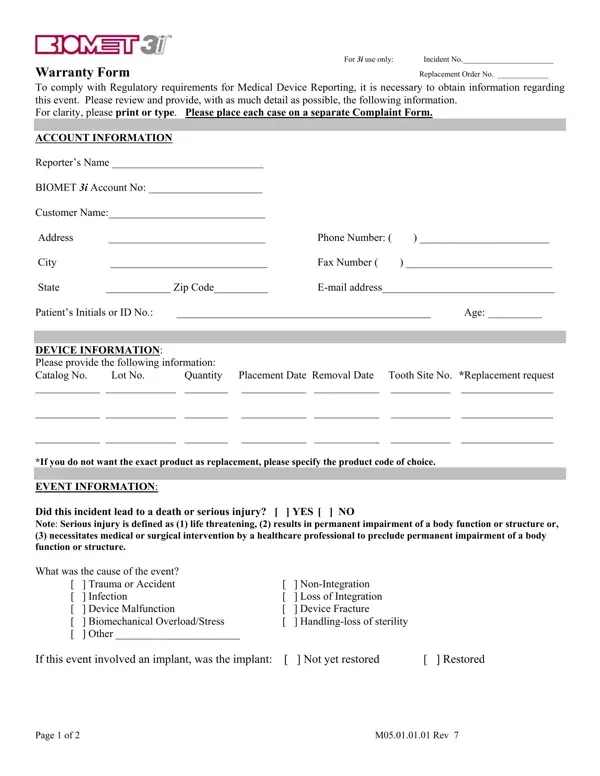
The 3I Biomet form is a warranty and complaint document used to report incidents involving Biomet 3I dental implants. It serves a dual purpose: satisfying FDA Medical Device Reporting requirements and initiating Biomet 3I's internal warranty and replacement process for documented implant failures.
This form is used by dental practitioners, oral surgeons, and clinics that place Biomet 3I implants. Any professional who observes a reportable adverse event - including non-integration, loss of the implant, or trauma-related failure - must complete and submit this form to Biomet 3I's Regulatory Services in Palm Beach Gardens, FL. Facilities that handle related documentation such as an ADA dental claim form may need this warranty report as supporting evidence for the patient record.
The 3I Biomet form collects information in four key areas:
Under 21 CFR Part 803, healthcare facilities and manufacturers must report device-related adverse events to the FDA. The 3I Biomet form satisfies this requirement for implant-related incidents. It functions similarly to a reportable event form required by many state health departments, and follows the same general adverse event documentation structure as an adverse action form. Proper completion protects the dental practice from compliance gaps and ensures the patient's incident is on record.
When an implant is returned as part of a warranty claim, it must be sterilized before shipping under United States Postal Regulations. The completed form and the sterilized device are sent to Biomet 3I's Regulatory Services team. Practitioners managing follow-up care for affected patients may also need a dental treatment consent form if the patient requires further intervention after implant removal.
| Question | Answer |
|---|---|
| Form Name | 3I Form Biomet |
| Form Length | 2 pages |
| Fillable? | No |
| Fillable fields | 0 |
| Avg. time to fill out | 30 sec |
| Other names | 3i warranty forms, information 3i form, 3i biomet implant return form, bimet3i |
| Form Purpose | Dental implant warranty claim and FDA MDR adverse event reporting |
| Submission address | Biomet 3I Regulatory Services, Palm Beach Gardens, FL |