
A video release form, sometimes known as a video consent form, is an enforceable document designed to confirm the participants’ consent to be recorded on video. This release of liability form ensures that the person is aware of being recorded and agrees to their images and sound recording usage. Fill it out online in a few minutes or download the free PDF template and share it with your whole team.
Last Updated: October 2026. This guide is reviewed and updated regularly to reflect current law. If you notice an error or outdated information, please contact us.
Build Your Document
Answer a few simple questions to make your document in minutes
Save and Print
Save progress and finish on any device, download and print anytime
Sign and Use
Your valid, lawyer-approved document is ready
Imagine that you’ve prepared a scenario, found the participants and location, and started the production. But at the very last minute, someone refuses to participate. Or, imagine that you’ve already made the video, and one of your talents decides that it’s inappropriate for their name to be in it.
In that case, you will probably need to look for another person to participate in the video, start over the production, or cut some parts out of the video. Thus, you are likely to waste both time and money. Even if the person verbally agrees to participate, it’s important to get the written consent form to avoid future misunderstandings or cancellations. So, consent forms are reasonable to use due to the following points:
A video consent form is a good way to make sure that nobody will cancel the video’s participation and that nobody appearing in the video will decide to sue the production company (or other entity making the video). Therefore, it’s critical to include every single detail of legal information in the form to protect your video footage.
| Document Name | Video Release Form |
| Other Names | Film Release, Video Production Release |
| Avg. Time to Fill Out | 5 minutes |
| # of Fillable Fields | 7 |
| Available Formats | Adobe PDF |
When preparing your release form, you should not rush and think over every detail. You are recommended to consider both present and future uses of the materials and include all this legal information in your document. Even if you’re in doubt of including certain provisions, it’s better to include them to avoid future misunderstandings. Video release forms usually contain the following information.

Three points come up in almost every video project. Talk them through with each participant before you hand over the form, so that nobody is surprised by the wording. Each point below is explained in a few plain sentences.
The steps below follow the FormsPal template this page hands out. Create the form online, or download the PDF and type your answers in the PDF editor. Each step matches one part of the form.
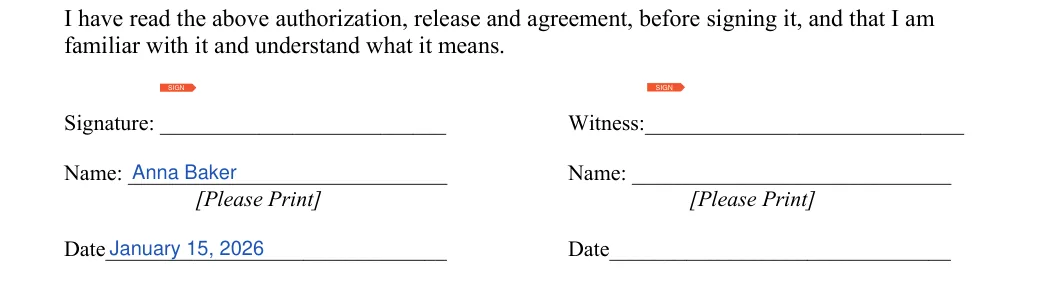
The screenshots under each step show the FormsPal Video (Film) Release template filled with sample entries in blue, so you can see where each answer goes. The names, addresses, dates and amounts are examples only.
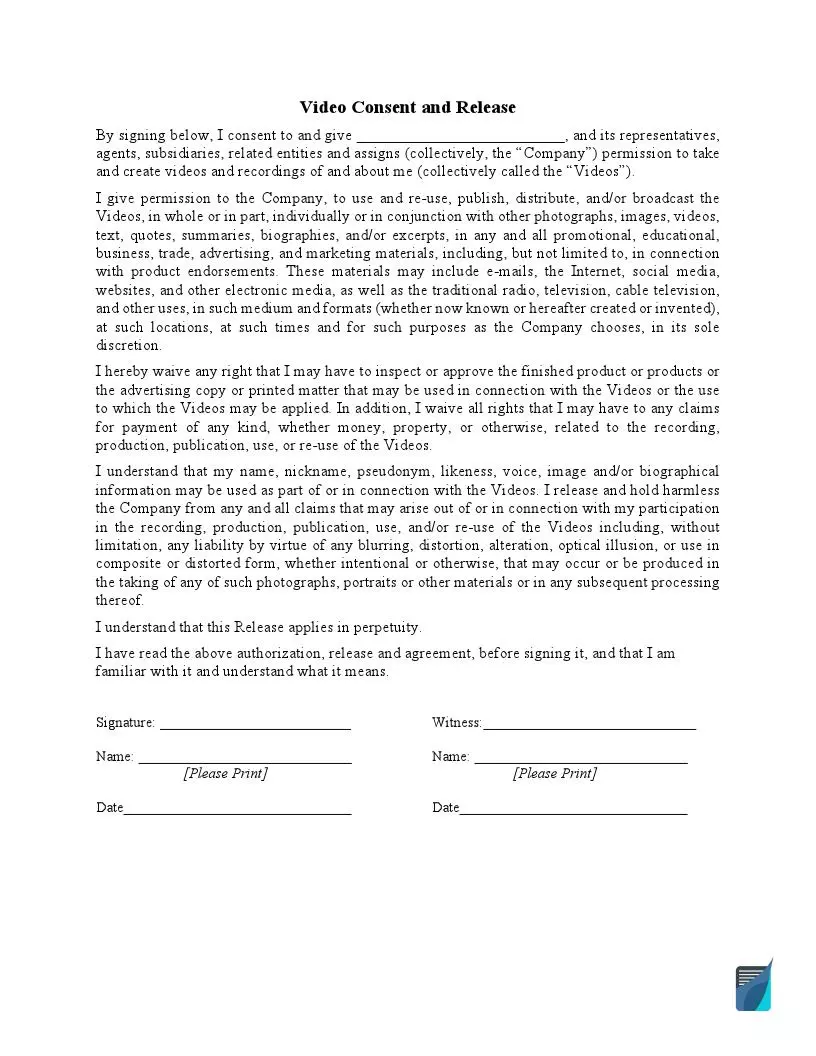
In the first sentence under Video Consent and Release, type the name of the person or business that will make and use the videos. It goes in the blank after "I consent to and give". The rest of the page is fixed text for the person being recorded to read.

After reading the release, the person being recorded signs on the Signature line, prints their name and enters the date. The form also has a Witness column on the right with its own signature, printed name and date lines. The witness fills them in the same way.
You should approach the process of the release form creation step-by-step. First, it’s necessary to check the federal and state recording laws since there can be some specifications. As a general rule, the production company has to always obtain the consent of everyone who is being recorded, especially for commercial purposes. You are encouraged to follow the next steps when obtaining the participants’ permission to be recorded.
It’s important to set clear expectations for all the video participants, including production time and when the edit will be ready. You need to explain why you are doing this project and why you want the participants to sign the consent form. Of course, if your talents work in the sphere for a long time, they will probably understand the purpose and need for such a document. But for the one who’s being recorded for the first time, waiving their rights can be a bit scary.
Try to be as enthusiastic as possible and explain everything in detail.
After ensuring everyone is ready to become a part of the video, you should prepare your document. It’s necessary to use the correct structure and format. You are expected to highlight the essential information, such as compensation provision, time limits for the release, and the ownership rights. You should emphasize the need to pay attention to that information.
When the document is ready, it’s time to obtain permission officially. Make sure that every participant reads the document carefully and understands it. You should get consent from everyone participating in the production if you don’t want to start over just because one of them has decided to quit.
Both the participant and the company should carefully reread all the provisions, and if everything is okay, the video participants should sign the form. Do not forget to indicate the participant’s name and document’s date. It’s also necessary to indicate whether a parent or legal guardian signs the form (if minors participate in the event).

A few quick checks can save trouble later. Go through the list below with each participant, then store the finished forms where your team can find them again. Keep the list handy while you collect signatures.
It is a written agreement in which a person gives a producer permission to record them on video and use the footage. It names both sides and carries their signatures.
The template asks for the name of the company or person making the video. It then asks for the signature, printed name and date of the person being recorded, plus a Witness column with the same lines.
If you want to invite someone to participate in your video, you should get these people’s signatures before the video production begins. That is how you can be sure that no one will change their mind in the most inconvenient moment. So, try to get the participant’s consent as soon as possible to avoid wasting time and money.
If you’ve already recorded the person and want to use the video for commercial purposes, you can ask to sign the release form to use or make it publicly available.
In most cases, it’s impossible to revoke the consent unless the release form allows them to. The majority of production companies provide the concept of irrevocability in the release forms. Thus, if someone signs the consent form, they cannot rescind it.
However, the form can include the possibility of discontinuing involvement in the project or activity before or during the video production. In rare cases, the form provides the possibility to rescind the consent after the production is complete, but only if this decision is reasonable considering the financial and administrative costs. Nonetheless, the participant can revoke the consent in case of a breach, for example, if the production company has not provided the third-party involvement in the form but allowed others to use the video.
Yes. You can create the form online with FormsPal in a few minutes and save your progress. You can also download the PDF, type your answers in a PDF editor and print it.
Keep the paperwork in one place so it is easy to find later:
General information, not legal or tax advice.
