
Updated:
A talent release form is an actor's written permission to be filmed. It lets the producer record, edit and publish the actor's image, voice and likeness for one project. Filmmakers need it before shooting, especially when the footage will be sold or distributed.
On this page you can fill out the free FormsPal talent release form online or download the PDF template, then follow the steps, the filled-in example and the checks below.

Build Your Document
Answer a few simple questions to make your document in minutes
Save and Print
Save progress and finish on any device, download and print anytime
Sign and Use
Your valid, lawyer-approved document is ready
An actor release form, also called a talent release form, is a signed agreement in which a performer lets a producer record and use their appearance, voice and likeness in a film, video or other production. The form names the producer, the project and the performer.
The release answers one question for everyone who later handles the footage: did this person agree to appear in it? Once the actor signs, the producer holds written proof of that consent. The actor, in turn, has a page that shows what was agreed: which project, which dates and which uses of the recordings.
Two parties take part in the release:
The release is not a full acting contract. It grants permission to use the recordings. Pay, schedules, credit and other terms of the job usually go in a separate agreement, or in extra lines both sides add and sign.
| Document Name | Talent Release Form |
| Other Names | Video Talent Release, Talent Release Agreement |
| Avg. Time to Fill Out | 7 minutes |
| # of Fillable Fields | 12 |
| Available Formats | Adobe PDF |
Get a signed release form from every actor who can be seen or heard in footage you plan to show, sell or share, and collect it before the camera rolls. Collecting signatures after the shoot means finding every performer again.
A spoken "yes" at an audition is hard to prove later. Film distributors often request copies of the actor release form, and a festival, a streaming service or a client may ask for them too. Signed pages kept with the production files answer that request at once.
A talent release form is often used for projects like these:
A casting call release covers recordings made at an audition: the tape, the photos and the notes. Use one when audition footage may be shown to clients or kept for later, and make clear on the page whether the tape can appear in the finished project.
Whether you need a release by law depends on where you film, who appears and how the footage is used, so this page does not state a rule for any state. A signed release still gives both sides a clear written account of what the performer agreed to, for every project.
The free FormsPal film release form template is a one-page document. It opens with a line for the producer's name, followed by the project title and dates. Four numbered uses of the recordings come next, and the page ends with blanks for the performer's name, the date and the contact details.
The four numbered uses in the template cover these points:
A paragraph on ownership of the recordings sits between the project details and the numbered uses. It has no blanks, but both sides should read it before signing.
The template grants the uses above. If your deal has other terms, settle them in writing before the performer signs:
Fill out a talent release form from top to bottom in three parts: the producer, the project, then the performer's details. You can create the free film talent release form online with FormsPal, or download the PDF and type your answers in the PDF editor. Each step below matches one part of page 1 of the template.
The screenshots under each step show the FormsPal Talent Release template filled with sample entries in blue, so you can see where each answer goes. The names, addresses, dates and amounts are examples only.
At the top of page 1, write the producer's name on the blank after "I authorize." The producer is the person or company that will record and use the performance. Use the full company name if a company runs the shoot.

Enter PROJECT TITLE and DATE(S) OF PROJECT. Use the title your production team uses and the dates when the recording takes place. The paragraph about ownership and the four numbered uses have no blanks, so just read them.

The performer prints their full name and the date, then the full address with city, state and zip code.
Below the address lines, add a telephone number, an email address and a fax number if there is one. A working phone or email lets the producer reach the performer about the release later.
When the performer is a minor, add the parent's or guardian's name and contact details as well, so the producer knows who agreed on the child's behalf.
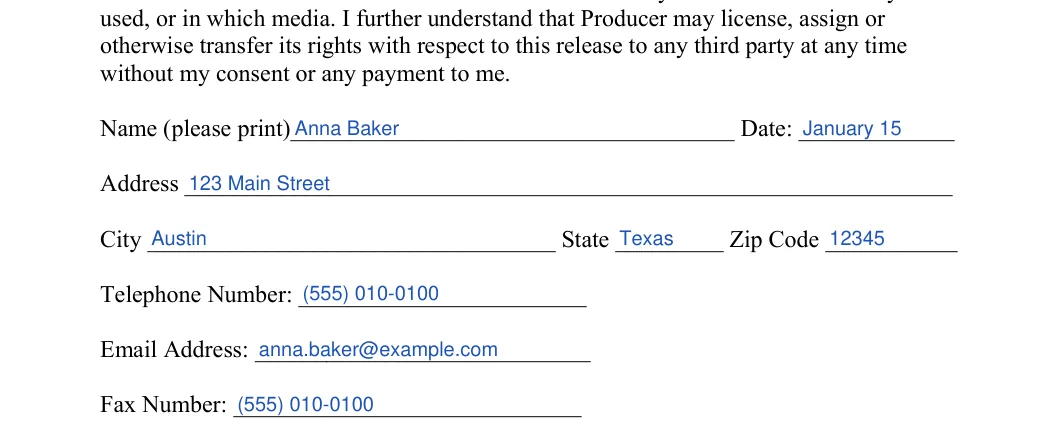
The numbered boxes in the two images below mark the blanks in the order they appear on the page.


Sign the talent release before filming starts, give each side a copy, and use the footage only within the uses the form lists. The three steps below take you from the blank page to the edit room.
Hand the release to the performer with enough time to read it, including the four numbered uses. The performer signs and dates it, and the producer keeps the original. Give the performer a signed copy of their own.
Collect one signed release from every person who appears in the footage. A scan makes a handy digital backup of the finished page.
Use the performances in the film, its edits and its promotion, as the numbered uses describe. Before you cut a scene into the final version, check that every person in it has a signed release on file.
Our talent release template has no signature line for a parent or legal guardian, so for a minor actor add one and have the parent or guardian sign it next to the child's details. The age at which a person counts as an adult, and the extra rules for child performers, differ from state to state, and this page's sources hold no rule on them. Check the rules of the state where you film before a child appears on camera.
A talent release covers a person's performance on film or video, while other release forms cover photos, places or physical risk. Pick the document that matches what you need permission for:
| Document | What it covers | Typical use |
|---|---|---|
| Talent release form | A performer's image, voice and likeness in recordings | Films, commercials, web videos |
| Model release | A person's likeness in still photos | Photo shoots, stock images |
| Appearance release | A person who appears on camera without performing a role | Interviews, event and street footage |
| Location release | Filming on someone's property | Homes, shops, offices used as sets |
| Release of liability | A waiver of claims for injury or damage | Stunts, sports, risky activities |
A busy shoot can call for several of these at once. A stunt performer, for example, may sign a talent release for the footage and a release of liability for the stunt itself.
A sample makes the blanks easier to read. The table below shows how the main entries could look when a production company and a performer complete them. All names, dates and addresses are made up, so replace each one with your own entries.
| Part of the form | Sample entry |
| Producer | Northside Pictures |
| Project title | Harbor Lights |
| Dates of project | June 1 to June 30 |
| Name | Anna Baker |
| Date | June 1 |
| Address | 123 Main Street, Austin, Texas 12345 |
| Telephone number | (555) 010-0100 |
| Email address | anna.baker@example.com |
In this example, Anna Baker is the performer and Northside Pictures is the production company. Your own project may have a longer title or a different set of dates, and that is fine as long as the entries are clear to both sides.
Most talent release mistakes are small: a misspelled name, a missing date or a vague project title. Go through the list below with the performer before you finish the form, then store it where you can find it again.
Take a minute to read each line out loud, because it is easier to catch a wrong name that way. If you spot a mistake before anyone puts a name on the line, correct the entry or print a clean page.
Yes, ask every extra whose face or voice can be recognized in the footage to sign one. A background actor whose face can be seen appears in the footage just like a lead, so an extra release form covers that person too.
The FormsPal template is made for one performer per page. Use a separate copy for each actor, so every name, date and set of contact details stays on its own signed page.
The template asks for the producer's name, the project title and dates, and the performer's name, date, address, phone number, email and fax number. Everything else on the page is printed text to read.
Yes. You can create the form online with FormsPal and save your progress. You can also download the PDF, type your answers and print it.
Yes. The template on this page is a free film talent release form that you can complete online or download.
If you catch the mistake before anyone signs, correct the entry or print a fresh page. If the form is already finished, talk with the other person and agree on the fix together.
Keep a version for each person and store a scan as a backup. Having the paperwork in one place makes it easy to find if a question comes up later.
General information, not legal or tax advice.
