
Updated:
An actor release form is written permission to use an actor’s performance. The free FormsPal template records the project title, the filming dates and the actor’s contact details. Filmmakers use it for each cast member, especially before a film reaches distributors.

Build Your Document
Answer a few simple questions to make your document in minutes
Save and Print
Save progress and finish on any device, download and print anytime
Sign and Use
Your valid, lawyer-approved document is ready
An actor release form covers the rights an actor grants a filmmaker or production company over their performance, voice, choreography, image and other specific actions in a motion picture. The actor gives consent, and the filmmaker gets permission to use the recorded footage in the final film.
The form also gives the actor a clear account of what they agreed to, which helps both sides while the film is edited and shared. Missing forms can affect post-production and negotiations with film distributors, because nobody can show written confirmation of the rights.
A talent release form is the wider name for this kind of permission, and the actor version is written for a film performer. The FormsPal template carries the heading TALENT RELEASE, so the same form answers to both names. It also goes by film release form, movie release form or release for actors.
| Document Name | Actor Release Form |
| Other Name | Release for Actors |
| Avg. Time to Fill Out | 7 minutes |
| # of Fillable Fields | 12 |
| Available Formats | Adobe PDF |
Use an actor release whenever a person’s performance, voice or image will appear in your film, and give each person a release form of their own. That covers:
A complete set of signed forms reduces ambiguous moments later, since each person’s consent is on paper when the film goes out to screenings and distributors. A filmmaker gains the permission, and an actor gains a written account of what the permission includes.
The FormsPal actor template has blank lines for the producer, the project and the performer, with no line for a guardian, so prepare a special form for a child in your cast.
A form for a minor works best when it shows:
Work rules for child performers are a separate subject this page does not cover. A production attorney can check the form and those rules for the place where you film. For pictures of a child rather than a film role, see the photo release form for minors.
An actor release form carries the filming dates on the DATE(S) OF PROJECT line and, at the bottom, today’s date beside the actor’s printed name. The first answers when the project happens, and the second shows when the actor completed the form.
Example only: DATE(S) OF PROJECT: June 3 to June 14, 2027. Date at the bottom: May 28, 2027.
A film’s public release date does not go on this template, and this page does not list movie release dates. Those belong to the film’s distributor and to film databases.
An actor should sign the release form before the shoot, because the filmmaker then holds written permission before any footage exists to disagree about. A form collected after filming still needs the actor’s agreement, and the actor can decline. Print the real signing date, never the filming date, and ask a production attorney about footage that has no signed form.
Creating an actor release means putting what you discussed orally into writing: the filmmaker prepares and collects the forms, and each actor reads and signs their own copy. Each side has a short checklist.
A filmmaker’s checklist covers enough forms for the whole cast, correct signatures on each one and a guardian’s form for any child.
An actor’s checklist starts with reading every paragraph, because signing the release form gives consent to all of its terms.

The FormsPal actor release template is a free one-page form with a few blank lines. Create it online with the button at the top of this page, or download the PDF and fill it in on screen or by hand. If you need extra advice, please consult your production attorney.
The screenshots under each step show the FormsPal Actor Release template filled with sample entries in blue, so you can see where each answer goes. The names, addresses, dates and amounts are examples only.
At the top, write who receives the release on the blank after “I authorize”. That is the Producer, usually the filmmaker or the production company.
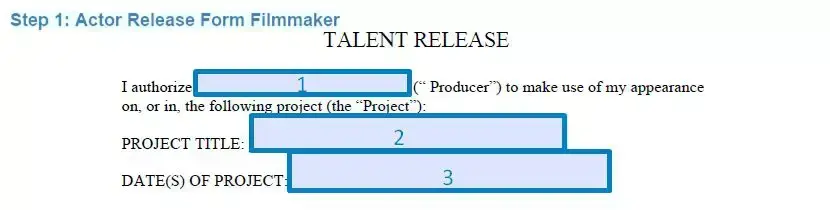

Write the film’s title on the PROJECT TITLE line and the filming dates on the DATE(S) OF PROJECT line. The paragraphs and numbered rights below have nothing to fill in, so read them before you go on.

At the bottom, print the actor’s full name and today’s date. Then fill in Address, City, State, Zip Code, Telephone Number, Email Address and Fax Number. The form has a line for a printed name, not a separate signature line.

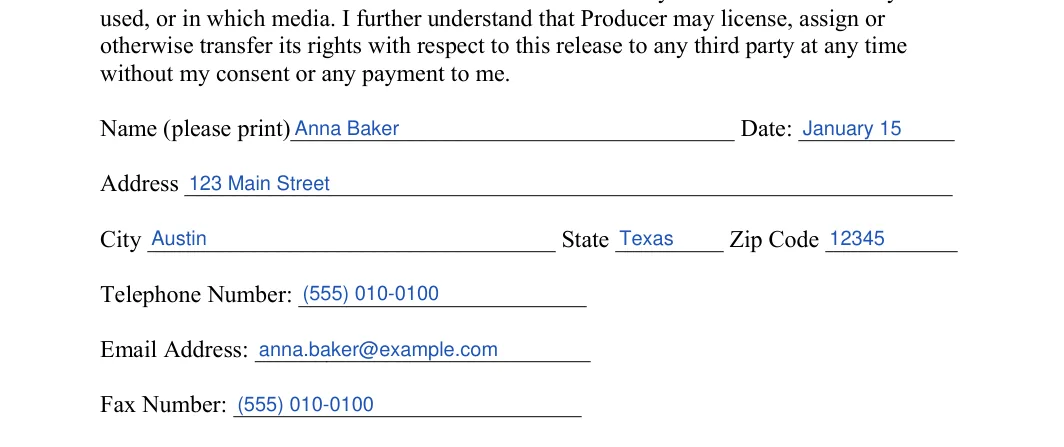
Prefer to type? Download the PDF, fill it in with the online PDF editor, then print it for signatures.
After the template is filled in, read the final version once more with the other person, add both signatures and keep a copy where you can find it when the film is ready to distribute.
An actor release gives permission to use a performance, while a liability waiver deals with claims for injury, so the documents answer different questions. Both sit under the wider release of liability form family on this site.
| Document | What it covers | Typical use |
|---|---|---|
| Actor release | Use of a performance, voice and image in a film | Cast of a film project |
| Media release form | Use of a person’s picture or recording in media | Press, marketing or an event |
| Liability waiver | Claims for injury during an activity | Sports or recreation |
This page cannot answer that for actor releases, because the passages it quotes deal with injury claims, not film performances. Check each state’s official code for any rules on the use of a person’s name or likeness and on minors’ entertainment contracts. Michigan and Florida show how the injury statutes differ for children.
Before a minor participates in a recreational activity sponsored or organized by a nongovernmental, nonprofit organization, a parent or guardian may release the sponsor, organizer or other person in writing from liability for injury or death that results solely from the inherent risks of the activity, but not from that person’s own negligence or the negligence of its employees or agents, under Mich. Comp. Laws § 700.5109.
Natural guardians may waive in advance a minor child’s claims against a commercial activity provider for personal injury, including death, and property damage resulting from an inherent risk in the activity, under Fla. Stat. § 744.301.
Both passages concern injury claims, not the use of a child’s image in a film, so neither one tells you who signs a talent release. A production attorney can say what applies where you film.
Use the Create My Document button at the top of this page to build the release for your film. Answer a few questions about the film and the performer, then save your progress, download the form and print it for each person in the cast.
Yes, the talent release form on this page downloads as a PDF you can fill in on screen with an online PDF editor or print blank and fill in by hand with a pen. Either way, read the whole form once before it goes to the filmmaker.
A filmmaker can provide electronic templates instead of paper, so the actors fill them in online and place an electronic signature. A production attorney can confirm that this suits your distributor.
Yes, using the same form template for every adult performer keeps the paperwork simple and consistent, as long as each person completes a copy of their own. A child in the cast gets the special form described above.
The FormsPal template is a one-page form with blank lines for the producer, the project title and the dates, and the performer’s contact details. The numbered paragraphs are already written, so there is nothing to fill in there.
Keep the finished copies together with the other production files, for example in one folder for the film, so every form is easy to find. Each performer can also keep a copy of their own form.
General information, not legal or tax advice.
