
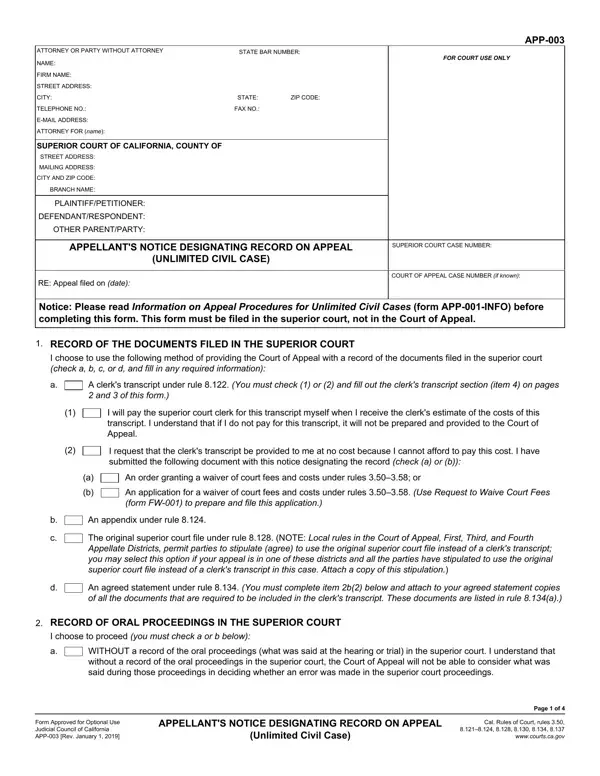
Filling out the California appellate notice form online is simple with our PDF editor. No download or installation required. Complete your civil appeal notice digitally and save it instantly.
Step 1: Click the “Get Form” button at the top of this page to open the PDF in our editor.
Step 2: Use the editing tools to fill in all required fields. You can add text, insert your signature, and annotate the PDF for your civil case filing.
This form requires specific information. Gather your case number, case name, and California superior court details before you begin:
1. Complete Section 1 by selecting your record type. Check the applicable boxes to designate whether you choose a clerk's transcript, an appendix, the original court file, or another record type for your California appeal.
2. Section 2 covers your selected record method: I choose to use the following, A clerk's transcript under rule, I will pay the superior court, I request that the clerk's, An order granting a waiver of, An application for a waiver of, An appendix under rule, The original superior court file, An agreed statement under rule, RECORD OF ORAL PROCEEDINGS IN THE, I choose to proceed you must check, and WITHOUT a record of the oral.
3. Section 3 requires CASE NAME, SUPERIOR COURT CASE NUMBER, and reporter details: APP, WITH the following record of the, A reporter's transcript under rule, Deposited with the superior court, Attached a copy of a Transcript, Attached the reporter's written, all the designated items, Attached a certified transcript, An agreed statement Check and, I have attached an agreed, All the parties have stipulated, A settled statement under rule, and The oral matters in the case.
Review what you type in “I have attached an agreed” carefully - this is a common error area.
4. Section 4 covers administrative records: RECORD OF AN ADMINISTRATIVE, I request that the clerk transmit, Title of Administrative Proceeding, Date or Dates, NOTICE DESIGNATING CLERK'S, Required documents, Document Title and Description, Date of Filing, Notice of appeal, Notice designating record on, and Judgment or order appealed from.
5. Final section: Judgment or order appealed from, Notice of entry of judgment if any, Notice of intention to move for, Ruling on one or more of the items, Register of actions or docket if, APP Rev January, APPELLANT'S NOTICE DESIGNATING, Page of, and Unlimited Civil Case.
Step 3: Review all information, then click “Done” to finalize your California civil appeal PDF notice. Register for a 7-day trial to download and save it to your account. Your information is never sold or shared.
Before filing with the California court, confirm:
- Case number and case name match your notice of appeal
- Record type chosen: clerk's transcript, appendix, or court file
- Court reporter fees are paid or a fee waiver is attached
- Judgment or order appealed from is listed on your California civil notice
For other California court forms, see the App 002 notice form and the superior court claim form.
