
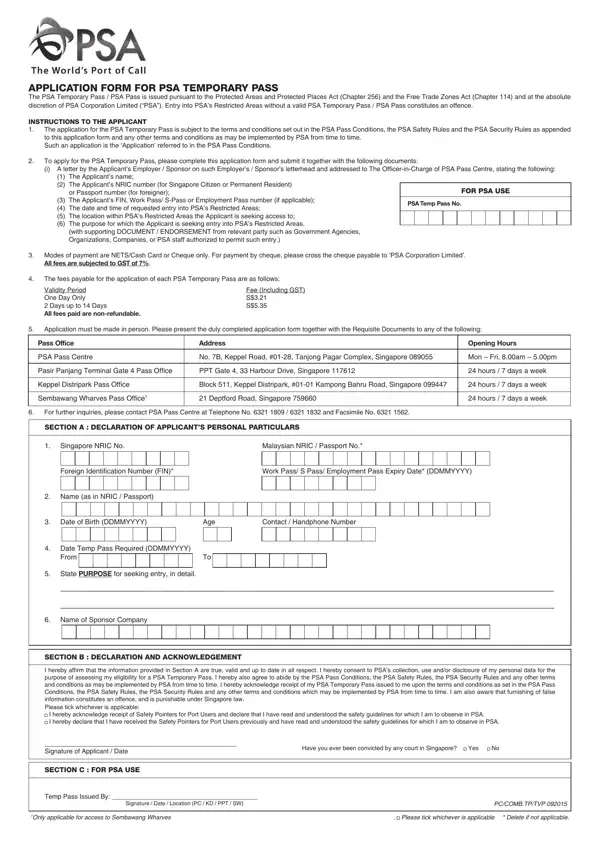
FormsPal provides a free online PDF editor that lets you fill out, edit, and prepare the PSA Pass application form from any browser. Once you finish, download, print, and sign it before submitting in person to the PSA office. Follow these steps to complete your form correctly.
How to Fill Out the Form Using FormsPal
Step 1: Open the PDF form in our editor by clicking the "Get Form" button at the top of this page. The form will load immediately in the browser.
Step 2: Complete each field in the form. The editor lets you type text, check boxes, enter dates, and add a signature. When filling out the PSA Pass application, pay attention to these main areas:
- Applicant details: full name, NRIC or passport number, contact number
- Sponsoring company details: name, address, contact person, and reason for access
- Vehicle details: registration number and IU number if requesting vehicle access
- Access period: specific dates and locations within the terminal
When completing the declaration and signature section, make sure the I hereby affirm statement and signature of applicant fields are completed before you finalize the form. These are required by PSA as part of the submission process.
For the vehicle and pass type section, the form covers the following fields: Application for (select the appropriate pass type), PSA Temporary Pass number if renewing, PSA Pass number if applicable, Name of Company, In-Transit Destination if applicable, Vehicle Details, and In-Vehicle Unit IU number. Fill in only the fields that apply to your situation.
Complete the remaining fields in this final section: Signature of Applicant and Date, the PSA Use Only section (leave blank), Temp Pass Issued By, and any applicable zone restrictions. Do not fill in fields marked "For PSA Use Only."
Step 3: Check that all information is accurate, then click "Done" to save and download your completed PDF. Your data is saved securely and can be revisited if you need to make corrections before printing.
Documents You Need Before Submitting
Prepare the following before visiting the PSA office to submit your completed PSA Pass application form:
- Valid Singapore NRIC or passport (for foreign nationals)
- Official sponsoring company letter on company letterhead confirming your purpose of visit and required access areas
- Vehicle registration documents if requesting vehicle access to the terminal
- Relevant technical certifications if performing maintenance or operational work on-site
All documents must match the information on your application exactly. Discrepancies can delay processing or result in rejection.
Frequently Asked Questions
How long does it take to process the PSA Pass application?
Standard applications are typically reviewed within two to three business days. Requests involving vehicle access or multiple restricted areas may take longer. Apply well in advance of when you need access.
Can the pass be renewed or extended?
Yes. PSA Passes can be renewed by submitting a new application before the current pass expires. Extensions are not automatic. The renewal process follows the same steps as a new application, including updated documentation from your sponsoring company.
What fees apply for the PSA Pass?
PSA charges a processing fee at the time of submission. The amount depends on the type and duration of access requested. Confirm the current fee schedule with PSA directly before your visit, as fees may change.
Is in-person submission required for the PSA Pass?
Yes. The completed PSA Pass application form must be submitted in person at the designated PSA office. The applicant or an authorized representative must attend. Postal or online submission is not accepted.
For other access-related forms, see the Airport Entry Pass Form for regulated airport facility access, or the Visitor Request Form for general visitor access requests at other premises.
