
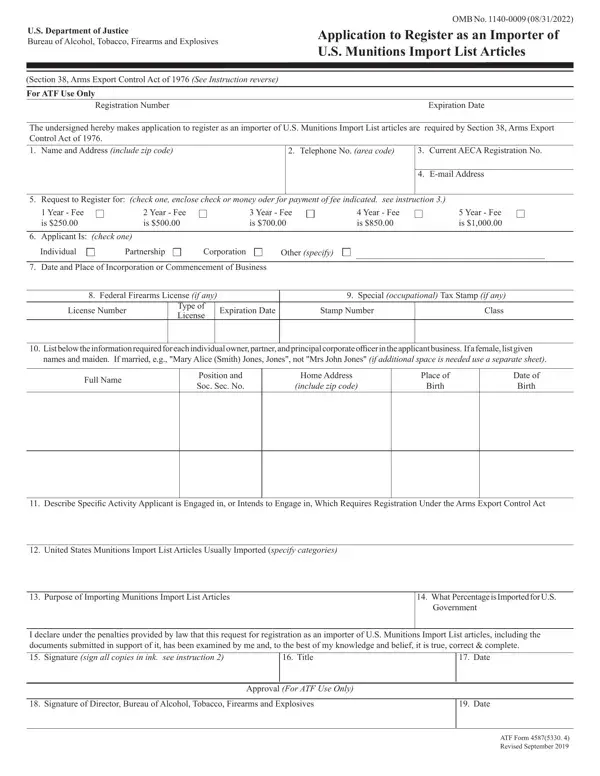
Handling PDF files online is a straightforward process with FormsPal's PDF editor. Anyone can fill in Form 5330 4 here quickly and accurately. The FormsPal development team continually improves the editor to give users a simpler experience with a full range of functions. If you are ready to get started, here is what to do:
Step 1: Press the "Get Form" button above. This will open the editor so you can begin filling out your form.
Step 2: Once you open the file in the editor, the document will be ready to fill out. In addition to completing the blank fields, you can perform other actions such as adding your own text, modifying existing content, inserting images, and placing your signature on the PDF.
This PDF document will require specific details. To ensure consistency and accuracy, follow the field-by-field guidance below:
1. Begin completing the form with the primary information fields. Gather all required information before you start and confirm that nothing has been left out.
2. After completing the first section, you will need to fill in the required fields: Full Name, Position and Soc Sec No, zip code, Birth Date, Date of Birth, Describe Specific Activity, United States Munitions Import, Purpose of Importing Munitions, What Percentage is Imported for US Government, I declare under the penalties, Date, and Title. These fields are needed before moving to the next stage.
3. This third section includes: I declare under the penalties, Date, Title, Signature of Director Bureau of, Date, Approval For ATF Use Only, and ATF Form Revised September. All of these form fields must be filled in here.
Take extra care when filling in Date and Signature of Director Bureau of, as these are the fields where most applicants make mistakes.
Step 3: Before submitting, verify that all blank fields are completed correctly. When everything looks accurate, press "Done." Create a free account to access your completed Form 5330 4, ready for download. Any changes you make are automatically saved, allowing you to return and edit the document later if needed. At FormsPal.com, we are committed to keeping your personal information secure.
Frequently Asked Questions About ATF Form 4587
Who is required to register using this importer form?
Any person or business that engages in the commercial importation of articles on the U.S. Munitions Import List must register using the ATF importer application. This includes firearms dealers, ammunition importers, and defense contractors bringing controlled items into the United States. Those importing covered articles for personal non-commercial use may be subject to different requirements.
What is the U.S. Munitions Import List?
The U.S. Munitions Import List is a catalog of controlled defense articles whose importation is regulated by the Arms Export Control Act and administered by the ATF. The list includes categories such as firearms, ammunition, explosives, and military-grade equipment. Importing any item from this list without proper ATF registration is prohibited under federal law.
Is ATF Form 4587 the same as Form 5330.4?
Yes. Both numbers refer to the same document. The designation 4587 is the standard form number assigned by the ATF, while 5330.4 is the OMB control number used for regulatory tracking. Both names appear on the official government document and refer to the same application for importer registration.
How long does the ATF registration process take?
Processing times for the importer registration application vary based on the volume of submissions received by the ATF and the completeness of the information provided. Applicants should plan for a processing period of several weeks. Submitting a fully complete document with all required supporting materials helps avoid delays caused by requests for additional information.
How do I submit the completed form?
Completed applications must be sent to the Bureau of Alcohol, Tobacco, Firearms and Explosives along with the required registration fee, processed through Pay.gov. Retain a copy of your completed PDF document and payment confirmation for your records. Visit ATF Form 4473 or the ATF e-Form 3 page for information on related federal firearms documents available at FormsPal.
