
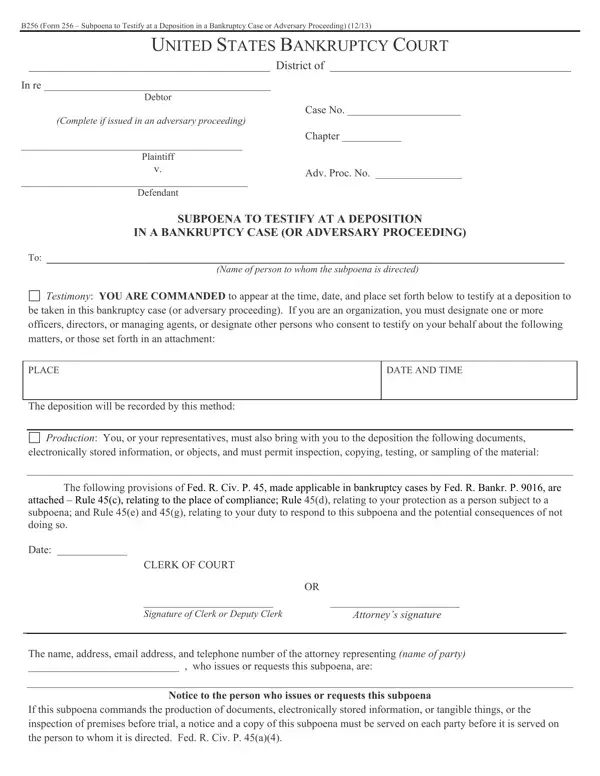
The B256 form (bankruptcy subpoena) can be filled in online without any problem. Just try FormsPal’s PDF editing tool to complete the job promptly. To make our tool more convenient, we consistently add new features based on user feedback. Follow these steps to get started:
Step 1: Click the “Get Form Button” at the top of this page to open our editing tool. Here you’ll find everything you need to fill out your document.
Step 2: The tool lets you modify your PDF in a variety of ways. You can write custom text, adjust existing content, and place a digital signature – all within minutes.
It is easy to finish the document by following this tutorial. Here’s what you should do:
1. The bankruptcy subpoena form requires certain details to be entered. Make sure the following blanks are complete:
2. Once your current task is complete, take the next step and fill out all of these fields: be taken in this bankruptcy case, PLACE, The deposition will be recorded by, DATE AND TIME, Production You or your, electronically stored information, The following provisions of Fed R, attached Rule c relating to the, CLERK OF COURT OR Signature of, and Attorneys signature with their corresponding information. Double-check that everything has been entered correctly before continuing.
3. The following part covers The name address email address and, Notice to the person who issues or, and If this subpoena commands the – fill in every one of these fields.
4. This subsection contains these blanks: This section should not be filed, I received this subpoena for name, on date, I served the subpoena by, on date or, I returned the subpoena unexecuted, Unless the subpoena was issued on, My fees are for travel and for, and I declare under penalty of perjury.
5. Wrap up the form by going through this final segment. Below is a comprehensive set of fields that require accurate information: I declare under penalty of perjury, Date, Additional information concerning, Servers signature, Printed name and title, and Servers address.
For Additional information concerning and Printed name and title, make certain you get them right. Both of these are among the most important fields on the page.
Step 3: Verify your details are correct and click “Done” to continue. FormsPal is committed to the confidentiality of all our users – all information entered into our editor remains protected.
Common Mistakes to Avoid When Completing the B256 Form
Many people make avoidable errors when responding to a bankruptcy subpoena. The most frequent mistakes include leaving the proof of service section blank, failing to list all requested documents in the production demand, entering incorrect dates or times for the deposition, and neglecting to sign the attorney or clerk signature line. Review each section carefully before submitting the form to avoid delays or legal complications.
Related Bankruptcy and Subpoena Forms
If you are working with the B256 subpoena, you may also need these related legal documents:
- California Deposition Subpoena – for depositions in California civil proceedings
- Subpoena Duces Tecum for Deposition – compels production of documents at a deposition
- Bankruptcy B10 Proof of Claim – used to file a claim in a bankruptcy case
- Bankruptcy Cover Sheet Petition – the cover sheet required with bankruptcy filings
- Criminal Subpoena Template – for witnesses in criminal proceedings
