
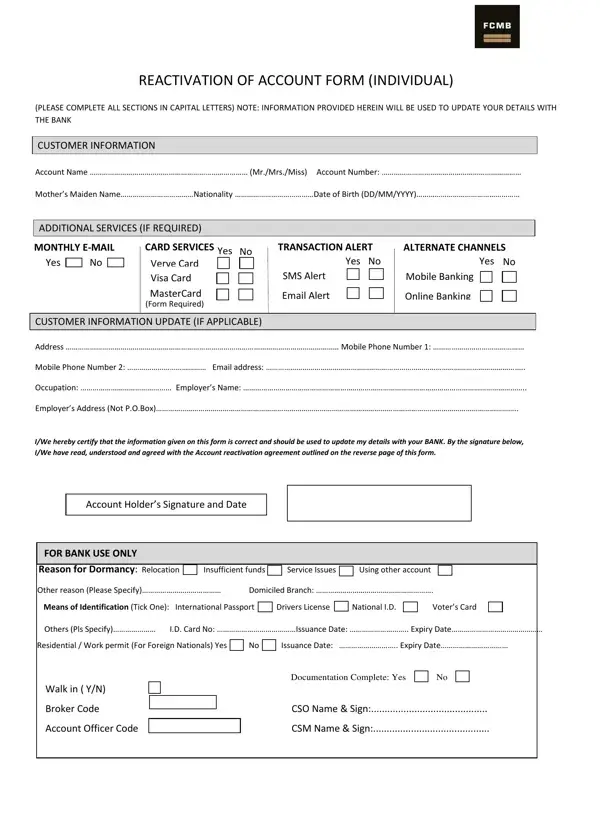
Banking processes often involve specific forms designed to protect both financial institutions and their customers. This form is especially useful for individuals seeking to reactivate dormant accounts. It must be completed in capital letters for clarity and accuracy.
The form covers several key sections. First, it gathers basic customer details such as account name, account number, mother's maiden name, nationality, and date of birth. It also lets you select optional services including monthly email statements, card services, transaction alerts, and access to mobile and online banking.
In addition, the form includes a section for updating your contact and personal information. This dual purpose makes it a reactivation instrument as well as an information refresh tool. You may also need a related account reactivation form or an account closure form for other banking tasks.
The form also outlines the terms under which the reactivated account will operate. These include the bank's obligations, electronic banking terms, and your responsibilities for maintaining the confidentiality of your security information. Accuracy and honesty are essential when completing each section.
| Question | Answer |
|---|---|
| Form Name | Bank Account Activation Form |
| Form Length | 2 pages |
| Fillable? | No |
| Fillable fields | 0 |
| Avg. time to fill out | 30 sec |
| Other names | how to activate my fcmb account, fcmb account reactivation code, my fcmb account update online, how to remove my fcmb account from dormant |
Bank Account Activation Form isn’t the one you’re looking for?