
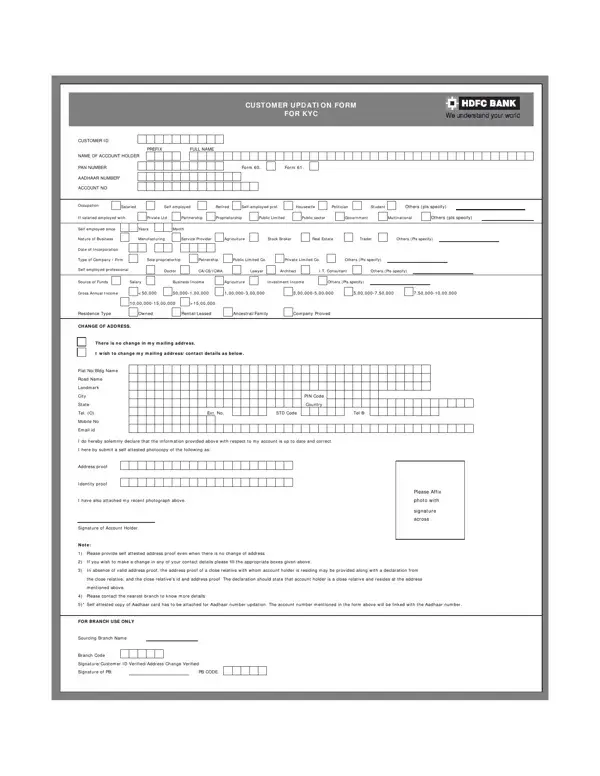
The Bank Customer Updation Form collects current information from bank account holders. Banks use this form to update Know Your Customer (KYC) records as required by Reserve Bank of India guidelines. Submitting this form on time keeps your account active and avoids transaction limits.
The form collects personal details including your full legal name, customer ID, and bank account number. You must also provide your Permanent Account Number (PAN) and your Aadhaar number. These are mandatory for all Indian bank customers under the Prevention of Money Laundering Act, 2002.
Contact information is another key section of the form. You will enter your current residential address, phone number, and email address. If you have moved recently, this form updates all your records at once across the bank's systems.
The form also covers employment and income details. You will select your occupation category, such as salaried, self-employed, student, or retiree. You will then enter your gross annual income range. Banks use this information to verify your source of funds and assign an account risk rating. If you bank with HDFC or a similar institution, you may also use an Axis Bank KYC form or an ICICI Bank Re-KYC form for periodic updates.
All individual and joint bank account holders in India must keep their KYC records up to date. The Reserve Bank of India requires banks to refresh customer information on a schedule based on account risk level. Low-risk accounts are typically updated every ten years. Medium-risk accounts are updated every eight years. High-risk accounts require updates every two years.
You will also need to submit this form if your name, address, phone number, or employer changes. New customers opening accounts may start with a customer information form, while existing customers use the updation form to revise records already on file.
Banks send a notice when your KYC update is due. You typically have 30 days from the date of the notice to submit the completed form. Failing to submit within this period may result in restrictions on withdrawals, online transfers, or check payments.
You can also submit a voluntary update at any time. If your mobile number changes, your bank cannot send one-time passwords for online transactions until the new number is on record. An updated address is also required before your bank can deliver a new debit card or account statement to your home. For HDFC customers, the HDFC bank account opening form and the updation form share many of the same fields, so keeping a copy of your original application simplifies the process.
Attach self-attested copies of your PAN card and Aadhaar card to the completed form. An address proof document dated within the last three months is also required. Acceptable address proofs include a utility bill, a bank statement from another institution, or a rental agreement. A recent passport-size photograph with your signature across it must be affixed in the designated space on the form.
If you are submitting the form through your bank's online portal, upload scanned copies of these documents instead. The bank will verify the uploaded images against its existing records. Once verified, your account records are updated within one to three working days. Check whether you also need to complete a bank account activation form if your account was suspended while awaiting a KYC update.
| Question | Answer |
|---|---|
| Form Name | Bank Customer Updation Form |
| Form Length | 2 pages |
| Fillable? | No |
| Fillable fields | 0 |
| Avg. time to fill out | 30 sec |
| Other names | hdfc bank kyc form, hdfc kyc application form, hdfc kyc form download, hdfc bank kyc form download pdf |
Bank Customer Updation Form isn’t the one you’re looking for?