
BC-600 Form PDF Details

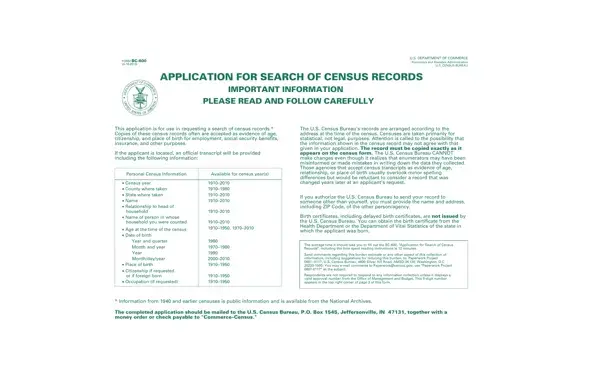
The BC-600 form, issued by the U.S. Department of Commerce and managed by the U.S. Census Bureau, lets applicants access census records for proof of age, citizenship, or genealogical research. As a gateway to historical records from 1910 to 2010, this form provides official transcripts with personal data including name, age, birth date, place of birth, and citizenship status.

Records from the BC-600 form are arranged by address and are unalterable, reflecting the Census Bureau's accuracy standards. The form accommodates individual requests and also covers requests for minor children, mentally incompetent persons, and deceased persons when proper authorization is provided.

A non-refundable fee is required with each submission. Additional fees apply for expedited processing or full schedule requests. The BC-600 outlines strict guidelines for completing it correctly and emphasizes the confidentiality of census data, restricting its release to authorized persons only. Falsifying information carries legal penalties including fines or imprisonment.

Census records obtained through this form can support social security applications, insurance claims, and other legal needs. Related forms you may also need include the birth certificate form and the 1910 census form. Before filling out the BC-600, gather the full name, approximate age, and last known address of the person whose records you are requesting.

QuestionAnswer
Form NameBc 600 Form
Form Length4 pages
Fillable?No
Fillable fields0
Avg. time to fill out1 min
Other namesform bc 600, gov form bc 600, form 600 census form, form bc600

How to Edit Bc 600 Form Online for Free

To complete the BC-600 census records search form online, use FormsPal's free PDF editor. No software installation is needed. Follow these steps:

Before you begin: Have ready the full name, birth year, approximate address during the census year, and the reason for your request. This information is required to complete the bc 600 form accurately.

Step 1: Click the "Get Form" button above to open the PDF editor. All fields needed to submit your census records request will appear on screen.

Step 2: Use the editor to enter your personal information, update existing fields, and add your signature. All edits can be made in minutes.

The BC-600 requires specific details in each section. Complete every field to avoid delays:

1. Fill in the required personal details for the applicant and the person whose census records are requested:

Part 1 of BC-600 census records search form - personal details section

2. Complete the remaining fields including: Signature, fee amount enclosed, extra copies requested, full schedules, expedited service fee, total amount, full name of the person whose census records are requested, first name, middle name, maiden name (if any), present last name, and nicknames or aliases.

Part 2 of BC-600 form - signature, payment, and name fields

3. Complete the census year entry fields (April and January columns), ZIP Code fields, and locator information. Read each instruction carefully before entering data. A common mistake here is entering the wrong census year for the requested records.

Part 3 of BC-600 form - census year columns and address locator fields

Review the census year fields thoroughly before submitting. Errors in this section are the most frequent cause of delayed census record requests.

Step 3: Proofread your completed form and click "Done." Register for a 7-day free trial to download or email the finished document. Your file will be saved in your FormsPal account for future access. Related forms include the birth certificate form, the social security application, and the 1910 census form.