
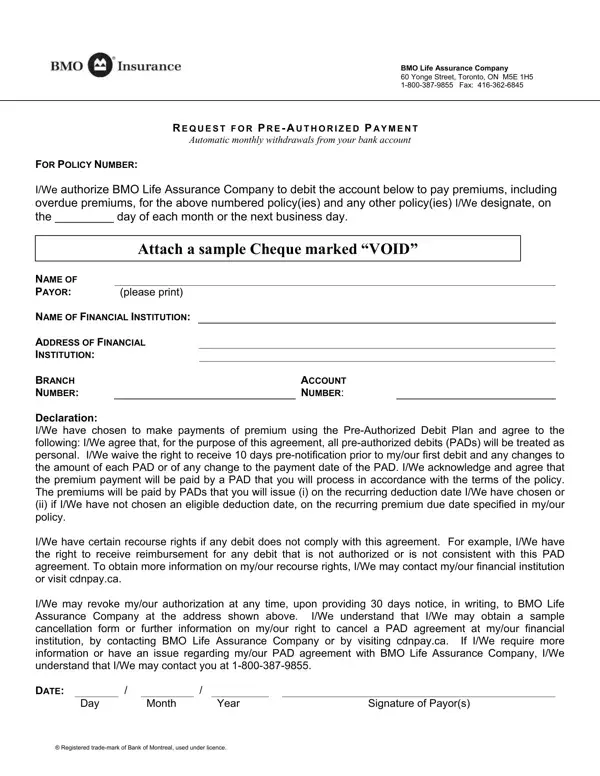
The BMO Authorization Form, also known as the BMO PAD form, allows BMO Life Assurance Company policyholders to authorize pre-authorized debit payments directly from their bank account. This removes the need to remember monthly premium due dates and ensures continuous insurance coverage without lapses.
The form collects your banking information, policy number(s), and payment authorization details. All withdrawals processed through this form are classified as Pre-Authorized Debits (PADs) and treated as personal transactions under Canadian Payments Association rules. BMO Life Assurance Company, headquartered at 60 Yonge Street in Toronto, processes these debits on a monthly schedule.
When you sign this form, you agree to regular debits from your account. However, you keep important protections. You can waive or request advance notification before each debit. You can dispute any debit that does not match the terms of your agreement by contacting your bank within 90 days. Most importantly, you can revoke the authorization entirely by giving BMO 30 days of written notice.
If you need other BMO banking documents, FormsPal offers several related forms. The BMO Direct Deposit Form sets up incoming deposits to your account. The BMO Deposit Form handles standard deposit transactions. For non-BMO pre-authorized payments, see the Pre-Authorized Debit Form or the ACH Authorization Form for U.S.-based transactions.
| Question | Answer |
|---|---|
| Form Name | BMO Authorization Form |
| Form Length | 1 pages |
| Fillable? | Yes |
| Fillable fields | 12 |
| Avg. time to fill out | 2 min 39 sec |
| Other names | bmo pre authorized payment form, bmo pre authorized debit, bank of montreal pre authorized debit form, bmo pad form online |
BMO Authorization Form isn’t the one you’re looking for?