
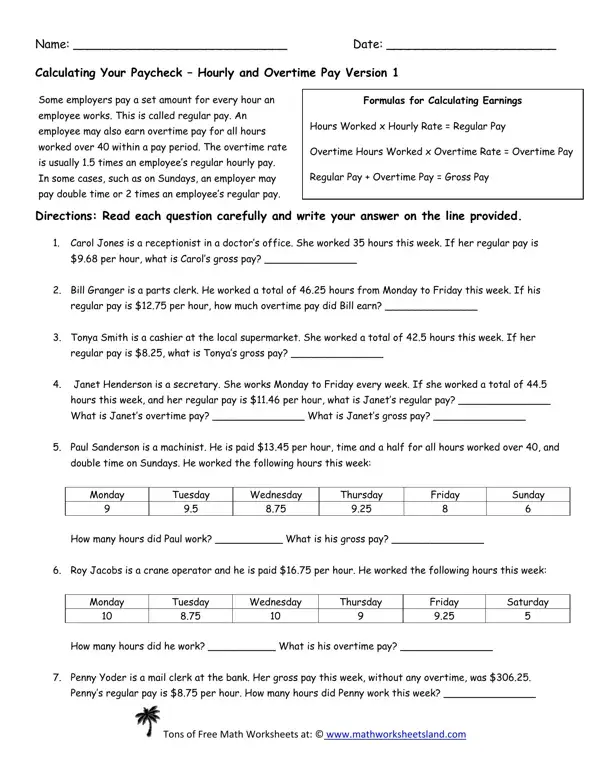
Understanding how to calculate salary is essential for both employees and employers to ensure accurate paychecks. The Calculating Salary Worksheet form begins with an explanation of regular pay, defined as a fixed amount paid for each hour worked, then covers overtime pay that compensates for hours worked beyond a standard 40-hour workweek at a rate of 1.5 times the regular hourly rate. Certain conditions, such as work on Sundays, may warrant double time pay at 2.0 times the base hourly rate.
Regular pay is the base wage an employee earns for each hour worked within the standard workweek. To compute regular earnings, multiply the hourly rate by the number of regular hours worked. For example, a receptionist earning $10.00 per hour who works 35 regular hours earns $350.00 in gross wages for that week with no overtime. This straightforward math formula makes it easy for anyone to verify expected take-home earnings before payday and confirm the hourly rate applied matches the employment agreement.
Overtime wages apply to any hours worked beyond the 40-hour weekly threshold. Under standard employment rules, overtime is paid at 1.5 times the regular hourly rate. A parts clerk earning $12.00 per hour who works 46 hours in one week earns $480.00 in regular wages plus $108.00 in overtime wages (6 hours at $18.00 each), producing a total gross pay of $588.00. Roy Jacobs, a crane operator in one worksheet example, works similar scenarios involving both regular rates and Sunday double time. The worksheet walks through each calculation using real job role examples so the math applies directly to workplace situations today.
Gross pay is the total amount an employee earns before any deductions, taxes, or withholding. The formula is: Gross Pay = Regular Wages plus Overtime Wages. This worksheet guides users through that calculation step by step, presenting real scenarios with different job roles, varying hours, and multiple hourly rate values. These practical examples make the math accessible whether the user is an employee checking their own paycheck or a business owner managing payroll for hourly staff.
The Calculating Salary Worksheet includes several workplace examples covering common employment scenarios:
Each scenario in the worksheet reinforces the core math skills needed to verify any hourly rate calculation, supporting both personal financial planning and payroll accuracy in small business settings.
| Question | Answer |
|---|---|
| Form Name | Calculating Salary Worksheet Form |
| Form Length | 1 pages |
| Fillable? | No |
| Fillable fields | 0 |
| Avg. time to fill out | 15 sec |
| Other names | calculating your paycheck weekly time card 1 answers, calculating a weekly time card worksheet answers, calculating your paycheck salary worksheet 1, calculating your paycheck weekly time card 1 answer key |