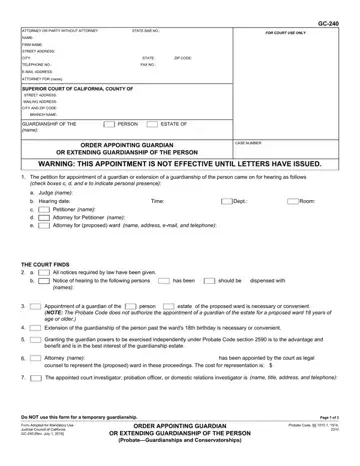
Use FormsPal's PDF editor to complete the California GC-240 form online. The steps below walk you through each section of this guardianship order document.
Step 1: Click the "Get Form Here" button on this page to open the PDF editor.
Step 2: Use the toolbar to fill in text, add checkboxes, or highlight any section. The editor works directly in your browser with no software to install.
Complete the following sections of the GC-240 form:
In the case identification section, enter the attorney's name, address, email, and phone number. Mark whether the court finds that all required notices were properly given, or that notice should be dispensed with. Specify whether the order applies to guardianship of the person, the estate, or both.
In the court orders section, enter the full name and address of the appointed guardian. Note that an estate guardian cannot be appointed for a proposed ward who is 18 years of age or older. Include all required contact information as directed by the court.
Complete the bond section by indicating whether a bond is required and setting the bond amount. If funds are to be placed in a restricted account, note the account type and file receipts as directed by the court. Add any additional orders in Attachment c when applicable.
In the final section, specify whether the estate guardian will operate under independent administration conditions. Check all applicable orders for the guardianship. Review all entries for accuracy before proceeding.
Step 3: Click the "Done" button to save and download the completed PDF.
Step 4: Save a copy for your records. Your information is private and will not be shared with any third party.
Related California Guardianship Forms
When handling a California guardianship case, you may also need these related court forms:
- California Form GC-110 - Petition for Appointment of Guardian of the Person
- California Form GC-250 - Letters of Guardianship
- California Form GC-340 - Inventory and Appraisal
- Annual Report of Guardian