
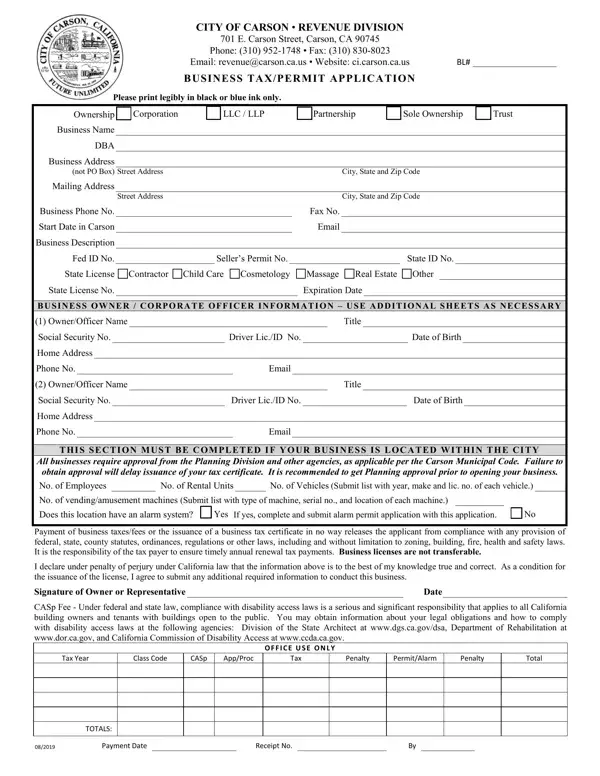
Please print legibly in black or blue ink only.
Ownership: Corporation, LLC / LLP, Partnership, Sole Ownership or Trust.
Business address: not PO Box or mail drop.
Contractors: if you have a project with 20+ residential dwelling units or 20,000+ SF of commercial or industrial development, a Contractors Permit is required.
Vehicles: submit list with year, make and license no. of each vehicle.
Alarm: if the business is in Carson and this location has an alarm system, complete alarm permit application.
| Question | Answer |
|---|---|
| Form Name | Business Tax/Permit Application |
| Form Length | 1 page |
| Fillable? | Yes |
| Fillable fields | 63 |
| Avg. time to fill out | 11 min |
| Edition | 05/2024 |
| Issuing agency | City of Carson Revenue Division |
| Matches the agency's file | Yes, checked October 4, 2026 |
| Other names | Carson business license, City of Carson business tax permit, Business Tax/Permit Application, Carson CA business license |
| Official source | Business Tax/Permit Application (Rev 05/2024), City of Carson Revenue Division |
City Of Carson Business Tax Permit Form isn’t the one you’re looking for?