
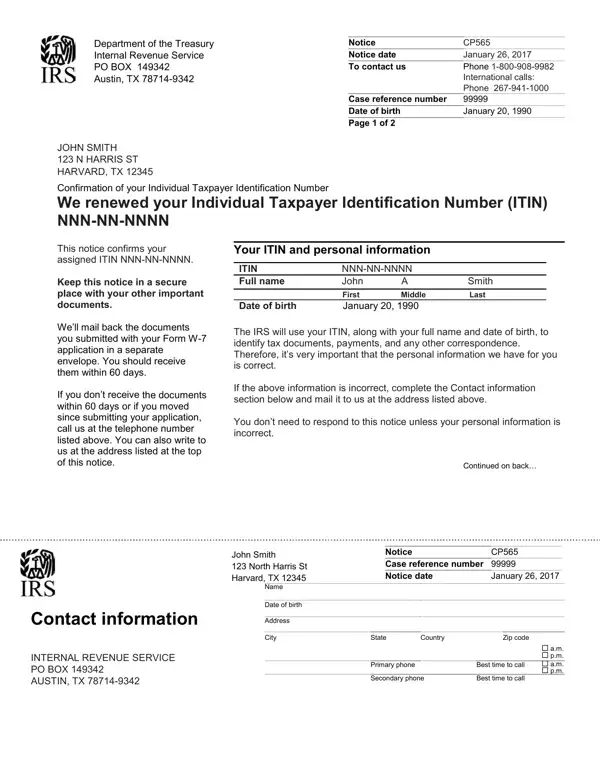
Use the editor above to open, complete, and download your CP 565 notice as a PDF. Follow the steps below to understand your notice and take the correct action with the IRS.
What Is the CP 565 Notice?
The IRS issues this notice to individuals who applied for or renewed an Individual Taxpayer Identification Number (ITIN). Your ITIN is a nine-digit number that begins with the digit 9. The IRS assigns it to taxpayers who need a U.S. federal tax ID but are not eligible for a Social Security Number. This includes nonresident aliens, resident aliens, dependents or spouses of U.S. citizens, and foreign nationals with U.S. tax obligations.
Your notice confirms the specific ITIN assigned to you. Review the name and identification details carefully. If any information is incorrect, contact IRS ITIN Operations at the address or phone number printed on the notice.
What Are Your Responsibilities as an ITIN Holder?
After receiving this notice, keep the following obligations in mind:
- Use your ITIN on all federal tax forms, statements, and returns where a tax identification number is required.
- File at least one federal income tax return, such as IRS Form 1040-NR for nonresident aliens, within every three-year period to keep your ITIN active.
- Report name changes to IRS ITIN Operations by submitting a written request with your current ITIN, former name, new name, and supporting documents such as a marriage certificate or court order.
- Notify the IRS if you become eligible for a Social Security Number. Apply for an SSN at the Social Security Administration and use it instead of your ITIN for all future tax filings.
How Do You Renew an Expired ITIN?
ITINs expire when they are not used on a federal tax return for three consecutive tax years. If your ITIN has expired, or contains certain middle digits designated for renewal by the IRS, you must renew before filing your next return. To renew, complete IRS Form W-7, the Application for IRS Individual Taxpayer Identification Number. Attach original or certified copies of your identity documents, such as a valid passport or national ID card, and mail everything to the IRS ITIN Operations mailing address. Processing typically takes seven to eleven weeks. Once your renewal is approved, the IRS will send a new notice confirming your current ITIN.
How to Fill Out and Sign the CP 565 Notice Online
If you need to complete or annotate your notice electronically, use the online PDF editor at the top of this page. You can open the document, add typed text, place a digital signature, and download the completed file. No software installation is required. Once saved, you can print a copy for your records or attach the document to IRS correspondence as needed.
