
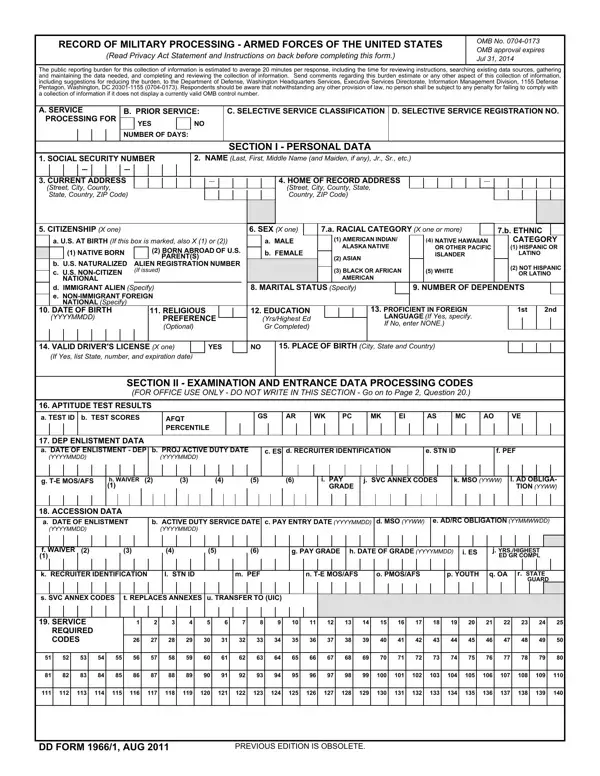
Fill out dd form 1966 army quickly using our PDFinity® online editor. We add new features regularly based on user suggestions. Follow these steps to complete your form:
Step 1: Open the Editor
Click the "Get Form Button" at the top of this page to open the PDF editor.
Step 2: Fill In the Form Fields
The editor lets you modify PDF files in many ways. You can add text, correct existing entries, and insert a signature.
Complete each section carefully to finalize the dd form 1966 correctly:
1. Fill in the fields in the first section of the form:
2. Complete the following fields: APTITUDE TEST RESULTS (TEST ID), AFQT PERCENTILE, DEP ENLISTMENT DATA (DATE OF), PROJ ACTIVE DUTY DATE (YYYYMMDD), ES, RECRUITER IDENTIFICATION, STN ID, PEF, TE MOSAFS, WAIVER, PAY GRADE, SVC ANNEX CODES, MSO YYWW, AD OBLIGATION YYWW, ACCESSION DATA (DATE OF), and ACTIVE DUTY SERVICE DATE (YYYYMMDD).
3. Fill in: NAME (Last, First, Middle Initial), SOCIAL SECURITY NUMBER, SECTION III OTHER PERSONAL DATA, EDUCATION (list all high schools, name, location, and graduate status), MARITAL/DEPENDENCY STATUS, and court order information. Complete these fields with full accuracy.
4. Continue with: dependent information (immediate dependents or only-living-child status), PREVIOUS MILITARY SERVICE details, employment history, benefits or disability status, and ABILITY TO PERFORM MILITARY DUTIES.
5. Complete the final section: the DRUG USE AND ABUSE disclosure. This is where many applicants make errors, so review it carefully.
Always review the DRUG USE AND ABUSE section before submitting. Errors here can affect your eligibility for service.
Step 3: Review and Download
After checking your entries, click "Done." Create a free account at FormsPal to download, email, or save your completed form. FormsPal keeps all user information private and secure.
Common Mistakes to Avoid
Many applicants make errors on this form that delay or disqualify their enlistment. Here are the most frequent mistakes to watch for.
Incomplete personal history. Leave out no schools, jobs, or addresses. List every high school, college, and employer, even if attendance was brief. Background checks can flag any gaps.
Incorrect Social Security Number. This number links all of your military records. A single incorrect digit causes serious processing delays and may require the entire form to be redone.
Unreported prior military service. All previous service in any branch, including Reserve and National Guard, must be disclosed. Omitting this information is grounds for disqualification.
Errors in the drug use section. The DRUG USE AND ABUSE portion requires complete honesty. Understating or omitting drug history is a common reason for rejection. Background checks are thorough and often verify this information independently.
After Completing the Form
The DD Form 1966/1 is not submitted directly by the applicant. Instead, personnel at the Military Entrance Processing Station review and process it during your MEPS appointment. Your recruiter will guide you through each step.
Keep a copy of your completed form for your records. If any information changes after submission, notify your recruiter right away. Changes to contact information, education status, or dependent information should always be reported promptly to keep your record accurate.
Related Military Enlistment Forms
The dd 1966 1 form is completed at a Military Entrance Processing Station along with other documents. You may also need the DD Form 1966, the DD Form 2808 (Report of Medical Examination), the DD Form 2807-1 (Report of Medical History), and the DD Form 93 (Record of Emergency Data). All of these are part of the standard enlistment process.
