
Duplicate Ukc Form PDF Details

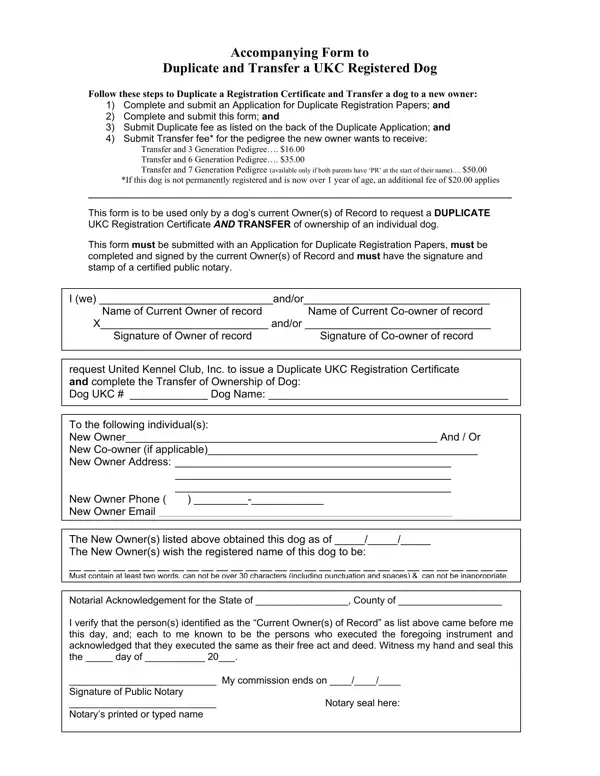
When the time comes for a dog owner to hand over the leash to someone new, dealing with the paperwork can be just as important as finding the perfect new home. The Duplicate UKC form plays a crucial role in this process, ensuring that the transition from one owner to another is recognized and recorded properly. This form is specifically designed for use by the current registered owner(s) of a dog who wishes to transfer ownership along with obtaining a duplicate UKC Registration Certificate, an essential document for any UKC registered canine. The comprehensive procedure includes filling out an application for duplicate registration papers, submitting this form, and covering the associated fees for duplication and transfer, which vary depending on the pedigree's generation length chosen by the new owner. Additionally, if the dog is over a year old and not permanently registered, an extra charge is incurred. The completion and notarization of this form are mandatory steps, underscoring the importance of a formal ownership transfer process and ensuring all details are accurately recorded for the dog's new chapter in life with its new family. Through this form, both the relinquishing party and the new owners are guided meticulously through the transition, ensuring the dog’s pedigree and registration records are maintained accurately and responsibly.

QuestionAnswer
Form NameDuplicate Ukc Form
Form Length1 pages
Fillable?No
Fillable fields0
Avg. time to fill out15 sec
Other namesukc litter form, ukc duplicate papers, duplicate ukc application, duplicate ukc dog

How to Edit Duplicate Ukc Form Online for Free

Whenever you would like to fill out duplicate ukc application, you don't have to download and install any sort of applications - just make use of our online PDF editor. The tool is continually improved by our staff, acquiring additional functions and turning out to be much more versatile. All it takes is a couple of simple steps:

Step 1: Hit the "Get Form" button above on this page to access our editor.

Step 2: As soon as you start the PDF editor, you'll notice the form made ready to be completed. In addition to filling in different blanks, you can also perform many other things with the file, that is adding any textual content, modifying the original text, inserting graphics, affixing your signature to the PDF, and more.

As for the blanks of this specific PDF, here is what you want to do:

1. It's essential to fill out the duplicate ukc application properly, therefore be mindful while working with the parts including these particular fields:

Writing section 1 in ukc duplicate registration

2. Just after this section is done, go to enter the suitable details in these - Notarial Acknowledgement for the.

Step # 2 in completing ukc duplicate registration

Be very mindful while filling out Notarial Acknowledgement for the and Notarial Acknowledgement for the, as this is where most users make mistakes.

Step 3: Make certain your details are right and just click "Done" to finish the process. After registering a7-day free trial account at FormsPal, you'll be able to download duplicate ukc application or send it via email without delay. The PDF will also be accessible via your personal account page with your every single change. FormsPal is invested in the personal privacy of our users; we ensure that all information entered into our system remains confidential.