
Dwc045 Form PDF Details

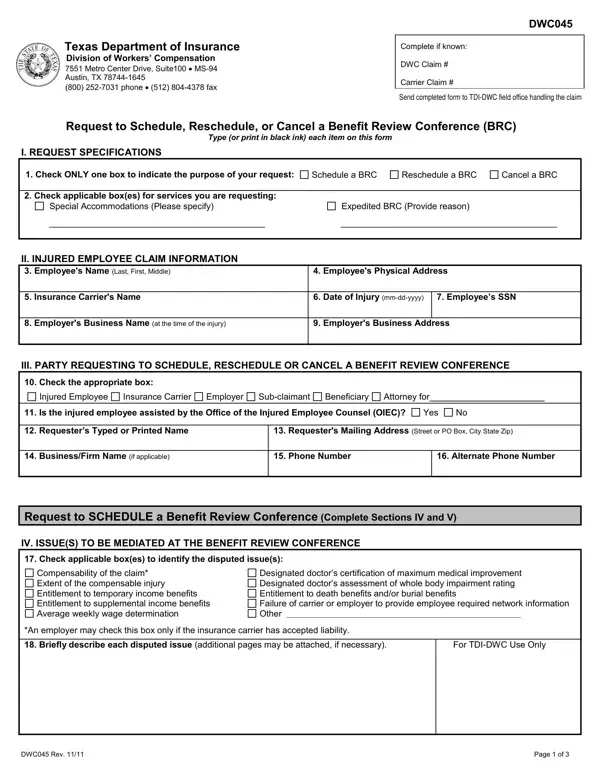
Navigating the intricacies of workers' compensation in Texas can be complex, but understanding the DWC045 form is a vital step for those seeking to address disputes within this system. Issued by the Texas Department of Insurance Division of Workers’ Compensation, this form plays a crucial role by facilitating the request to schedule, reschedule, or cancel a Benefit Review Conference (BRC). Whether you're an injured employee, insurance carrier, employer, or another related party, filling out the form accurately is imperative to ensure that your case is heard efficiently. The DWC045 form requires detailed information including personal details of the injured employee, the nature of the request, specifics about the dispute, and documentation of prior efforts to resolve the issue. Moreover, the form allows for special accommodations and the opportunity to expedite the BRC under certain conditions, underscoring the system's adaptability to the unique needs of each case. Completing the form correctly and understanding the subsequent steps, including what happens after submission, is essential for those looking to navigate their way through the workers' compensation dispute resolution process effectively.

QuestionAnswer
Form NameDwc045 Form
Form Length3 pages
Fillable?No
Fillable fields0
Avg. time to fill out45 sec
Other namesTX, dwc045, tdi texas gov forms dwc dwc045brc pdf, DWC045

How to Edit Dwc045 Form Online for Free

In case you wish to fill out dwc045, it's not necessary to download any kind of software - just try our online PDF editor. FormsPal team is constantly working to expand the tool and make it much faster for people with its multiple functions. Enjoy an ever-improving experience now! If you're looking to start, this is what it's going to take:

Step 1: Open the PDF form in our tool by hitting the "Get Form Button" in the top part of this page.

Step 2: The tool provides the opportunity to customize your PDF file in various ways. Modify it by including personalized text, correct what's originally in the document, and place in a signature - all at your disposal!

Filling out this form needs focus on details. Ensure that all required blank fields are filled in correctly.

1. You'll want to fill out the dwc045 correctly, hence be careful while working with the areas containing these specific fields:

How to fill out DWC stage 1

2. Once your current task is complete, take the next step – fill out all of these fields - Check the appropriate box, Injured Employee, Insurance Carrier, Employer, Subclaimant, Beneficiary, Attorney for, Is the injured employee assisted, Yes, Requesters Typed or Printed Name, BusinessFirm Name if applicable, Requesters Mailing Address Street, Phone Number, Alternate Phone Number, and Request to SCHEDULE a Benefit with their corresponding information. Make sure to double check that everything has been entered correctly before continuing!

Is the injured employee assisted, Injured Employee, and Yes inside DWC

It is easy to make errors when filling in the Is the injured employee assisted, thus be sure to take another look before you decide to send it in.

3. This next part will be focused on I certify that prior to this, Signature of RequesterDate, Request to RESCHEDULE or CANCEL a, VI DOCUMENTATION OF GOOD CAUSE FOR, Check ONE box below to indicate, Cancel PRIOR to BRC Complete and, If you are requesting to, a a description of objective facts, prevent you from attending the, amount of additional time to, b a description of objective facts, The date the notice of setting is, NOTE If this information is not, and Yes - type in all of these empty form fields.

Step no. 3 of filling out DWC

4. This next section requires some additional information. Ensure you complete all the necessary fields - Check the appropriate box below, The information provided in the, Information provided in the, For TDIDWC Use, Only, I certify that I will provide a, NOTE With few exceptions upon your, DWC Rev, and Page of - to proceed further in your process!

Stage number 4 in filling in DWC

Step 3: Go through everything you've entered into the form fields and then hit the "Done" button. Try a 7-day free trial account at FormsPal and gain immediate access to dwc045 - accessible in your personal account page. FormsPal provides safe form editing devoid of data recording or distributing. Rest assured that your information is safe with us!