
EAP Form Anthem PDF Details

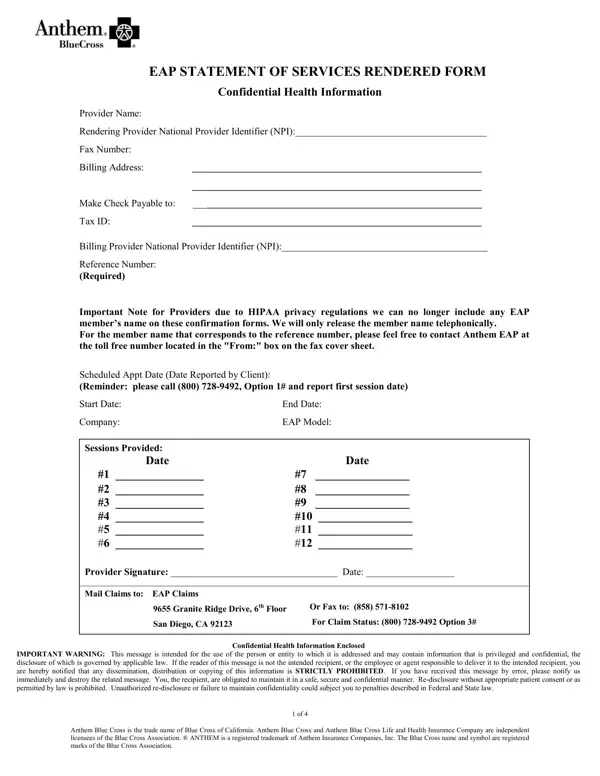
Navigating the complexities of health care and wellness support can seem daunting, but forms like the Employee Assistance Program (EAP) Statement of Services Rendered play a pivotal role in ensuring the process unfolds smoothly. This document is integral for health providers working under the EAP, detailing critical information like provider names, National Provider Identifier (NPI) numbers, billing addresses, and much more. Unique to this form is the adherence to HIPAA privacy regulations, notably the mandate forbidding the inclusion of EAP member’s names directly on the forms, a provision aimed at safeguarding patient confidentiality. Moreover, the form serves as a bridge between health professionals and the Anthem EAP, providing scheduled appointment dates, the range of sessions provided, and instructions for submitting claims. It is, in essence, the backbone of EAP-oriented transactions, simultaneously prioritizing patient confidentiality while ensuring providers have a clear and structured method to report services and arrange for payments. The document underscores the importance of confidentiality warnings and adheres to the rigors of federal and state laws regarding patient information, delivering a comprehensive tool for managing EAP claims and services.

QuestionAnswer
Form Name EAP Form Anthem
Form Length 4 pages
Fillable? No
Fillable fields 0
Avg. time to fill out 1 min
Other names anthem eap billing form, anthem eap provider, eap anthem bcc, eap services rendered anthem form

How to Edit EAP Form Anthem Online for Free

If you want to fill out eap services rendered anthem form, you won't have to install any applications - simply give a try to our online PDF editor. The editor is continually improved by our team, receiving awesome features and turning out to be greater. Here is what you would have to do to begin:

Step 1: Hit the "Get Form" button at the top of this webpage to open our editor.

Step 2: The editor grants the capability to customize PDF files in a variety of ways. Modify it with personalized text, adjust what is already in the file, and add a signature - all within the reach of several clicks!

This form will require you to provide specific information; to ensure correctness, don't hesitate to consider the guidelines listed below:

1. The eap services rendered anthem form needs particular information to be typed in. Ensure that the subsequent fields are completed:

Completing section 1 of eap services rendered

2. After filling in the previous section, go on to the next step and fill in the essential particulars in these fields - Scheduled Appt Date Date Reported, Start Date, Company, Sessions Provided, End Date, EAP Model, Date Date, Provider Signature Date, Mail Claims to EAP Claims, Granite Ridge Drive th Floor, Or Fax to, San Diego CA, For Claim Status Option, IMPORTANT WARNING This message is, and Confidential Health Information.

Sessions Provided, For Claim Status   Option, and End Date inside eap services rendered

People generally make errors when completing Sessions Provided in this part. Ensure that you reread whatever you type in here.

3. This next section will be focused on Confidential Health Information, Client Name EAP Assessment Check, Alcohol, Drug, Impacted By Alcohol, Impacted by Drug Family, EmotionalPsychological, Reference Required, Company, MaritalCouple Problem, Violence, Medical Problem, Legal, Financial Problem, and Impacted by EmotionalPsych of - complete each of these blanks.

Part number 3 of filling in eap services rendered

4. To go ahead, this next step will require typing in several empty form fields. These include Benefit Utilization, EAP Assistance Only Referrals, Referrals Not Utilizing Insurance, Referral Information The Client, Psychiatrist, Psychologist, MFTLCSW, Community Resources Referrals Not, PCPMedical Specialist, Other, Case Closed EAP Assistance OnlyNo, If care was transferred to another, Phone, Fax, and ReportLetter, which are integral to going forward with this document.

eap services rendered conclusion process explained (step 4)

5. To finish your document, the particular subsection involves a couple of extra fields. Typing in GRIEVANCE PROCEDURE If you are, Client Signature Date, Please Print, Social Security, Company Name, and Anthem Blue Cross is the trade should conclude the process and you're going to be done quickly!

Social Security, GRIEVANCE PROCEDURE If you are, and Please Print inside eap services rendered

Step 3: Prior to finalizing your file, you should make sure that blank fields were filled out as intended. As soon as you confirm that it is good, click on “Done." Get the eap services rendered anthem form when you register at FormsPal for a 7-day free trial. Quickly gain access to the pdf in your personal account page, along with any modifications and adjustments conveniently kept! FormsPal is focused on the confidentiality of our users; we always make sure that all information put into our system remains confidential.