

Form MT-1 at a glance
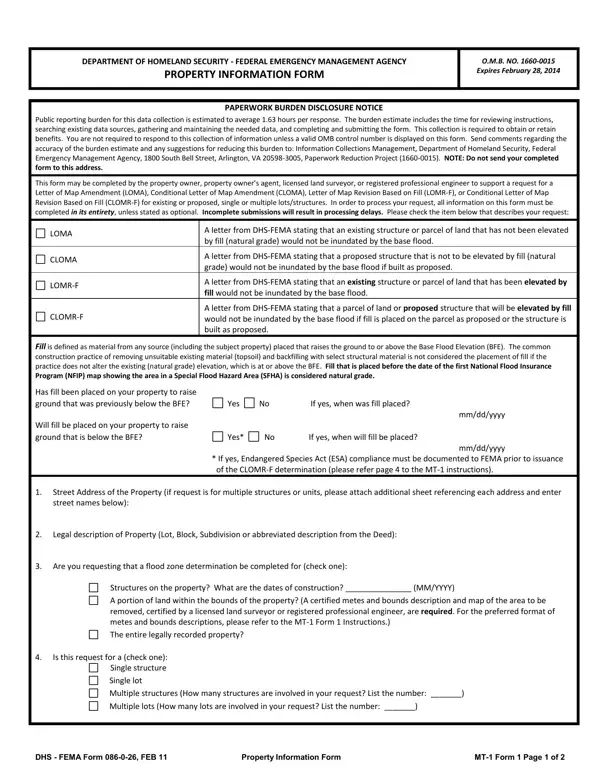
What it is: The Property Information Form of the Department of Homeland Security, Federal Emergency Management Agency, is MT-1 Form 1.
Who signs: Sign on the Signature of Applicant (required) line and enter the Date (required).
The property owner, property owner's agent, licensed land surveyor, or registered professional engineer may complete this form to support a request for a LOMA, CLOMA, LOMR-F or CLOMR-F for existing or proposed, single or multiple lots/structures; all information must be completed in its entirety, unless stated as optional, and incomplete submissions will result in processing delays. Check the item that describes your request: LOMA, CLOMA, LOMR-F or CLOMR-F.
What to bring and attach to Form MT-1
In addition to this form (MT-1 Form 1), complete the checklist; ALL requests must include one copy of the following:
Copy of the effective FIRM panel on which the structure and/or property location has been accurately plotted (property inadvertently located in the NFIP regulatory floodway will require Section B of MT-1 Form 3).
Copy of the Subdivision Plat Map for the property (with recordation data and stamp of the Recorder's Office). OR Copy of the Property Deed (with recordation data and stamp of the Recorder's Office), accompanied by a tax assessor's map or other certified map showing the surveyed location of the property relative to local streets and watercourses. The map should include at least one street intersection that is shown on the FIRM panel.
Form 2 - Elevation Form. If the request is to remove the structure, and an Elevation Certificate has already been completed for this property, it may be submitted in lieu of Form 2.
If the request is to remove the entire legally recorded property, or a portion thereof, the lowest lot elevation must be provided on Form 2.
Please include a map scale and North arrow on all maps submitted.
For LOMR-Fs and CLOMR-Fs, the following must be submitted in addition to the items listed above on page 2: Form 3 - Community Acknowledgment Form.
For CLOMR-Fs, the following must be submitted in addition to the items listed above on page 2: documented ESA compliance, which may include a copy of an Incidental Take Permit, an Incidental Take Statement, a "not likely to adversely affect" determination from the National Marine Fisheries Service (NMFS) or the U.S. Fish and Wildlife Service (USFWS), or an official letter from NMFS or USFWS concurring that the project has "No Effect" on proposed or listed species or designated critical habitat. Please refer to the MT-1 instructions for additional information.
Please do not submit original documents.
Please retain a copy of all submitted documents for your records.
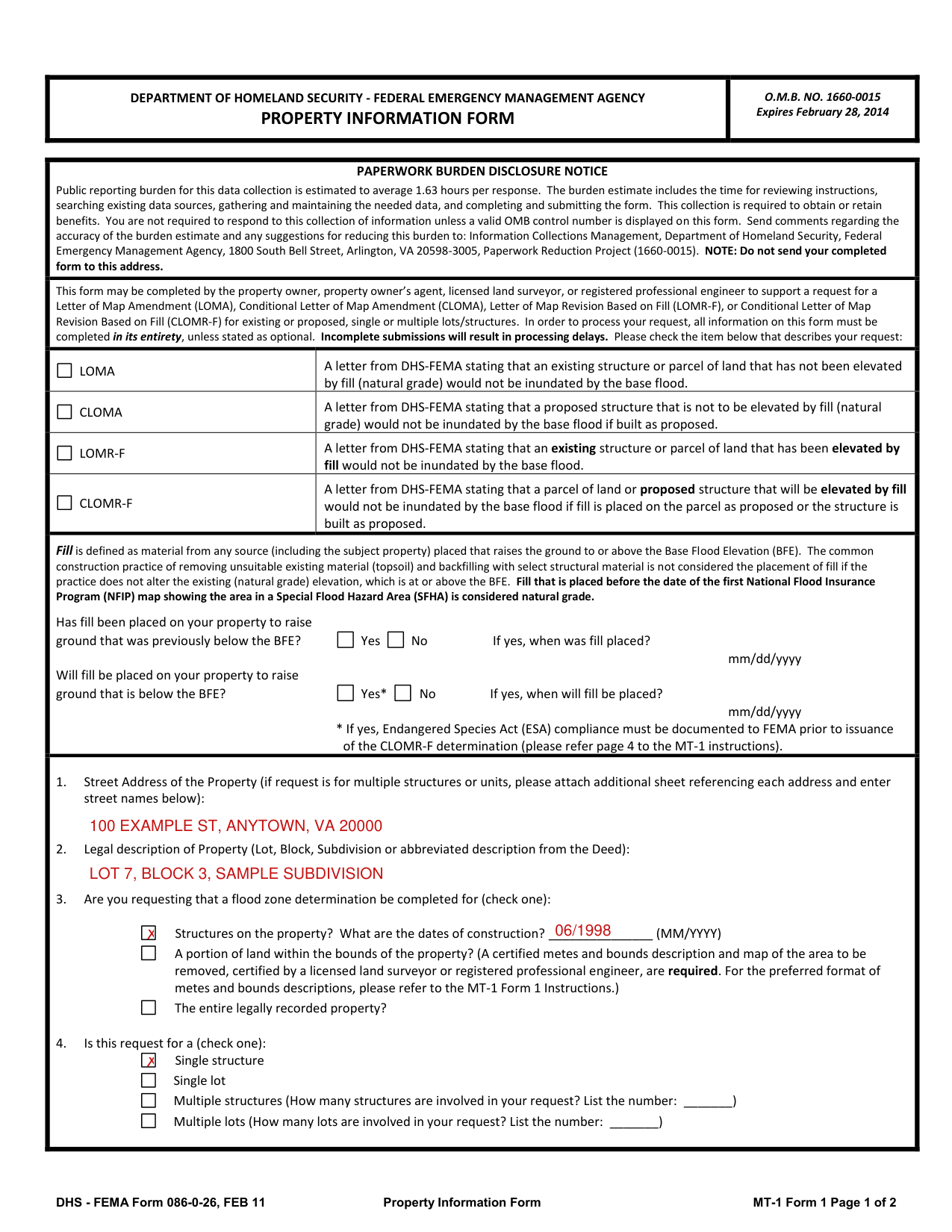
A filled-in Form MT-1 example: a homeowner requests a map amendment for one house
How to fill out Form MT-1, box by box
Fill placed on your property

Page 1: has fill been placed on your property to raise ground that was previously below the BFE? Yes or No. If yes, enter when fill was placed.
Page 1: will fill be placed on your property to raise ground that is below the BFE? Yes or No. If yes, enter when fill will be placed as mm/dd/yyyy.
If yes, Endangered Species Act (ESA) compliance must be documented to FEMA prior to issuance of the CLOMR-F determination (please refer page 4 to the MT-1 instructions).
Street address and legal description

In box 1, enter the Street Address of the Property; if the request is for multiple structures or units, attach an additional sheet referencing each address and enter street names below.
In box 2, enter the Legal description of Property (Lot, Block, Subdivision or abbreviated description from the Deed).
Zone determination for structures, a portion of land or the entire property

In box 3, check one: Structures on the property (What are the dates of construction? MM/YYYY); a portion of land within the bounds of the property, where a certified metes and bounds description and map of the area to be removed, certified by a licensed land surveyor or registered professional engineer, are required; or the entire legally recorded property.
Single or multiple structures or lots

In box 4, check one: Single structure, Single lot, Multiple structures (How many structures are involved in your request? List the number) or Multiple lots (How many lots are involved in your request? List the number).
Signature of Applicant
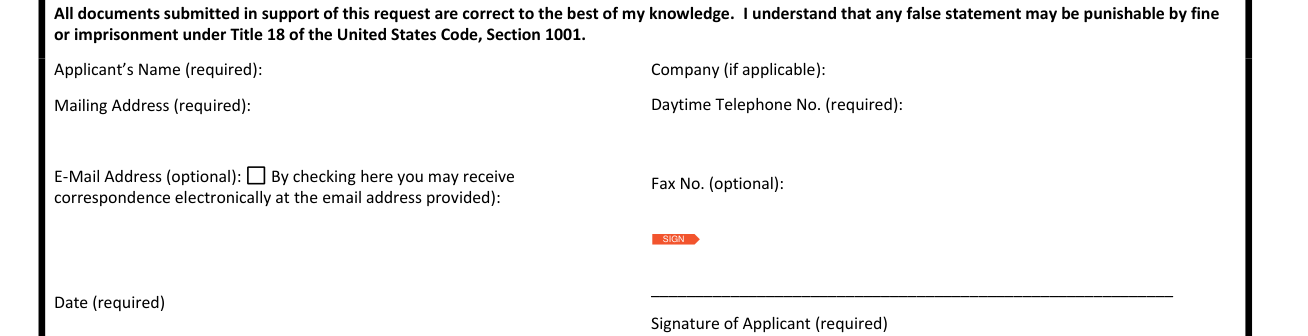
By signing, you state that all documents submitted in support of this request are correct to the best of your knowledge, and you understand that any false statement may be punishable by fine or imprisonment under Title 18 of the United States Code, Section 1001.
Enter the Name (required).
Enter the Mailing Address (required).
Enter the Daytime Telephone No. (required).
Sign on the Signature of Applicant (required) line and enter the Date (required).
Elevation Form
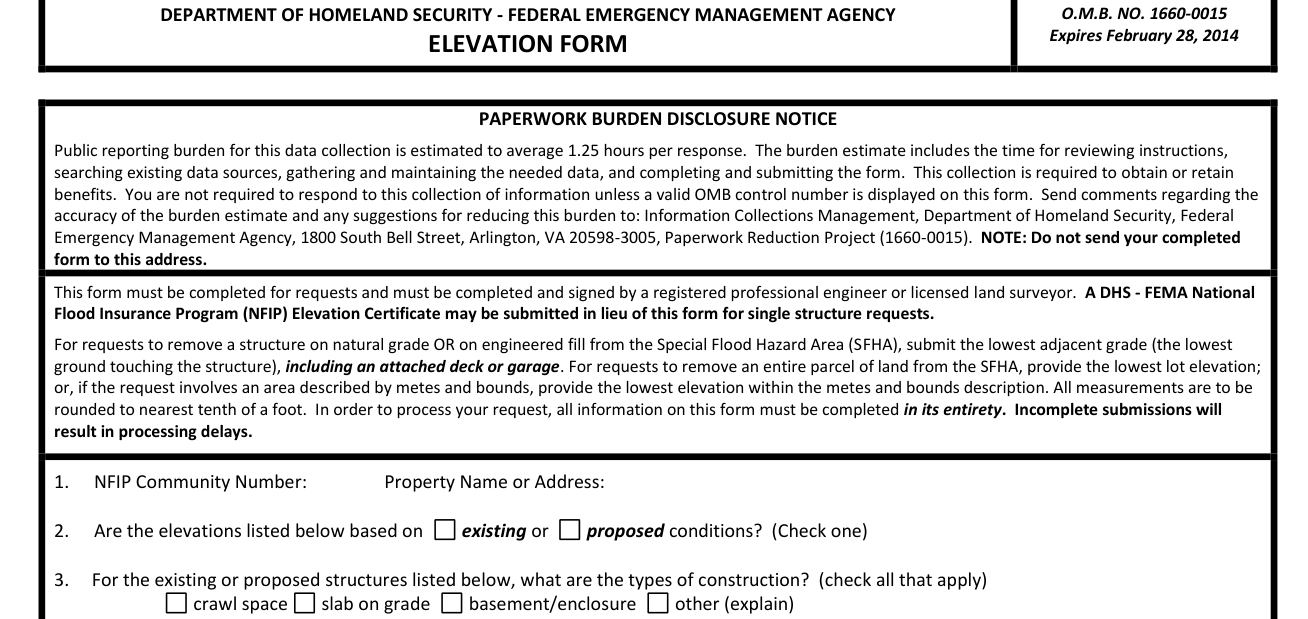
The ELEVATION FORM must be completed and signed by a registered professional engineer or licensed land surveyor.
A DHS - FEMA National Flood Insurance Program (NFIP) Elevation Certificate may be submitted in lieu of this form for single structure requests.
For requests to remove a structure on natural grade OR on engineered fill from the Special Flood Hazard Area (SFHA), submit the lowest adjacent grade (the lowest ground touching the structure), including an attached deck or garage.
For requests to remove an entire parcel of land from the SFHA, provide the lowest lot elevation; or, if the request involves an area described by metes and bounds, provide the lowest elevation within the metes and bounds description.
All measurements are to be rounded to nearest tenth of a foot.
If the Lowest Adjacent Grade to Structure is the only elevation provided, a determination will be issued for the structure only.
Community Acknowledgment Form
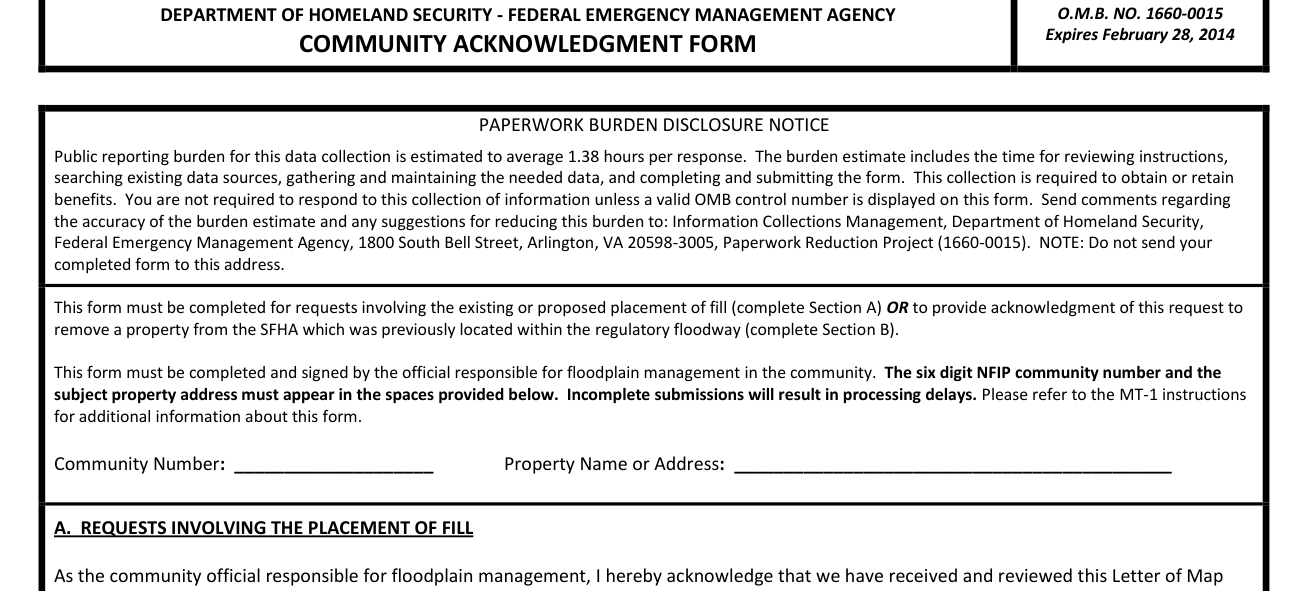
The COMMUNITY ACKNOWLEDGMENT FORM must be completed for requests involving the existing or proposed placement of fill (complete Section A) OR to provide acknowledgment of this request to remove a property from the SFHA which was previously located within the regulatory floodway (complete Section B).
The official responsible for floodplain management in the community must complete and sign it.
The six digit NFIP community number and the subject property address must appear in the spaces provided.
Payment Information Form
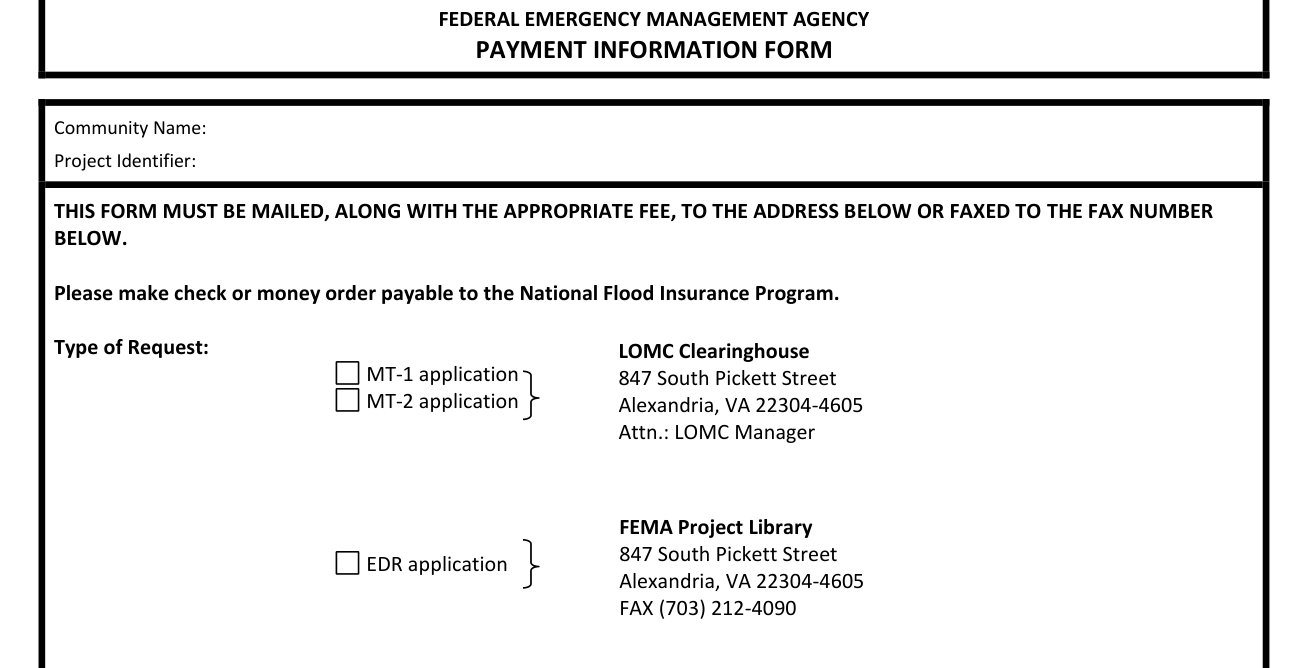
The PAYMENT INFORMATION FORM must be mailed, along with the appropriate fee, to the address on it or faxed to the fax number on it.
Check INITIAL FEE only for EDR and/or Alluvial Fan requests (as appropriate); check FEE BALANCE only if submitting a corrected fee for an ongoing request.
Complete the credit card section only if paying by credit card.
LOMA, CLOMA, LOMR-F and CLOMR-F
LOMA
LOMA: a letter from DHS-FEMA stating that an existing structure or parcel of land that has not been elevated by fill (natural grade) would not be inundated by the base flood.
CLOMA
CLOMA: a letter from DHS-FEMA stating that a proposed structure that is not to be elevated by fill (natural grade) would not be inundated by the base flood if built as proposed.
LOMR-F
LOMR-F: a letter from DHS-FEMA stating that an existing structure or parcel of land that has been elevated by fill would not be inundated by the base flood.
CLOMR-F
CLOMR-F: a letter from DHS-FEMA stating that a parcel of land or proposed structure that will be elevated by fill would not be inundated by the base flood if fill is placed on the parcel as proposed or the structure is built as proposed.
Common questions about Form MT-1
Are there fees?
Single/multiple lot(s)/structure(s) LOMAs are fee exempt. Check the fee that applies to your request: $325 (single lot/structure LOMR-F following a CLOMR-F) (checked November 1, 2026). $425 (single lot/structure LOMR-F) (checked November 1, 2026). $500 (single lot/structure CLOMA or CLOMR-F) (checked November 1, 2026). $700 (multiple lot/structure LOMR-F following a CLOMR-F, or multiple lot/structure CLOMA) (checked November 1, 2026). $800 (multiple lot/structure LOMR-F or CLOMR-F) (checked November 1, 2026). Please submit the Payment Information Form for remittance of applicable fees. Please make your check or money order payable to: National Flood Insurance Program.
Sources
[1] Form MT-1 (Rev 04/2013), Property Information Form, Federal Emergency Management Agency (the Official source link on this page).