
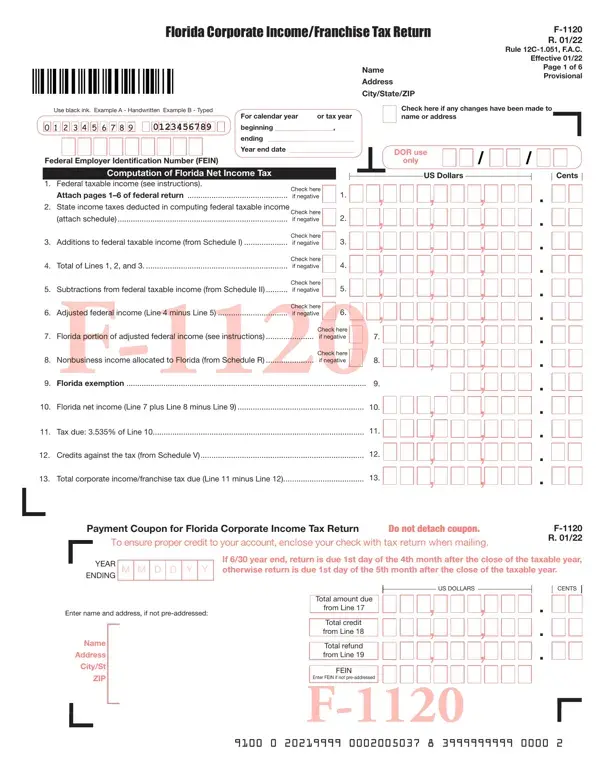
Florida Form F-1120 PDF Details

Understanding the complexities of corporate income and franchise tax obligations is critical for businesses in Florida, and the Florida Corporate Income/Franchise Tax Return F-1120 serves as a key component in fulfilling these obligations. This form, revised in January 2020 and governed by Rule 12C-1.051, F.A.C., is designed to calculate the tax due based on the Florida net income of corporations. It requires detailed information, starting with the corporation’s name, address, and Federal Employer Identification Number (FEIN), moving through the computation of Florida net income and adjustments to federal taxable income, and concluding with the determination of tax liability and available credits against the tax. The inclusion of federal taxable income, state income taxes deducted, additions and subtractions to federal taxable income, and specific allocations for nonbusiness income pertinent to Florida, are vital sections of this form. Other crucial parts include schedules for additions, subtractions, apportionment of adjusted federal income, and credits against corporate income/franchise tax. Additionally, the form requires a declaration under penalties of perjury that it has been examined for accuracy. Businesses have the responsibility to ensure that the form is correctly filled out and submitted alongside required documentation, such as a copy of the federal return and the Florida Form F-7004 if an extension was requested. Details pertaining to the corporation’s incorporation state, business activity codes as they relate to Florida, and other specifics about the company’s status and activities within and outside Florida are also requested, highlighting the comprehensive nature of this tax return form in assessing a corporation's tax responsibilities within the state.

QuestionAnswer
Form NameFlorida Form F-1120
Form Length6 pages
Fillable?Yes
Fillable fields253
Avg. time to fill out26 min 5 sec
Other namesform f 1120, 1120 form revenue, form f 1120 due date, f1120 instructions 2020

How to Edit Florida Form F-1120 Online for Free

Dealing with PDF files online can be easy using our PDF tool. You can fill out f 1120 here effortlessly. To have our editor on the leading edge of convenience, we work to implement user-oriented features and improvements on a regular basis. We are routinely looking for suggestions - help us with revolutionizing PDF editing. With a few easy steps, you'll be able to begin your PDF editing:

Step 1: Firstly, open the editor by clicking the "Get Form Button" above on this page.

Step 2: The editor will let you work with your PDF document in many different ways. Transform it by including any text, adjust what is originally in the file, and place in a signature - all within the reach of a few mouse clicks!

With regards to the blank fields of this specific document, here's what you should know:

1. It is very important fill out the f 1120 properly, therefore take care when filling in the areas that contain these blanks:

Stage number 1 in filling in f 1120 instructions

2. Just after filling out the previous part, go to the next stage and fill in all required details in all these blanks - Florida exemption, Florida net income Line plus, Tax due of Line, Credits against the tax from, Total corporate incomefranchise, Payment Coupon for Florida, Do not detach coupon, To ensure proper credit to your, F R, YEAR ENDING, DMM, D Y, If year end return is due st day, Enter name and address if not, and Name.

Filling in segment 2 in f 1120 instructions

In terms of To ensure proper credit to your and Name, ensure you review things in this current part. Both of these are thought to be the most important ones in the PDF.

3. Completing a Penalty F b Other, c Interest F d Other Line Total, Total of Lines and Payment, Tentative tax payment, Total amount due Subtract Line, due here and on payment coupon If, here and on payment coupon, Refund Enter amount of, F R Page of, If your return is not signed or, This return is considered, is properly signed and verified, Under penalties of perjury I, Sign here, and Paid preparers only is essential for the next step, make sure to fill them out in their entirety. Don't miss any details!

A way to complete f 1120 instructions step 3

4. Filling out Firms name or yours if, ZIP, State of incorporation, Florida Secretary of State, G Part of a federal consolidated, FEIN from federal consolidated, All Taxpayers Must Answer, Florida consolidated return, C D q Initial return q Final, Principal Business Activity Code, YES q NO q, Name of corporation, G The federal common parent has, Location of corporate books, and A Florida extension of time was is paramount in this fourth form section - ensure that you take the time and fill in each blank area!

Stage no. 4 for completing f 1120 instructions

5. The document has to be concluded within this section. Here you'll see a comprehensive set of blanks that need appropriate details to allow your document submission to be accomplished: Schedule I Additions andor, Interest excluded from federal, Undistributed net longterm, Net operating loss deduction, Net capital loss carryover attach, Excess charitable contribution, Employee benefit plan, Enterprise zone jobs credit, Ad valorem taxes allowable as an, Guaranty association assessments, Rural andor urban highcrime area, State housing tax credit, Florida tax credit scholarship, Florida renewable energy, and New markets tax credit.

f 1120 instructions conclusion process described (portion 5)

Step 3: Reread the information you've entered into the form fields and hit the "Done" button. Grab your f 1120 the instant you register at FormsPal for a 7-day free trial. Readily gain access to the form from your FormsPal account page, with any edits and changes being all saved! We do not share the details that you enter when filling out forms at our site.