
Form 1099 Sf PDF Details

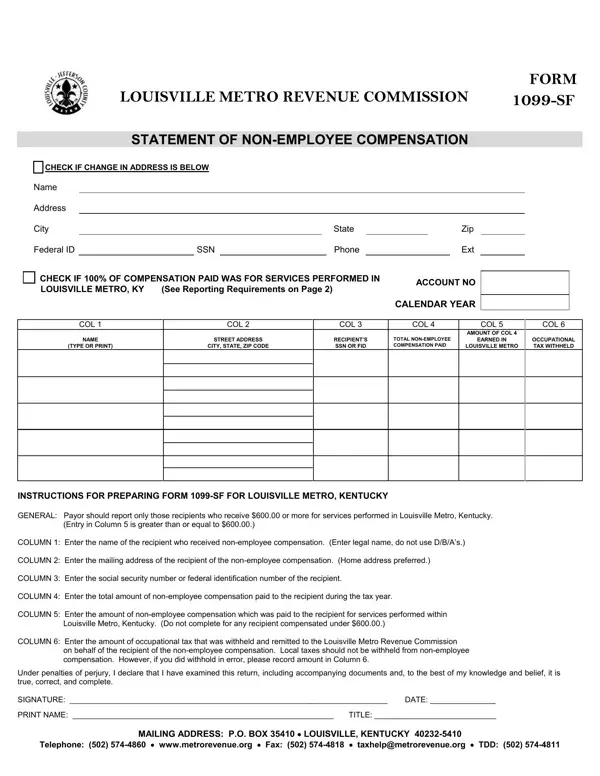
The 1099-SF form is a crucial document for reporting non-employee compensation for services performed within the Louisville Metro area in Kentucky. Specifically designed for the Louisville Metro Revenue Commission, this form addresses payments equal to or greater than $600 made to individuals who are not employees, such as independent contractors or freelancers. This form captures essential information such as the recipient's name, address, Social Security Number or Federal Identification Number, total non-employee compensation paid during the tax year, and the portion of this compensation that was earned for services rendered within Louisville Metro. Additionally, if any occupational tax was withheld, this information is noted as well. Businesses utilizing this form must submit it by February 28th of the year following the payment to comply with local tax requirements. The intention behind the 1099-SF is not only to ensure proper reporting and taxation of non-employee compensation at the local level but also to inform recipients about their tax obligations to avoid potential penalties, fines, or court costs associated with non-compliance. The form also includes a declaration section for the payor to confirm the accuracy of the information under penalties of perjury. With detailed instructions for completion and a specific focus on services performed within Louisville Metro, Kentucky, the 1099-SF form plays a significant role in local tax administration and compliance.

QuestionAnswer
Form NameForm 1099 Sf
Form Length2 pages
Fillable?No
Fillable fields0
Avg. time to fill out30 sec
Other names1099 sf form, form 1099 sf, louisville 1099 sf, 1099sf

How to Edit Form 1099 Sf Online for Free

You'll be able to fill out 1099 sf louisville ky effortlessly with our online editor for PDFs. Our tool is constantly developing to deliver the very best user experience possible, and that is because of our dedication to constant improvement and listening closely to comments from users. Starting is simple! All you have to do is take the following basic steps directly below:

Step 1: Simply hit the "Get Form Button" above on this page to access our pdf editor. This way, you'll find all that is necessary to work with your file.

Step 2: The tool will let you change PDF files in many different ways. Improve it by adding your own text, adjust original content, and include a signature - all within a few mouse clicks!

Filling out this document usually requires attention to detail. Make sure that each and every blank field is filled in properly.

1. Complete the 1099 sf louisville ky with a number of major fields. Gather all the important information and make certain nothing is neglected!

louisville metro 1099 sf completion process detailed (part 1)

2. Just after the last selection of blank fields is done, go to enter the suitable details in all these: INSTRUCTIONS FOR PREPARING FORM SF, and PRINT NAME TITLE.

PRINT NAME  TITLE, PRINT NAME  TITLE, and PRINT NAME  TITLE of louisville metro 1099 sf

When it comes to PRINT NAME TITLE and PRINT NAME TITLE, make sure that you review things in this current part. These two could be the most significant fields in the document.

Step 3: Just after rereading the fields you have filled out, click "Done" and you are done and dusted! Download your 1099 sf louisville ky the instant you register here for a 7-day free trial. Immediately use the pdf form in your FormsPal account, together with any edits and changes automatically saved! FormsPal guarantees your data confidentiality by using a secure system that never saves or shares any kind of personal information used. Feel safe knowing your files are kept safe each time you use our service!