
Form 2433 PDF Details

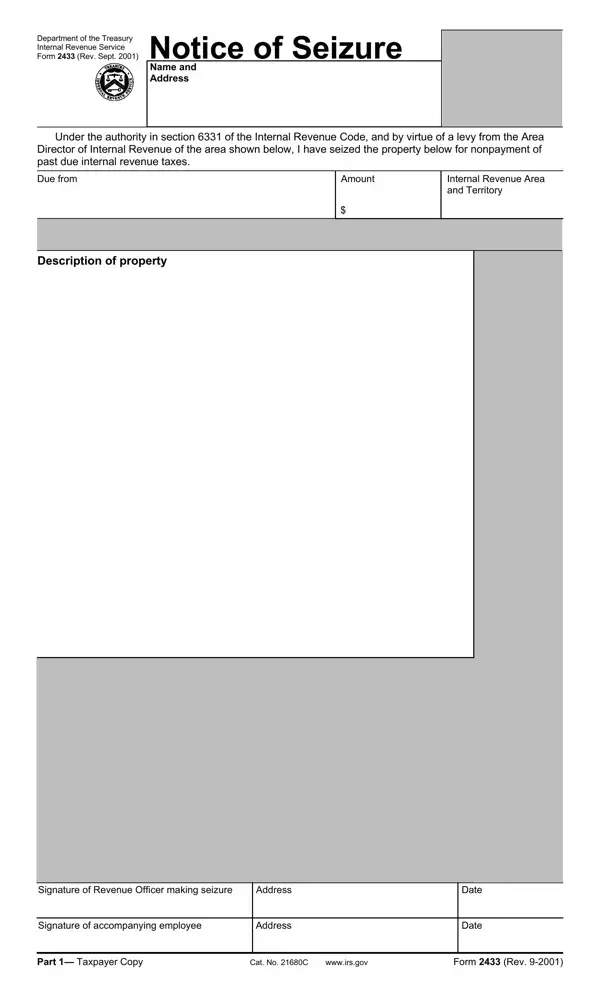
When the Department of the Treasury's Internal Revenue Service (IRS) exercises its power to seize property due to nonpayment of taxes, it follows a strict procedure detailed in the Form 2433, known as the Notice of Seizure. Revised in September 2001, this document serves a critical function in the IRS's collection processes, encapsulating the authority granted under sections 6331 and 6343 of the Internal Revenue Code. This form meticulously records the details of the seized property, the owed amounts, and the internal revenue area involved. It requires signatures from the revenue officer making the seizure and any accompanying IRS employee, ensuring a formal record of the action. Furthermore, the form is divided into multiple parts, including copies designated for the taxpayer, a third party, and a file copy which contains additional specifics like the release of levy and a receipt for property returned. This not only facilitates clarity and transparency between the taxpayer and the IRS but also outlines the framework for potentially releasing the levy on the seized property, should conditions permit. The form underscores the IRS's authority to levy or proceed in court within ten years after the tax assessment, emphasizing a critical timeframe for collection after the assessment of any tax imposed. Form 2433 embodies the bureaucratic and legalistic nature of tax collection, serving as a stark notice to taxpayers about the serious consequences of tax delinquency, while providing a pathway for resolution post-seizure.

QuestionAnswer
Form NameForm 2433
Form Length10 pages
Fillable?No
Fillable fields0
Avg. time to fill out2 min 30 sec
Other nameshow to form notice seizure, customs seizure notice, notice seizure form, us customs and border protection seizure letter

How to Edit Form 2433 Online for Free

With the online PDF editor by FormsPal, you are able to fill out or alter notice of seizure and information to claimants non cafra form right here. In order to make our tool better and less complicated to work with, we constantly work on new features, with our users' feedback in mind. Starting is simple! Everything you should do is follow these easy steps directly below:

Step 1: Just click the "Get Form Button" in the top section of this site to open our pdf form editing tool. Here you'll find all that is necessary to work with your document.

Step 2: As you start the file editor, you'll notice the form prepared to be completed. Aside from filling in various blank fields, it's also possible to do some other actions with the file, namely putting on custom text, changing the original textual content, inserting graphics, signing the form, and a lot more.

It really is simple to fill out the document using out helpful tutorial! Here's what you should do:

1. It is critical to complete the notice of seizure and information to claimants non cafra form correctly, so be careful while working with the segments including all these blank fields:

Guidelines on how to fill in customs seizure list portion 1

2. After this section is completed, you're ready to add the needed details in Signature of Revenue Officer, Address, Signature of accompanying employee, Address, Date, Date, Part cid Taxpayer Copy, Cat No C wwwirsgov, and Form Rev so that you can move on to the next part.

Part # 2 of filling out customs seizure list

3. Completing Name and Address, Under the authority in section of, Due from, Description of property, Amount, and Internal Revenue Area and Territory is essential for the next step, make sure to fill them out in their entirety. Don't miss any details!

Step no. 3 in completing customs seizure list

4. The form's fourth section comes with the following fields to consider: Signature of Revenue Officer, Address, Signature of accompanying employee, Address, Date, Date, Part cid Third Party Copy, Cat No C wwwirsgov, and Form Rev.

Stage # 4 of filling out customs seizure list

5. Because you come near to the finalization of this form, there are actually just a few more requirements that have to be met. Notably, Name and Address, On certain property or rights, belonging to the taxpayer named, Account of, and Under section of the Internal must all be filled out.

The right way to prepare customs seizure list portion 5

As to belonging to the taxpayer named and Under section of the Internal, be sure that you get them right here. Both of these are definitely the most significant fields in the file.

Step 3: When you've reread the details provided, press "Done" to conclude your form at FormsPal. After getting afree trial account at FormsPal, it will be possible to download notice of seizure and information to claimants non cafra form or send it via email right off. The file will also be available via your personal account page with all your modifications. At FormsPal, we strive to be certain that your information is stored protected.