
Form 2480 PDF Details

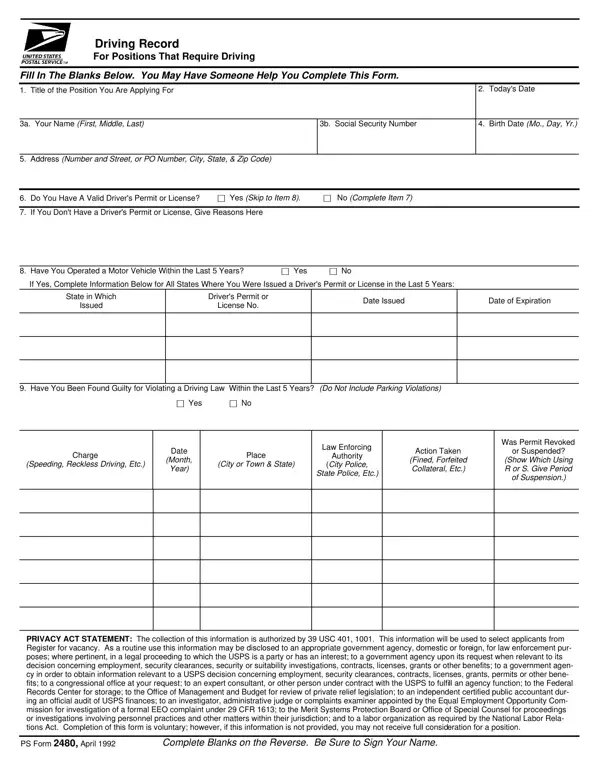
Understanding the complexities and requirements of the 2480 form is crucial for individuals seeking positions that necessitate driving responsibilities. This form serves as a detailed record of an applicant's driving history, including the validity of their driver's license, any traffic violations, and involvement in motor vehicle accidents within a specified timeframe. Applicants are prompted to provide personal information, including their name, social security number, date of birth, and contact details, ensuring a comprehensive background check can be conducted. The inclusion of a privacy act statement highlights the legal basis for the collection of this information and outlines how it may be used or disclosed, emphasizing the importance of accuracy and honesty in completing the form. Notably, the form also includes provisions for describing motor vehicle accidents, asking for details about the incident, damages incurred, and any legal judgments, with the option to use additional sheets if the incidents exceed three. The requirement for applicants to certify the truthfulness of their statements underscores the form's role in making informed decisions for positions requiring driving, making it a critical step in the application process for such roles.

QuestionAnswer
Form NameForm 2480
Form Length2 pages
Fillable?No
Fillable fields0
Avg. time to fill out30 sec
Other namesgsa form 2480, how to usps driving record, ps forms printable, irs form 2480

How to Edit Form 2480 Online for Free

Any time you intend to fill out ps forms sample, there's no need to install any kind of programs - simply try our online PDF editor. The editor is constantly maintained by our staff, acquiring useful features and growing to be greater. It merely requires a few basic steps:

Step 1: Press the "Get Form" button above. It is going to open our tool so you could begin filling in your form.

Step 2: With our state-of-the-art PDF file editor, it is easy to do more than simply fill out forms. Express yourself and make your docs appear professional with custom text incorporated, or fine-tune the file's original input to perfection - all comes with the capability to insert your own photos and sign the document off.

This form requires some specific information; in order to ensure consistency, please be sure to adhere to the subsequent guidelines:

1. The ps forms sample needs specific information to be inserted. Be sure that the following blanks are complete:

Simple tips to fill out ps forms printable portion 1

2. Once your current task is complete, take the next step – fill out all of these fields - Have You Been Found Guilty for, Yes, Charge, Speeding Reckless Driving Etc, Date, Month Year, Place, City or Town State, Law Enforcing, Authority, City Police, State Police Etc, Action Taken, Fined Forfeited Collateral Etc, and Was Permit Revoked with their corresponding information. Make sure to double check that everything has been entered correctly before continuing!

Stage number 2 in filling out ps forms printable

3. Completing Place City or Town State, Describe How the Accident Happened, Date of Accident, Amount of Damage to Your Vehicle, Amount of Damage to Other Partys, Did You or Your Insurance Company, Was Anyone Killed, Yes, Were You Judged at Fault, Yes, Give the Name of the Court or, Place City or Town State, Describe How the Accident Happened, Accident No, and Date of Accident is essential for the next step, make sure to fill them out in their entirety. Don't miss any details!

The best way to complete ps forms printable part 3

4. The next part will require your involvement in the following areas: Amount of Damage to Your Vehicle, Amount of Damage to Other Partys, Did You or Your Insurance Company, Was Anyone Killed, Yes, Were You Judged at Fault, Yes, Give the Name of the Court or, Place City or Town State, Describe How the Accident Happened, Accident No, Date of Accident, Amount of Damage to Your Vehicle, Amount of Damage to Other Partys, and Did You or Your Insurance Company. Make sure that you fill out all of the requested information to go forward.

The right way to fill in ps forms printable portion 4

Always be really mindful while completing Accident No and Describe How the Accident Happened, because this is where a lot of people make mistakes.

5. Since you draw near to the end of your form, you'll find just a few more requirements that need to be met. Mainly, Signature of Applicant, Date, and PS Form April Reverse must be filled out.

PS Form  April  Reverse, Signature of Applicant, and Date in ps forms printable

Step 3: Before moving on, ensure that blank fields were filled in the right way. As soon as you believe it's all fine, press “Done." Create a free trial subscription with us and get direct access to ps forms sample - which you can then make use of as you wish inside your FormsPal cabinet. With FormsPal, you can easily complete forms without worrying about personal information breaches or records being distributed. Our secure software ensures that your private information is maintained safely.