
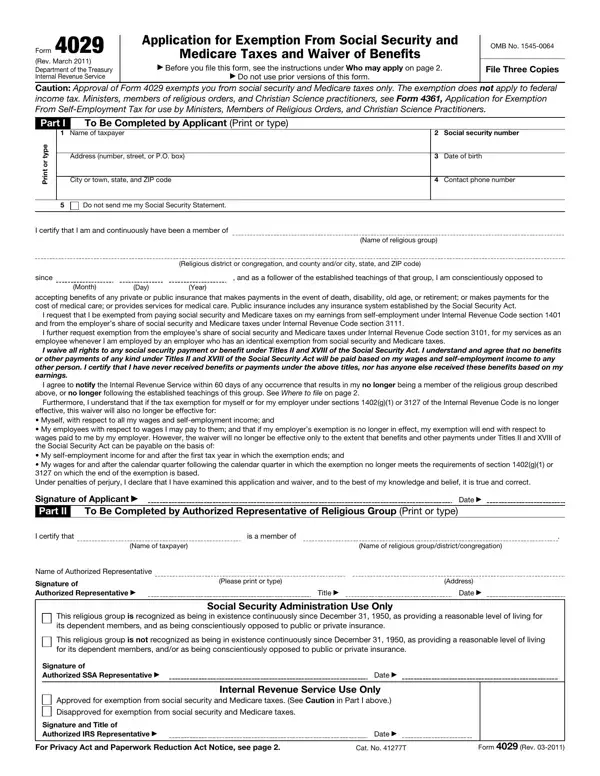
The exemption is for individuals and partnerships (when all the partners have approved certification).
Caution: approval of Form 4029 exempts you from social security and Medicare taxes only. The exemption does not apply to federal income tax.
Not eligible: You are not eligible if you received social security benefits or payments, or if anyone else received them based on your wages or self-employment income.
Paid back benefits: you can file Form 4029 and be considered for approval if you paid back any benefits you received.
Who may apply: you may apply for this exemption if you are a member of, and follow the teachings of, a recognized religious group.
Where to send: send the original and two copies of Form 4029 to the Social Security Administration Security Records Branch.
| Question | Answer |
|---|---|
| Form Name | Form 4029 |
| Form Length | 2 pages |
| Fillable? | Yes |
| Fillable fields | 20 |
| Avg. time to fill out | 4 min |
| Edition | November 2018 |
| Issuing agency | Department of the Treasury, Internal Revenue Service |
| Where to send | Social Security Administration Security Records Branch |
| Who signs | The applicant and an authorized representative of the religious group |
| Matches the agency's file | Yes, checked October 1, 2026 |
| Other names | Form 4029, IRS Form 4029, IRS 4029, 4029, 4029 form, Application for Exemption From Social Security and Medicare Taxes and Waiver of Benefits |
| Official source | Form 4029 (Rev November 2018), Department of the Treasury, Internal Revenue Service |
Form 4029 isn’t the one you’re looking for?