
Form 8834 PDF Details

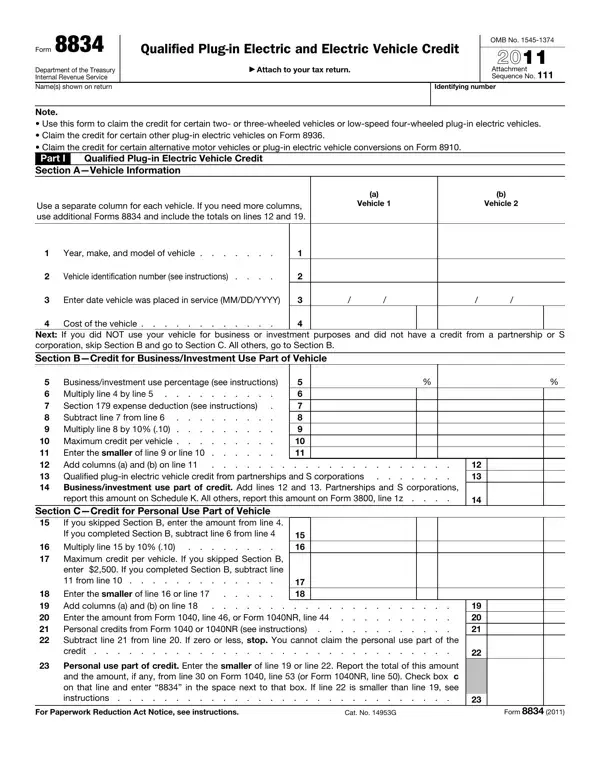
The 8834 form, as specified by the Department of the Treasury and the Internal Revenue Service, plays a crucial role in the promotion and adoption of plug-in electric and electric vehicles by providing tax credits to eligible individuals. This form is designed to be attached to the taxpayer's return, and it caters to various types of electric vehicles, including two- or three-wheeled vehicles and low-speed four-wheeled plug-in electric vehicles. Notably, the form outlines that the credit for other types of plug-in electric vehicles should be claimed on Form 8936, and conversions or alternative motor vehicles on Form 8910, thereby distinguishing the types of vehicles and credits applicable. It consists of multiple sections requiring detailed vehicle information and calculations to determine the credit amount for both personal and business/investment use parts of the vehicle. The form also addresses credits from previous years under specific conditions, emphasizing its comprehensive approach to facilitating electric vehicle ownership. Additionally, it includes provisions for basis reduction unless an exemption is elected, highlighting potential tax implications. The form’s significance is further underscored by its eligibility criteria, emphasizing the stringent requirements vehicles must meet to qualify. As changes to tax laws and credits occur, the documentation and instructions provided with Form 8834 remain an essential resource for taxpayers and professionals navigating the incentives for electric vehicle ownership.

QuestionAnswer
Form NameForm 8834
Form Length4 pages
Fillable?No
Fillable fields0
Avg. time to fill out1 min
Other names8582-CR, irs form 8834, site:unclefed.com/IRS-Forms/, pdf

How to Edit Form 8834 Online for Free

Any time you wish to fill out 26d, you won't need to install any sort of programs - simply use our online tool. In order to make our tool better and simpler to work with, we constantly work on new features, with our users' feedback in mind. It merely requires a few basic steps:

Step 1: Just hit the "Get Form Button" at the top of this site to open our pdf form editor. This way, you'll find all that is required to work with your file.

Step 2: When you access the PDF editor, you will see the form made ready to be completed. Besides filling in various blank fields, you can also do several other actions with the form, specifically writing your own textual content, changing the initial textual content, adding illustrations or photos, placing your signature to the document, and more.

As for the blank fields of this specific form, here's what you should consider:

1. The 26d will require particular details to be entered. Be sure the subsequent blank fields are complete:

The best ways to fill in 26b portion 1

2. Right after filling out this part, go to the subsequent step and complete all required particulars in all these blank fields - Businessinvestment use percentage, Section expense deduction see, Multiply line by line, Enter the smaller of line or, report this amount on Schedule K, Section CCredit for Personal Use, If you skipped Section B enter the, Multiply line by, Maximum credit per vehicle If you, Enter the smaller of line or line, and Personal use part of credit Enter.

Filling in segment 2 of 26b

3. The next part is easy - complete all of the fields in Personal use part of credit Enter, For Paperwork Reduction Act Notice, Cat No G, and Form to complete the current step.

Cat No G, For Paperwork Reduction Act Notice, and Personal use part of credit Enter in 26b

You can potentially get it wrong when completing your Cat No G, so ensure that you reread it before you decide to finalize the form.

4. Your next section requires your information in the following places: Part II Caution This part only, Qualified electric vehicle passive, Regular tax before credits, applicable line of your return, Estates and trusts Enter the sum, lines a and b or the amount from, Credits that reduce regular tax, a Foreign tax credit b Personal, a b c, Net regular tax Subtract line d, unless you are claiming the, Tentative minimum tax Individuals, Estates and trusts Enter the, and Subtract line from line If zero. Make certain you fill in all needed info to move onward.

Filling in segment 4 in 26b

5. This last point to submit this form is essential. Make certain to fill in the required blank fields, such as Subtract line from line If zero, Qualified electric vehicle credit, Whats New The qualified plugin, General Instructions Section, Purpose of Form Use Form to claim, The qualified plugin electric, depreciable property vehicles used, Qualified Plugin Electric Vehicle, Qualified Plugin Electric Vehicle, This is a vehicle made by a, kilowatt hours if the vehicle, kilowatt hours if the vehicle, The vehicle must also be either, A low speed vehicle or, and A vehicle with or wheels that, before using the file. Neglecting to do it might lead to an incomplete and possibly incorrect paper!

26b completion process described (step 5)

Step 3: Before obtaining the next step, check that all blanks are filled out the right way. As soon as you establish that it is correct, click “Done." Get the 26d when you register here for a 7-day free trial. Readily gain access to the pdf document within your FormsPal account, along with any edits and adjustments automatically synced! FormsPal guarantees your information confidentiality via a protected method that never saves or shares any sort of private information used in the PDF. Feel safe knowing your paperwork are kept protected whenever you use our tools!