
Form Cg 4700 PDF Details

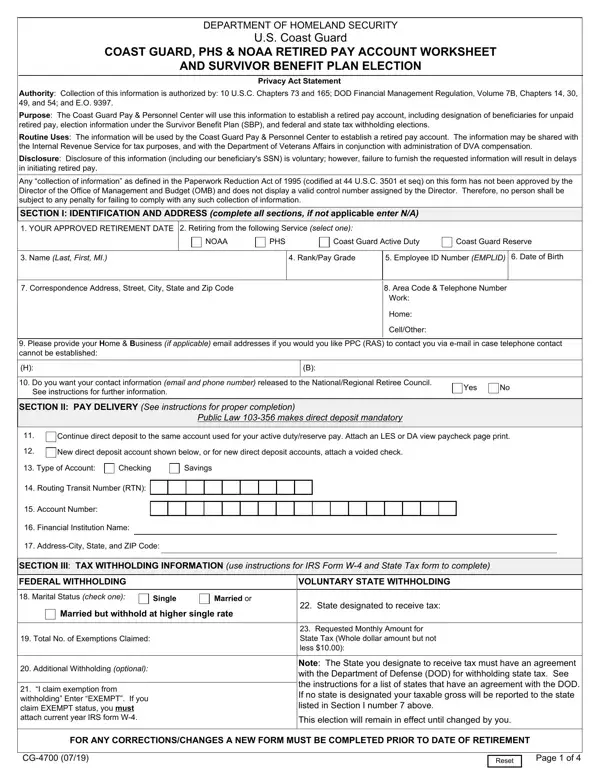
Embarking on the journey of retirement from esteemed positions within the U.S. Coast Guard, Public Health Service (PHS), or the National Oceanic and Atmospheric Administration (NOAA) marks a significant milestone. It's a time filled with anticipation for the next chapter and the importance of ensuring financial stability cannot be overstated. Crucial in this process is understanding and completing the CG 4700 form. This document serves as the cornerstone for establishing a retired pay account for service members transitioning to civilian life. It meticulously outlines the necessary steps for designating beneficiaries for unpaid retired pay, making essential elections under the Survivor Benefit Plan (SBP), and setting up federal and state tax withholdings. Additionally, the form addresses the direct deposit requirements for retired pay, a move that streamlines the transition by ensuring financial operations continue smoothly post-retirement. Disclosure of this information plays a pivotal role, not just for streamlining the initiation of retired pay but also for aiding the Coast Guard Pay & Personnel Center in efficiently managing retiree accounts. Perhaps one of the most crucial aspects underscored by the CG 4700 form is the attention to beneficiary designations and tax withholding preferences, reflecting a deep understanding of the complexities surrounding retirement benefits and the importance of preemptive planning for the financial well-being of retirees and their loved ones.

QuestionAnswer
Form NameForm Cg 4700
Form Length4 pages
Fillable?No
Fillable fields0
Avg. time to fill out1 min
Other namescoast retirement form, how to form 4700, cg 4700, form 4700 pdf

How to Edit Form Cg 4700 Online for Free

You are able to complete cg 4700 effectively in our PDFinity® online tool. In order to make our editor better and easier to utilize, we constantly work on new features, with our users' feedback in mind. With just several simple steps, you can begin your PDF journey:

Step 1: Access the PDF doc in our tool by pressing the "Get Form Button" in the top part of this webpage.

Step 2: As soon as you start the online editor, you'll notice the document all set to be filled in. In addition to filling out various blanks, you could also perform several other actions with the PDF, including adding custom textual content, modifying the original text, inserting illustrations or photos, placing your signature to the document, and more.

In order to fill out this document, be sure you provide the right details in each and every blank:

1. You have to complete the cg 4700 accurately, so be careful when filling in the areas containing all of these fields:

Stage # 1 in filling in dhs form cg 4700

2. Once your current task is complete, take the next step – fill out all of these fields - Routing Transit Number RTN, Account Number, Financial Institution Name, AddressCity State and ZIP Code, SECTION III TAX WITHHOLDING, FEDERAL WITHHOLDING, VOLUNTARY STATE WITHHOLDING, Marital Status check one, Single, Married or, Married but withhold at higher, Total No of Exemptions Claimed, Additional Withholding optional, I claim exemption from, and State designated to receive tax with their corresponding information. Make sure to double check that everything has been entered correctly before continuing!

dhs form cg 4700 conclusion process outlined (part 2)

3. Within this step, check out Including Area Code, Social Security Number, Social Security Number, Social Security Number, Social Security Number, Date of Birth, Date of Birth, Date of Birth, Date of Birth, SECTION V CERTIFICATION DATA FOR, have not, have, and been convicted of any offense. Every one of these will have to be taken care of with highest precision.

Social Security Number, Social Security Number, and have not of dhs form cg 4700

4. This next section requires some additional information. Ensure you complete all the necessary fields - have, I connection with any matter, failed or refused to testify, have not, have not, have, knowingly or willfully remained, have, I material fact in an employment, knowingly or willfully made a, have not, am not, I foreign government nor have I, employed by any foreign government, and am not - to proceed further in your process!

Step number 4 in filling in dhs form cg 4700

5. The final point to conclude this form is integral. Make sure you fill out the necessary fields, consisting of Monthly Amount, Name and Address Street City State, FOR ANY CORRECTIONSCHANGES A NEW, Reset, and Page of, prior to using the document. Or else, it can generate a flawed and possibly incorrect paper!

Page  of, Monthly Amount, and FOR ANY CORRECTIONSCHANGES A NEW of dhs form cg 4700

Regarding Page of and Monthly Amount, make sure that you do everything right in this section. These two are considered the most significant ones in the page.

Step 3: Ensure that the details are accurate and just click "Done" to continue further. Go for a free trial subscription with us and gain direct access to cg 4700 - readily available from your personal account page. Here at FormsPal, we endeavor to make sure all of your information is kept private.