

HSMV 82002 at a glance
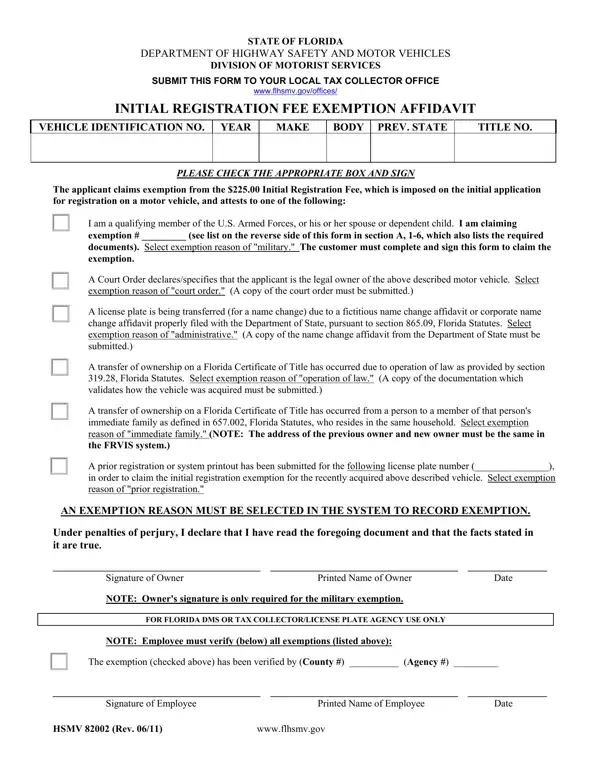
What it is: HSMV 82002 is the Florida Department of Highway Safety and Motor Vehicles Initial Registration Fee Exemption Affidavit.
Where and when to file: Submit this form to your local tax collector office or license plate agency.
The customer must complete and sign this form to claim the exemption.
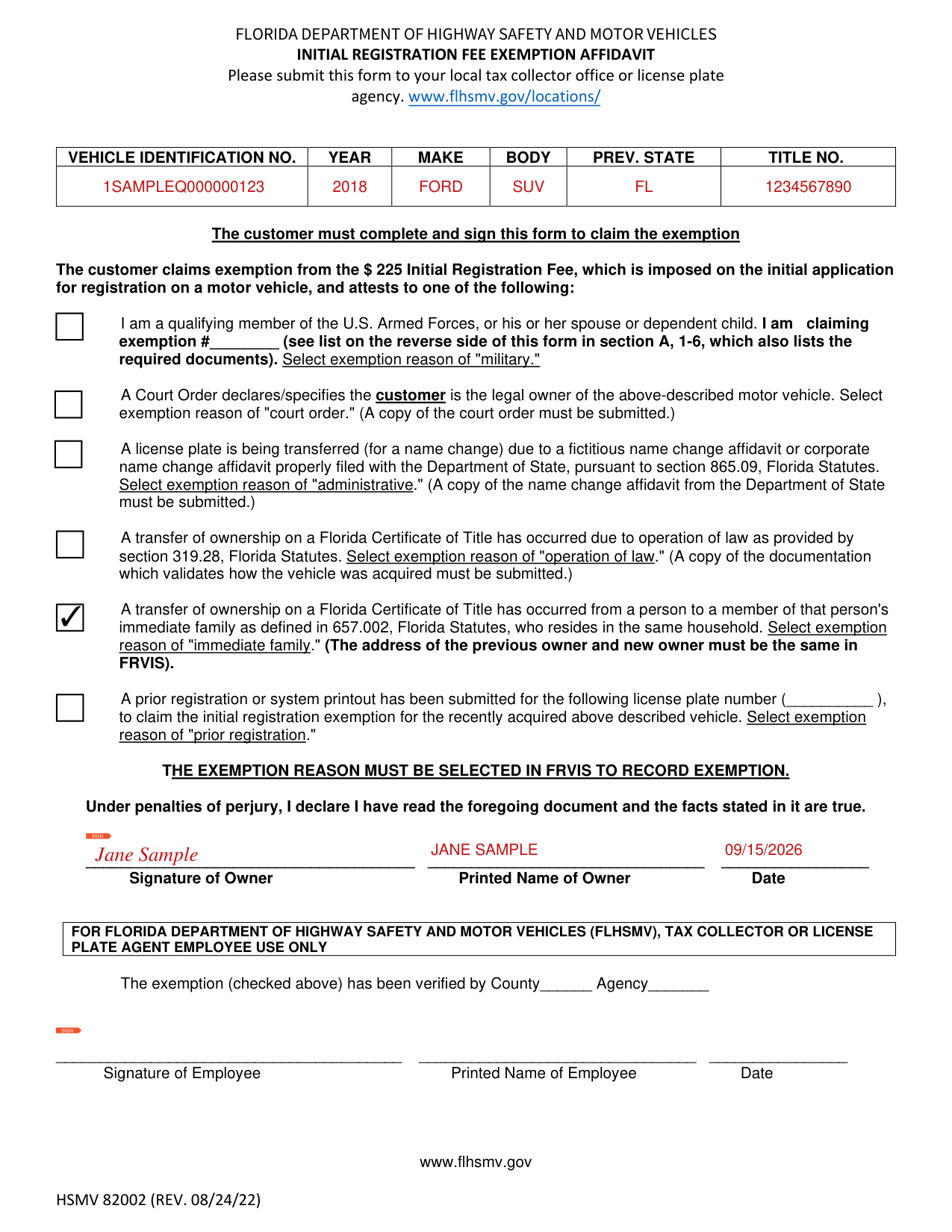
A filled-in HSMV 82002 example: an immediate family transfer
How to fill out HSMV 82002, box by box
Vehicle identification no., year, make, body, prev. state and title no.
Enter the VEHICLE IDENTIFICATION NO., YEAR, MAKE, BODY, PREV. STATE and TITLE NO.
Exemption reason
The exemption reason must be selected in FRVIS to record the exemption.
Military: the customer is a qualifying member of the U.S. Armed Forces, or his or her spouse or dependent child; claim exemption # from the list in section A, 1-6, which also lists the required documents, and select exemption reason of "military."
Court order: a Court Order declares/specifies the customer is the legal owner of the motor vehicle described on this form; a copy of the court order must be submitted; select exemption reason of "court order."
Administrative: a license plate is being transferred (for a name change) due to a fictitious name change affidavit or corporate name change affidavit properly filed with the Department of State, pursuant to section 865.09, Florida Statutes; a copy of the name change affidavit from the Department of State must be submitted; select exemption reason of "administrative."
Operation of law: a transfer of ownership on a Florida Certificate of Title has occurred due to operation of law as provided by section 319.28, Florida Statutes; a copy of the documentation which validates how the vehicle was acquired must be submitted; select exemption reason of "operation of law."
Immediate family: a transfer of ownership on a Florida Certificate of Title has occurred from a person to a member of that person's immediate family as defined in 657.002, Florida Statutes, who resides in the same household; the address of the previous owner and new owner must be the same in FRVIS; select exemption reason of "immediate family."
Prior registration: write the license plate number for which a prior registration or system printout has been submitted, to claim the initial registration exemption for the recently acquired vehicle described on this form; select exemption reason of "prior registration."
Qualifying member of the U.S. Armed Forces
A member of the U.S. Armed Forces (includes Navy, Army, Marines, Coast Guard, Space Force, and Air Force), or his or her spouse or dependent child, who is not a Florida resident and is stationed in the state of Florida on military orders. Submit a copy of your military orders and out of state driver license.
A member of the U.S. Armed Forces, or his or her spouse or dependent child, who is/was not a Florida resident and is stationed in the state of Florida on military orders and is now becoming a resident of Florida. Submit a copy of your Florida driver license and military orders.
A former member of the U.S. Armed Forces, or his or her spouse or dependent child. The customer purchased this motor vehicle while stationed outside Florida and was not dishonorably discharged nor discharged for bad conduct. The customer was a resident of Florida at the time of enlistment and discharge and continues to be a resident of Florida. The customer is applying for registration within 6 months after discharge. Submit a copy of your Discharge Order (DD214) and Florida driver license.
A member of the U.S. Armed Forces, or his or her spouse or dependent child, who was a resident of Florida at the time of enlistment and continues to be a resident of Florida. The customer purchased a motor vehicle while stationed outside of Florida and has been reassigned by military orders to this state. Submit a copy of your military orders and Florida driver license.
The customer purchased a motor vehicle while stationed outside of Florida and continues to be stationed outside of Florida. The member, spouse or dependent child and the copy to submit are the same.
A resident of Florida and a spouse or dependent child of a member of the U.S. Armed Forces, who lost his/her life (submit proof of military death notification) or is listed as "Missing in Action" (MIA) (submit proof of MIA status). The member of the U.S. Armed Forces must have been a resident of Florida at the time of enlistment. Registration must occur within one (1) year of notification of death or MIA status.
This form should not be used when
The U.S. Armed Forces member is not a resident of Florida AND is not assigned by military orders to the state of Florida.
The U.S. Armed Forces member is dishonorably discharged or discharged for bad conduct.
You are a member of a uniformed service, but not the U.S. Armed Forces.
Signature of Owner
Under penalties of perjury, I declare I have read this document and the facts stated in it are true: enter the Signature of Owner, Printed Name of Owner and Date.
Employee use only
Employee use only: the exemption has been verified by County and Agency; enter the Signature of Employee, Printed Name of Employee and Date.
Common questions about HSMV 82002
Where do I file it?
Submit this form to your local tax collector office or license plate agency.
Are there fees?
The customer claims exemption from the $225 Initial Registration Fee, which is imposed on the initial application for registration on a motor vehicle (checked October 20, 2026).
Sources
[1] HSMV 82002 (REV. 08/24/22), Florida Department of Highway Safety and Motor Vehicles (the Official source link on this page).