
Form IT-204-IP PDF Details

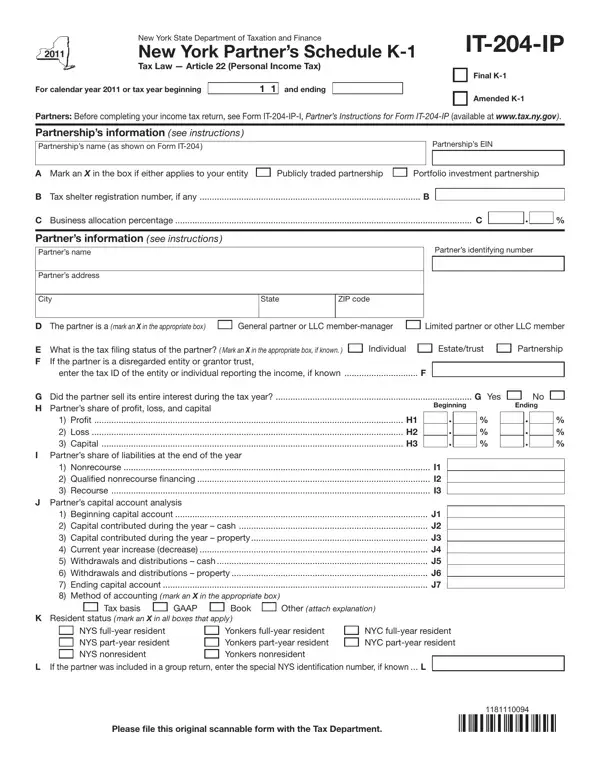
When partners in New York navigate their tax obligations, they must familiarize themselves with the IT-204-IP form, a crucial document laying out a partner's share of income, deductions, and credits from a partnership. Crafted by the New York State Department of Taxation and Finance, this form serves as the New York Partner’s Schedule K-1 under Tax Law Article 22, which covers Personal Income Tax. It's designed for use within the specific tax year it's issued for, in this case, the 2011 calendar year or a fiscal year that begins and ends in 2011. The form requires detailed information, including the partnership's name and Employer Identification Number (EIN), the partner’s identification and share of profits, losses, and capital, as well as their share of liabilities and capital account analysis. Additionally, it dives into intricate details such as the partner's resident status, estimated taxes paid on their behalf, and a thorough breakdown of their distributive share items and New York modifications. To guide partners through this maze of information, instructions and further details are provided by Form IT-204-IP-I. This step is critical before a partner can accurately complete their income tax return, emphasizing the form's role in ensuring that all information related to a partnership’s income, deductions, credits, and taxes paid is accurately reported and processed by the state tax department.

QuestionAnswer
Form Name Form It 204 Ip
Form Length 4 pages
Fillable? No
Fillable fields 0
Avg. time to fill out 1 min
Other names EZ, 2011, IT-204-IP, nyc 204 instructions 2017

How to Edit Form IT-204-IP Online for Free

When you intend to fill out EZ, it's not necessary to download and install any sort of applications - just give a try to our PDF tool. In order to make our editor better and easier to use, we constantly implement new features, bearing in mind suggestions coming from our users. Here's what you'd want to do to get started:

Step 1: Firstly, open the pdf editor by clicking the "Get Form Button" above on this site.

Step 2: With our online PDF tool, you're able to do more than merely fill in blank fields. Edit away and make your docs seem perfect with custom text added, or tweak the original input to excellence - all backed up by an ability to add your personal images and sign the file off.

With regards to the fields of this particular document, here is what you need to know:

1. Begin filling out the EZ with a group of essential blanks. Note all the necessary information and be sure nothing is neglected!

Filling out part 1 in K-1

2. The third step is usually to complete the following blank fields: Beginning, Proit H Loss H Capital H, Nonrecourse I Qualiied, G Did the partner sell its entire, Beginning capital account J, Ending, K Resident status mark an X in, Tax basis, GAAP, Book, Other attach explanation, NYS fullyear resident NYS partyear, Yonkers fullyear resident Yonkers, NYC fullyear resident NYC partyear, and If the partner was included in a.

Filling out segment 2 of K-1

3. This 3rd step is generally pretty easy, Page of, ITIP, M Was Form ITE iled with the, No No, N NYS estimated tax paid on behalf, First installment N Second, Date, Amount, Total NYS estimated tax paid on, O Estimated MCTMT paid on behalf, First installment O Second, Date, Amount, Total estimated MCTMT paid on, and Partners share of income - all of these empty fields will have to be completed here.

First installment  N  Second, Total NYS estimated tax paid on, and N NYS estimated tax paid on behalf inside K-1

4. This subsection comes with these particular empty form fields to fill out: Ordinary business income loss, reported separately to partners, Identify, Partners share of New York, New York State additions, Number, A Total amount, B New York State allocated amount, and a E A b E A c E A d E A e E A f.

Filling in segment 4 of K-1

It is possible to get it wrong while completing your reported separately to partners, therefore be sure to reread it before you send it in.

5. Because you come near to the finalization of this document, there are a few extra requirements that need to be met. In particular, a E A b E A c E A d E A e E A f, Total addition modiications, and Please file this original scannable should all be filled in.

Completing section 5 of K-1

Step 3: You should make sure the details are right and then click "Done" to conclude the project. Make a free trial account at FormsPal and get immediate access to EZ - downloadable, emailable, and editable in your FormsPal account. We don't share or sell any information that you provide whenever dealing with documents at FormsPal.