
Form Jv 466 PDF Details

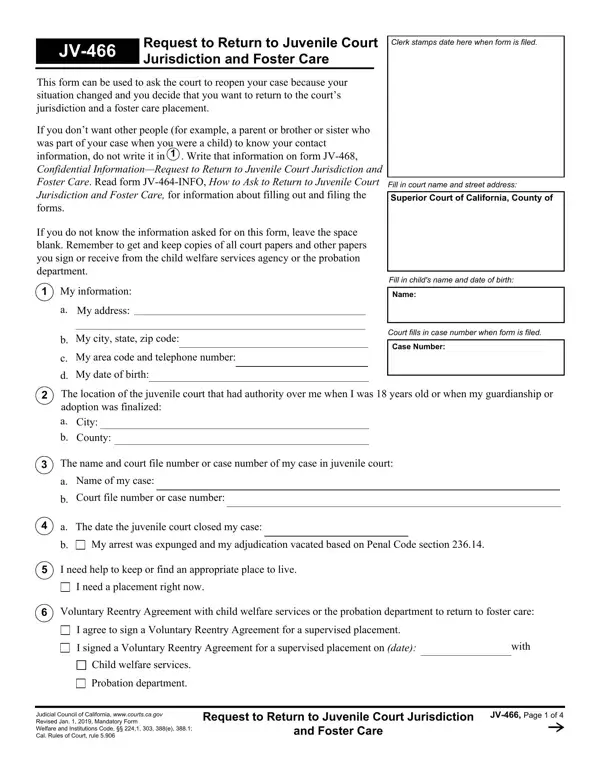
The JV-466 form serves a critical role in the arena of juvenile justice and child welfare, offering a structured path for young adults seeking to re-enter the jurisdiction of the juvenile court system and, by extension, a foster care placement. This document lays out a procedure by which individuals, whose circumstances have significantly changed since their case was closed, can petition the court for reevaluation and potential support. Crucially, the form touches on sensitive issues of privacy and the ongoing need for protection, allowing petitioners to withhold contact information from potentially estranged family members by directing them to a separate form, the JV-468. Further instructions and guidance are provided through the JV-464-INFO, streamlining the process of form submission to the Superior Court of California. Among the essential components of the form are sections requesting detailed personal information, the juvenile court's history regarding the individual, the necessity for a foster care placement, and the commitment to participating in various educational or employment activities, reflecting a broad sweep of criteria designed to establish the petitioner's current situation and future intentions. Additional provisions allow for the consideration of special circumstances, such as whether the petitioner was under a guardianship or adopted from foster care, and outline the steps toward securing legal representation for the ensuing court proceedings. This comprehensive form not only underscores the legal system's adaptability in addressing the evolving needs of young adults formerly in its care but also highlights the collaborative effort between petitioners, child welfare services, probation departments, and the court to optimize outcomes for vulnerable populations.

QuestionAnswer
Form NameForm Jv 466
Form Length4 pages
Fillable?No
Fillable fields0
Avg. time to fill out1 min
Other namesrequest court jurisdiction online, jv 466 court, request court jurisdiction form, return juvenile jurisdiction

How to Edit Form Jv 466 Online for Free

When using the online tool for PDF editing by FormsPal, it is possible to complete or change return juvenile court right here and now. To retain our tool on the cutting edge of convenience, we work to adopt user-driven features and improvements regularly. We are always glad to receive feedback - help us with revolutionizing PDF editing. Starting is easy! What you need to do is stick to the next simple steps directly below:

Step 1: First, access the pdf tool by clicking the "Get Form Button" in the top section of this site.

Step 2: Using our state-of-the-art PDF editor, it is possible to do more than simply fill out blank form fields. Try all of the functions and make your documents appear sublime with customized textual content incorporated, or tweak the file's original input to excellence - all supported by the capability to insert almost any photos and sign it off.

This document will require specific information; to ensure correctness, you should take heed of the recommendations just below:

1. When filling in the return juvenile court, be certain to include all necessary blanks in their associated form section. This will help to facilitate the process, making it possible for your information to be handled promptly and correctly.

Part # 1 of completing jv 466 juvenile

2. The next stage would be to fill out the next few fields: The name and court file number or, Name of my case, Court file number or case number, The date the juvenile court closed, My arrest was expunged and my, I need help to keep or find an, I need a placement right now, Voluntary Reentry Agreement with, I agree to sign a Voluntary, I signed a Voluntary Reentry, with, Child welfare services, Probation department, Judicial Council of California, and Request to Return to Juvenile.

Stage no. 2 of filling out jv 466 juvenile

3. In this part, take a look at You must plan to meet at least one, I plan to attend a high school or, I plan to attend a college a, I plan to attend a program or take, I plan to work at least hours per, I cannot go to a high school a, If you were in a guardianship on, I was placed by the juvenile court, I was adopted from foster care, My guardians or adoptive parents, My guardians or adoptive parents, My guardians or adoptive parents, My guardians or adoptive parents, and The judge will set a hearing about. Every one of these have to be filled in with utmost accuracy.

You must plan to meet at least one, My guardians or adoptive parents, and I plan to work at least  hours per of jv 466 juvenile

You can certainly make an error while filling in your You must plan to meet at least one, thus make sure that you take another look before you'll finalize the form.

4. All set to fill in this fourth portion! Here you will get these Do you want your parents or former, NO I do not want my parents or, YES I do want my parents or former, Parents name and address, Parents name and address, Former legal guardians name and, The judge will give you a free, you when you were a dependent ward, and Name and telephone number of the empty form fields to fill out.

Part number 4 of completing jv 466 juvenile

5. Finally, the following last part is precisely what you will need to complete before submitting the PDF. The blanks at this stage include the next: Did you have a Court Appointed, NO I did not have a CASA, YES I did have a CASA, Would you like the CASA to be told, NO I do not want the CASA to be, YES I want the CASA to be told, Did the Indian Child Welfare Act, NO The Indian Child Welfare Act, YES The Indian Child Welfare Act, Would you like to have the Indian, NO I do not want the Indian Child, YES I do want the Indian Child, and address and telephone number of my.

Part no. 5 for filling out jv 466 juvenile

Step 3: Right after going through the completed blanks, click "Done" and you are done and dusted! After registering afree trial account with us, you'll be able to download return juvenile court or email it right off. The file will also be accessible from your personal cabinet with all of your edits. FormsPal provides protected document editor with no data recording or any type of sharing. Rest assured that your details are safe here!