
Form LS-203 at a glance
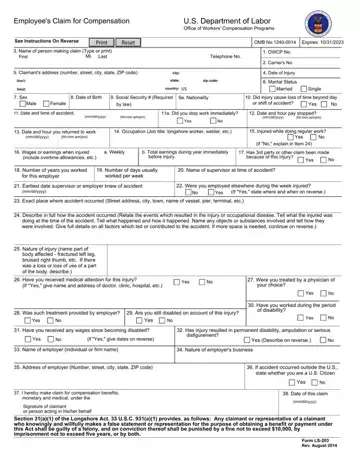
What it is: Form LS-203 is the U.S. Department of Labor Office of Workers' Compensation Programs Employee's Claim for Compensation.
Who signs: Sign on the line for the Signature of claimant or person acting on their behalf.
To file a claim for compensation benefits, complete and sign this form.
Use this form to file a claim under the Longshore and Harbor Workers' Compensation Act, Defense Base Act, Outer Continental Shelf Lands Act, Nonappropriated Fund Instrumentalities Act.
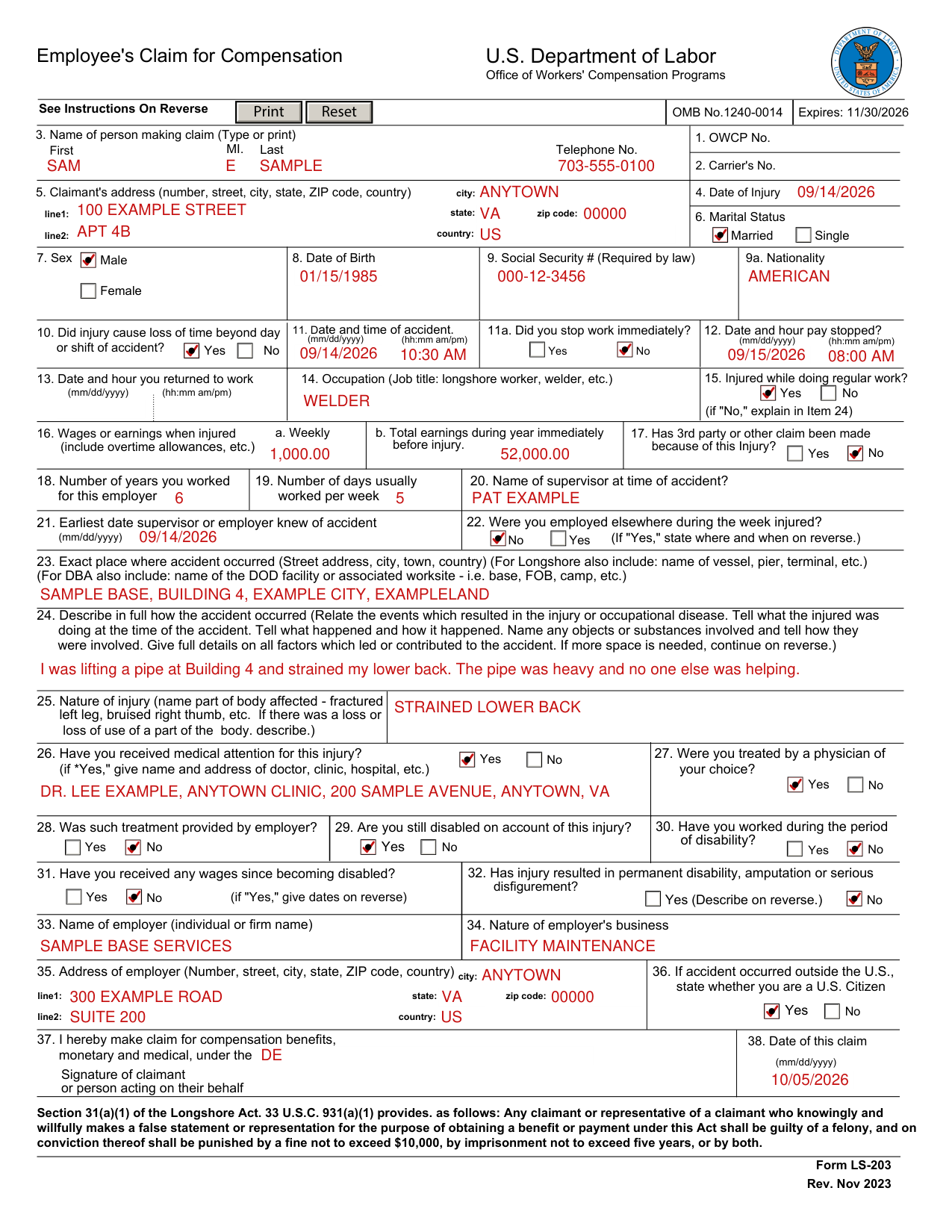
A filled-in Form LS-203 example: a welder files a claim
How to fill out Form LS-203, box by box
Boxes 1 to 3: OWCP No., Carrier's No. and name of person making claim

In Box 1, the OWCP No.; in Box 2, the Carrier's No. Applicant may leave items 1. and 2. blank.
In Box 3, type or print the First name, MI. and Last name of the person making claim.
Enter the Telephone No.
Boxes 4 and 5: date of injury and claimant's address

Enter the Date of Injury in Box 4.
In Box 5, enter the Claimant's address (number, street, city, state, ZIP code, country): line1, line2, city, state, zip code, country.
Boxes 6 to 9a: marital status, sex, birth, Social Security number and nationality

In Box 6, mark the Marital Status: Married or Single.
In Box 7, mark Sex: Male or Female.
Enter the Date of Birth in Box 8.
Enter the Social Security # in Box 9 (Required by law).
(7) Disclosure of the claimant's Social Security Number (SSN) or tax identifying number (TIN) on this form is mandatory.
Enter the Nationality in Box 9a.
Boxes 10 to 12: loss of time, date and time of accident, pay stopped

In Box 10, mark Yes or No: Did injury cause loss of time beyond day or shift of accident?
In Box 11, enter the Date and time of accident (hh:mm am/pm) (mm/dd/yyyy).
In Box 11a, mark Yes or No: Did you stop work immediately?
In Box 12, enter the Date and hour pay stopped (hh:mm am/pm) (mm/dd/yyyy).
Boxes 13 to 15: return to work, occupation and regular work

In Box 13, if you returned to work, enter the Date and hour (hh:mm am/pm) (mm/dd/yyyy).
In Box 14, enter the Occupation (Job title: longshore worker, welder, etc.).
In Box 15, mark Yes or No: Injured while doing regular work? If No, explain in Item 24.
Boxes 16 to 22: wages, claims, years, days, supervisor and other employment

In Box 16, enter the Wages or earnings when injured (include overtime allowances, etc.): a. Weekly and b. Total earnings during year immediately before injury.
In Box 17, mark Yes or No: Has 3rd party or other claim been made because of this Injury?
In Box 18, enter the Number of years you worked for this employer.
In Box 19, enter the Number of days usually worked per week.
In Box 20, enter the Name of supervisor at time of accident.
In Box 21, enter the Earliest date supervisor or employer knew of accident (mm/dd/yyyy).
In Box 22, mark Yes or No: Were you employed elsewhere during the week injured? If Yes, state where and when on reverse.
Boxes 23 to 25: where and how the accident happened and the injury
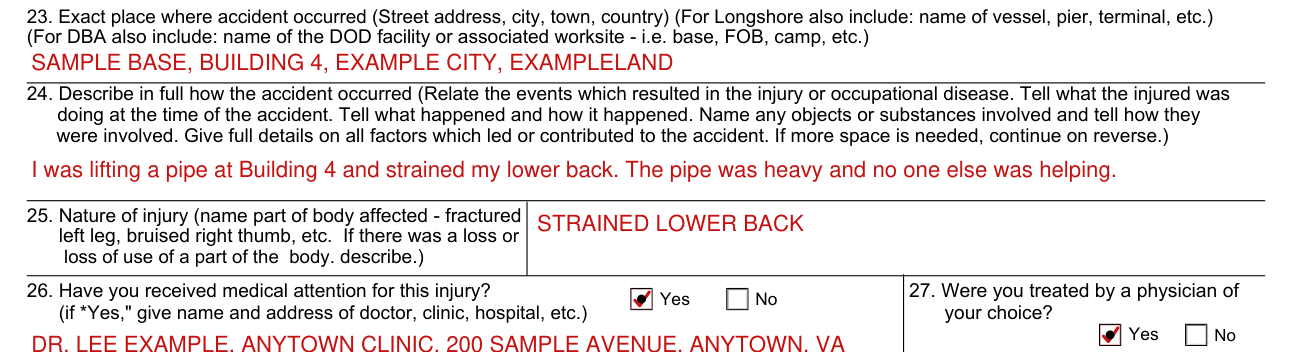
In Box 23, enter the Exact place where accident occurred (Street address, city, town, country). For Longshore also include: name of vessel, pier, terminal, etc. For DBA also include: name of the DOD facility or associated worksite - i.e. base, FOB, camp, etc.
In Box 24, describe in full how the accident occurred. Tell what happened and how it happened. If more space is needed, continue on reverse. Please number each answer to correspond to the number of the item being continued.
In Box 25, enter the Nature of injury (name part of body affected - fractured left leg, bruised right thumb, etc. If there was a loss or loss of use of a part of the body. describe.)
Boxes 26 to 32: medical attention and disability
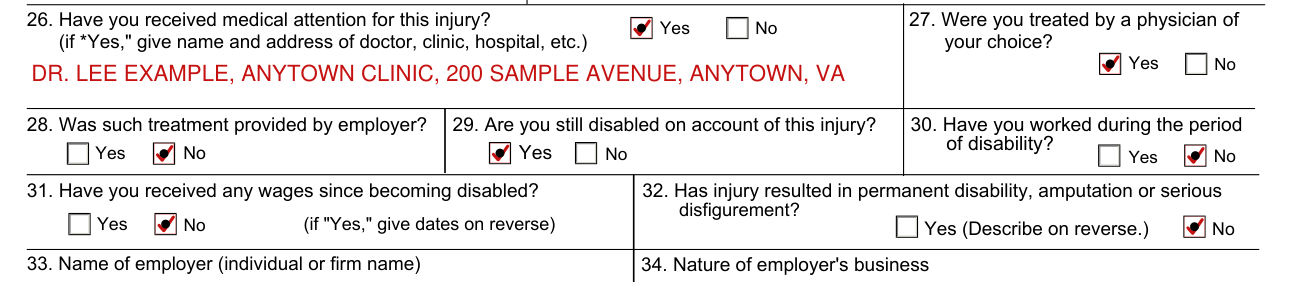
In Box 26, mark Yes or No: Have you received medical attention for this injury? If Yes, give name and address of doctor, clinic, hospital, etc.
In Box 27, mark Yes or No: Were you treated by a physician of your choice?
In Box 28, mark Yes or No: Was such treatment provided by employer?
In Box 29, mark Yes or No: Are you still disabled on account of this injury?
In Box 30, mark Yes or No: Have you worked during the period of disability?
In Box 31, mark Yes or No: Have you received any wages since becoming disabled? If Yes, give dates on reverse.
In Box 32, mark Yes or No: Has injury resulted in permanent disability, amputation or serious disfigurement? If Yes, describe on reverse.
Boxes 33 to 36: the employer

In Box 33, enter the Name of employer (individual or firm name).
In Box 34, enter the Nature of employer's business.
In Box 35, enter the Address of employer: line1, line2, city, zip code, state, country.
In Box 36, if accident occurred outside the U.S., state whether you are a U.S. Citizen: Yes or No.
Boxes 37 and 38: the law, the date and signing the claim

In Box 37, enter the one law you make claim for compensation benefits, monetary and medical, under: Longshore and Harbor Workers' Compensation Act, Defense Base Act, Outer Continental Shelf Lands Act or Nonappropriated Fund Instrumentalities Act.
In Box 38, enter the Date of this claim (mm/dd/yyyy).
Sign on the line for the Signature of claimant or person acting on their behalf.
Under Section 31(a)(1) of the Longshore Act, 33 U.S.C. 931(a)(1), any claimant or representative of a claimant who knowingly and willfully makes a false statement or representation for the purpose of obtaining a benefit or payment under this Act shall be guilty of a felony. On conviction thereof, shall be punished by a fine not to exceed $10,000, by imprisonment not to exceed five years, or by both. (checked November 1, 2026)
Common questions about Form LS-203
Is there a deadline?
Except as noted, a claim may be filed within one year after the injury or death (33 U.S.C. 913(a)). If compensation has been paid without an award, a claim may be filed within one year after the last payment. In case of hearing loss, a claim may be filed within one year after receipt by an employee of an audiogram, with the accompanying report thereon, indicating that the employee has suffered a loss of hearing. In cases involving occupational disease which does not immediately result in death or disability, a claim may be filed within two years after the employee or claimant becomes aware, or in the exercise of reasonable diligence or by reason of medical advice should have been aware, of the relationship between the employment, the disease, and the death or disability.
Where do I file it?
If this is a new claim, and you do not have an OWCP Case Number, please submit the form through the SEAPortal (preferred method) at https://seaportal.dol.gov/portal/ in the "Submit New Claim or Report of Injury" section. The Case Create Fax Number is (202) 513-6814. Alternatively, to submit the "case create" form by mail, please send it to U.S. Department of Labor Office of Workers' Compensation Programs Division of Federal Employees', Longshore and Harbor Workers' Compensation 400 West Bay Street, Suite 63A, Box 28 Jacksonville, FL 32202.
Sources
[1] Form LS-203 (Rev. Nov 2023), Employee's Claim for Compensation, U.S. Department of Labor (the Official source link on this page).
