
Form Rc4288 PDF Details

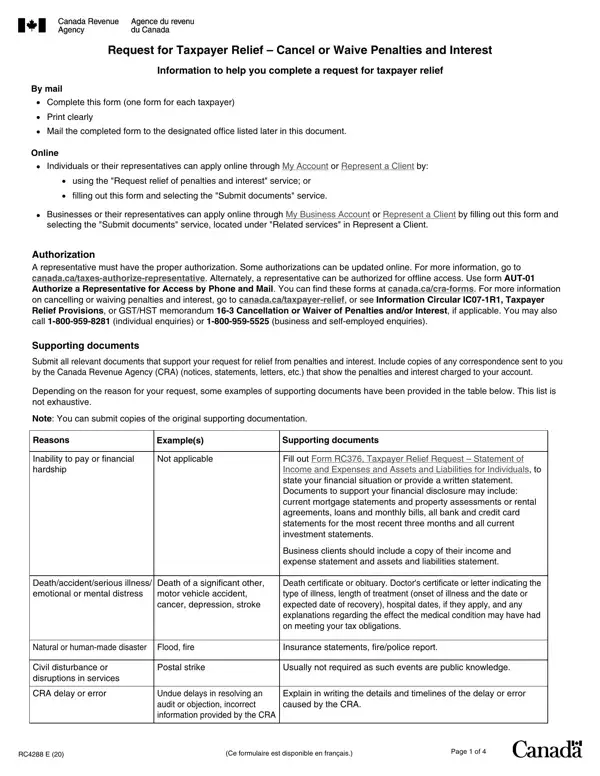
Many people and businesses find themselves in situations where they need relief from penalties and interest charged by the Canada Revenue Agency (CRA). The RC4288 form, titled "Request for Taxpayer Relief – Cancel or Waive Penalties and Interest," is designed to provide a structured way for individuals, businesses, and their representatives to formally request such relief. The process of completing and submitting this form can be done either by mail or online, through various CRA services such as My Account, My Business Account, or Represent a Client, depending on the applicant's status and preference. For the request to be considered, it is essential that all required information be provided clearly and that any relevant supporting documents be attached, including any previous correspondence with the CRA and proof of circumstances cited as reasons for the request. These reasons can range from financial hardship to CRA delays or errors, and natural or human-made disasters. Moreover, the form requires precise identification of the taxpayer and detailed specification of the request, including the type of relief sought, the reason for the request, the periods involved, and whether the application is for a first or second review of the situation. The certification section ensures the veracity of the information provided and asserts the applicant's or representative's authority to make the request. Understanding the importance of the RC4288 form and the procedures involved in its submission can significantly influence the outcomes for those seeking relief from financial penalties and interest that can accrively impact one's financial stability.

QuestionAnswer
Form NameForm Rc4288
Form Length4 pages
Fillable?No
Fillable fields0
Avg. time to fill out1 min
Other namesrc4288 form cra, cra form rc4288, taxpayer relief canada, relief taxpayer request

How to Edit Form Rc4288 Online for Free

When you need to fill out cra form taxpayer, it's not necessary to download and install any kind of software - just use our online tool. To have our tool on the forefront of convenience, we aim to put into action user-driven capabilities and improvements on a regular basis. We're routinely pleased to get suggestions - join us in revolutionizing how you work with PDF files. By taking a few easy steps, you can begin your PDF journey:

Step 1: Press the orange "Get Form" button above. It'll open our pdf tool so you can begin filling out your form.

Step 2: This tool will let you customize PDF forms in many different ways. Transform it by writing customized text, correct existing content, and put in a signature - all within a couple of clicks!

As a way to finalize this PDF document, ensure that you type in the necessary details in every single blank:

1. Before anything else, when filling out the cra form taxpayer, start in the area that features the next blanks:

cra tax relief form conclusion process outlined (stage 1)

2. The third step is usually to complete all of the following blanks: Type of request, Penalty relief Specify type of, Interest relief Specify type of, Reasons, Indicate the reasons for your, Canada Revenue Agency error, Natural or humanmade disaster, Canada Revenue Agency delay, Deathaccidentserious, Inability to payfinancial hardship, Civil disturbance or disruptions, Other circumstances Specify, Yearsperiods involved, For individualscorporations, and For employers indicate the pay.

Writing part 2 in cra tax relief form

3. This next part is relatively straightforward, For other indicate periodsyearss, Indicate if this is a request for, first review, second review, and Page of - all these form fields will need to be filled out here.

second review, Page  of, and For other indicate periodsyearss in cra tax relief form

4. To go onward, the following step will require completing a couple of empty form fields. These comprise of , which are key to going forward with this particular PDF.

Writing part 4 in cra tax relief form

Always be really careful when filling out this field and next field, as this is the section where a lot of people make errors.

5. To wrap up your document, the particular section requires a couple of additional blank fields. Completing Section Certification, I certify that the information on, Name of taxpayer or representative, Title of representative if, Representatives firm if applicable, Representatives Address, Home telephone number, Business telephone number, Signature of taxpayer or, Date, Year, Month Day, Privacy notice, Personal information including the, and Page of will wrap up everything and you're going to be done in no time!

Step number 5 for completing cra tax relief form

Step 3: Prior to submitting this file, make sure that all blank fields are filled in correctly. When you think it's all good, press “Done." After getting a7-day free trial account here, it will be possible to download cra form taxpayer or send it through email promptly. The PDF will also be easily accessible in your personal cabinet with your each change. FormsPal ensures your information confidentiality by using a protected method that in no way saves or shares any kind of private data involved. Be assured knowing your files are kept protected any time you use our tools!