
Form Subject Access Request PDF Details

In the digital age, the right to access personal data held by organizations plays a pivotal role in transparency and privacy rights. The Subject Access Request (SAR) form stands as a crucial tool in this context, particularly under the Data Protection Act 2018. This document facilitates individuals seeking information about themselves or, under certain conditions, about others who are unable to make the request themselves. The form requires detailed personal information, including national insurance numbers, service details for those affiliated with the military, and specifics such as dates of joining and leaving. It emphasizes the importance of verifying the identity of the requester and, if applicable, their authority to obtain data on another’s behalf, demanding explicit consent or a legal basis like a Power of Attorney. Moreover, the SAR form guides individuals through the process, listing necessary documents and where to send the completed request based on the branch of service. It underscores the requirement for consent or legal authorization when requesting data on behalf of someone else, ensuring that privacy rights are respected and upheld. Through this medium, individuals are empowered to maintain control over their personal data, making an informed request while understanding the modalities of disclosure and data management practices of the Ministry of Defence.

QuestionAnswer
Form NameForm Subject Access Request
Form Length4 pages
Fillable?No
Fillable fields0
Avg. time to fill out1 min
Other namesform subject access request download, mod subject access form, mod form 1694, form subject access request

How to Edit Form Subject Access Request Online for Free

It is possible to fill in mod subject access request effortlessly with our PDFinity® online tool. We at FormsPal are committed to giving you the absolute best experience with our editor by continuously introducing new functions and improvements. With all of these improvements, using our editor gets better than ever before! This is what you'll need to do to start:

Step 1: Simply hit the "Get Form Button" above on this site to open our pdf file editing tool. Here you'll find all that is necessary to fill out your document.

Step 2: This editor gives you the opportunity to change PDF forms in a range of ways. Transform it by writing personalized text, adjust existing content, and add a signature - all within the reach of a few clicks!

When it comes to fields of this particular form, this is what you should know:

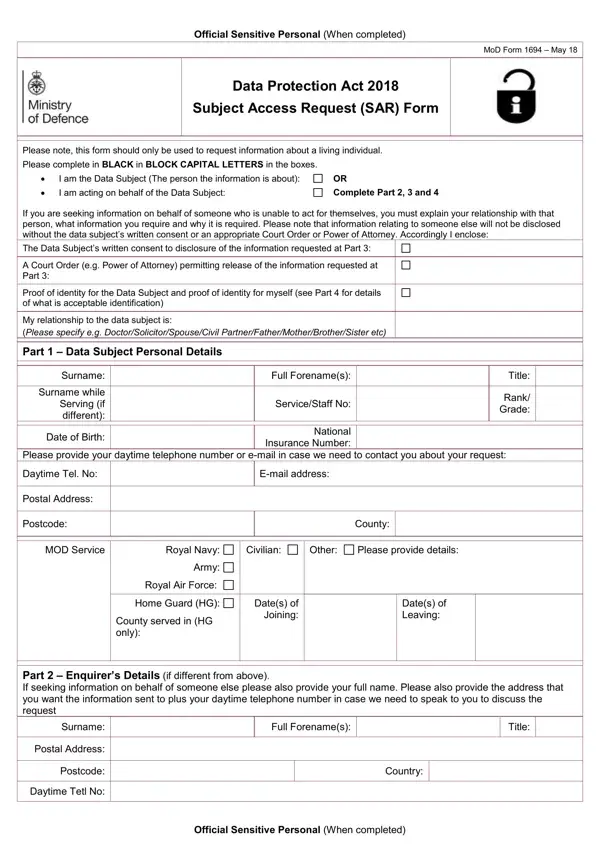
1. You'll want to fill out the mod subject access request correctly, therefore be attentive while filling in the sections containing all of these blanks:

mod form 1694 sar writing process outlined (part 1)

2. Right after performing this part, go to the subsequent part and fill in the necessary particulars in these fields - Postal Address, Postcode, County, MOD Service, Royal Navy, Civilian, Other, Please provide details, Army, Royal Air Force, Home Guard HG, County served in HG only, Dates of Joining, Dates of Leaving, and Part Enquirers Details if.

Completing segment 2 of mod form 1694 sar

It's easy to get it wrong when filling out your County, hence be sure to look again prior to deciding to send it in.

3. In this specific part, review State clearly the information you, and Please provide as much information. These will need to be filled out with highest accuracy.

mod form 1694 sar completion process described (step 3)

4. This part comes with these blanks to look at: a copy of your Photocard Drivers, I enclose as verification of, Driving Licence, Passport, Utility Bill, Other, I declare that to the best of my, Signature, Name in Capitals, Date, and Official Sensitive Personal When.

The way to fill out mod form 1694 sar part 4

5. To wrap up your document, the final area involves some additional blank fields. Completing Part For MOD Use Only, Actioned By Name in Capitals, Signature, Date Received, Date Responded, SAR Reference No, Disposal Date, and Official Sensitive Personal When will finalize everything and you will be done very quickly!

mod form 1694 sar conclusion process shown (part 5)

Step 3: Before submitting the document, make sure that form fields are filled in right. When you believe it is all good, press “Done." Join us right now and immediately access mod subject access request, ready for downloading. All adjustments made by you are preserved , allowing you to edit the document at a later time as required. We do not sell or share the details you use while working with forms at our site.