
Mpc 170 Form PDF Details

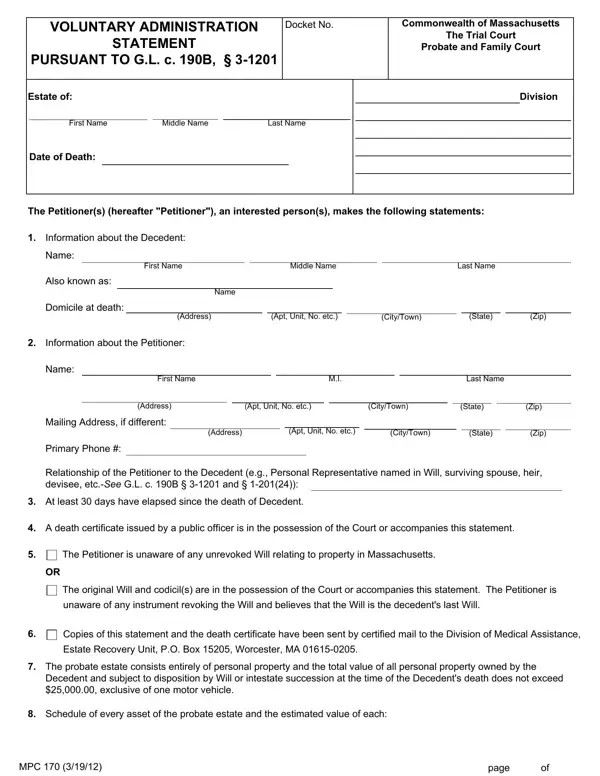
When a loved one passes away, the process of managing their estate, no matter the size, can be overwhelming. The Commonwealth of Massachusetts recognizes this challenge and offers a mechanism known as the Voluntary Administration procedure, detailed within the MPC 170 form. This formal document is especially crucial for estates deemed small under Massachusetts law, specifically those not exceeding $25,000 in total value, excluding one motor vehicle. It serves as a simplified court procedure that allows for an expedited and less formal process of settling an estate, bypassing the complexities that often accompany probate. The form requires detailed information about the decedent—the person who has passed away—and the petitioner, who is the individual initiating the process. It makes provisions for stating the decedent's assets, the identities of potential heirs or devisees, and asserts that no will exists or, if it does, that it is believed to be the last will of the decedent. Furthermore, the Petitioner agrees to act as the Voluntary Personal Representative, adhering to specified legal responsibilities. Importantly, it also emphasizes the importance of accountability, noting that actions are subject to review by any subsequently appointed Personal Representative or individuals with a superior claim to the estate. This introduction to the MPC 170 form underscores its role as a vital tool in the compassionate and efficient handling of a loved one's estate, emphasizing its utility for those facing the daunting task of estate administration.

QuestionAnswer
Form NameMpc 170 Form
Form Length3 pages
Fillable?No
Fillable fields0
Avg. time to fill out45 sec
Other namesmass probate form mpc 170, ma voluntary administration statement, mpc forms massachusetts form, form voluntary administration

How to Edit Mpc 170 Form Online for Free

Through the online editor for PDFs by FormsPal, you can fill in or edit ma voluntary administration statement right here and now. The editor is continually upgraded by our team, receiving handy functions and turning out to be greater. If you're seeking to get started, here is what it's going to take:

Step 1: Open the PDF file in our tool by clicking on the "Get Form Button" in the top area of this webpage.

Step 2: With this advanced PDF editing tool, you'll be able to accomplish more than just fill out forms. Express yourself and make your forms seem high-quality with customized text added in, or optimize the file's original content to perfection - all comes with the capability to incorporate your own pictures and sign the document off.

In an effort to fill out this PDF form, be sure to enter the necessary details in every area:

1. To start off, once filling in the ma voluntary administration statement, beging with the section containing next blanks:

Filling out section 1 in 170 mpc form

2. The third part is usually to complete all of the following blanks: Name, First Name, Last Name, Address, Apt Unit No etc, CityTown, State, Zip, Mailing Address if different, Primary Phone, Address, Apt Unit No etc, CityTown, State, and Zip.

170 mpc form completion process shown (portion 2)

3. This next section is all about MPC, and page - type in every one of these fields.

Filling in part 3 in 170 mpc form

You can potentially get it wrong when completing the page, thus ensure that you look again before you decide to finalize the form.

4. The following subsection arrives with all of the following fields to fill out: Motor vehicle make model VIN, Description of Property, Estimated Value, The following are the names and, Total, Name, Address, and Interest.

Address, Estimated Value, and The following are the names and of 170 mpc form

5. To wrap up your form, the final segment involves some extra blanks. Entering Heir, Devisee, Joint Owner, Heir, Devisee, Joint Owner, Heir, Devisee, Joint Owner, Heir, Devisee, Joint Owner, and Heir is going to wrap up the process and you'll definitely be done in a blink!

How one can fill in 170 mpc form portion 5

Step 3: Once you have reread the information in the file's blank fields, press "Done" to finalize your FormsPal process. Join FormsPal now and instantly get access to ma voluntary administration statement, all set for download. All alterations made by you are saved , allowing you to edit the document further if required. FormsPal offers secure form completion without personal information recording or sharing. Feel at ease knowing that your details are safe with us!