

Form MV-39 at a glance
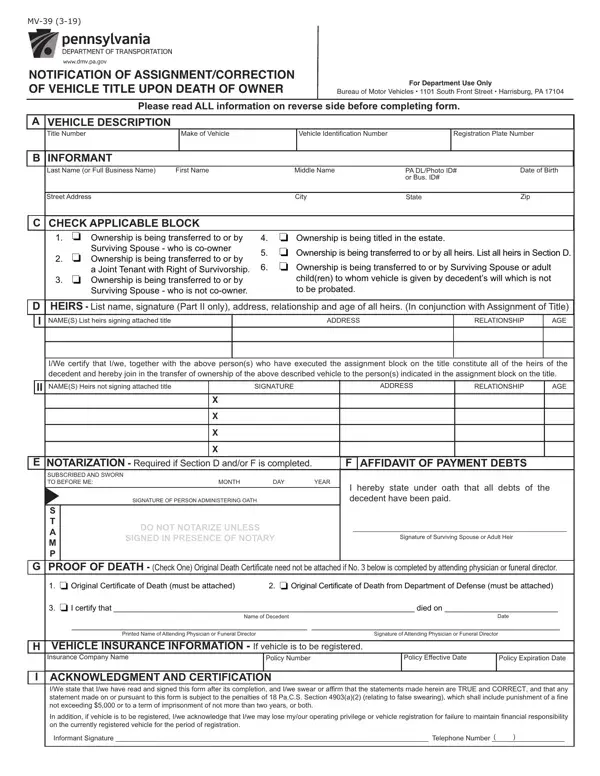
What it is: Form MV-39 is the Notification of Assignment/Correction of Vehicle Title upon Death of Owner.
Who signs: The informant whose name appears in Section B must always sign in Section I.
Where and when to file: Mail completed application to: Department of Transportation, Bureau of Motor Vehicles, 1101 S. Front St., Harrisburg, PA 17104.
A person authorized to complete this form (Informant) would be a Joint Tenant with Right of Survivorship, a surviving spouse, or if there is no spouse, an adult child of the decedent or if there are no such children, a parent, or the executor or administrator of the estate.
What to bring and attach to Form MV-39
Instructions: title must be attached.
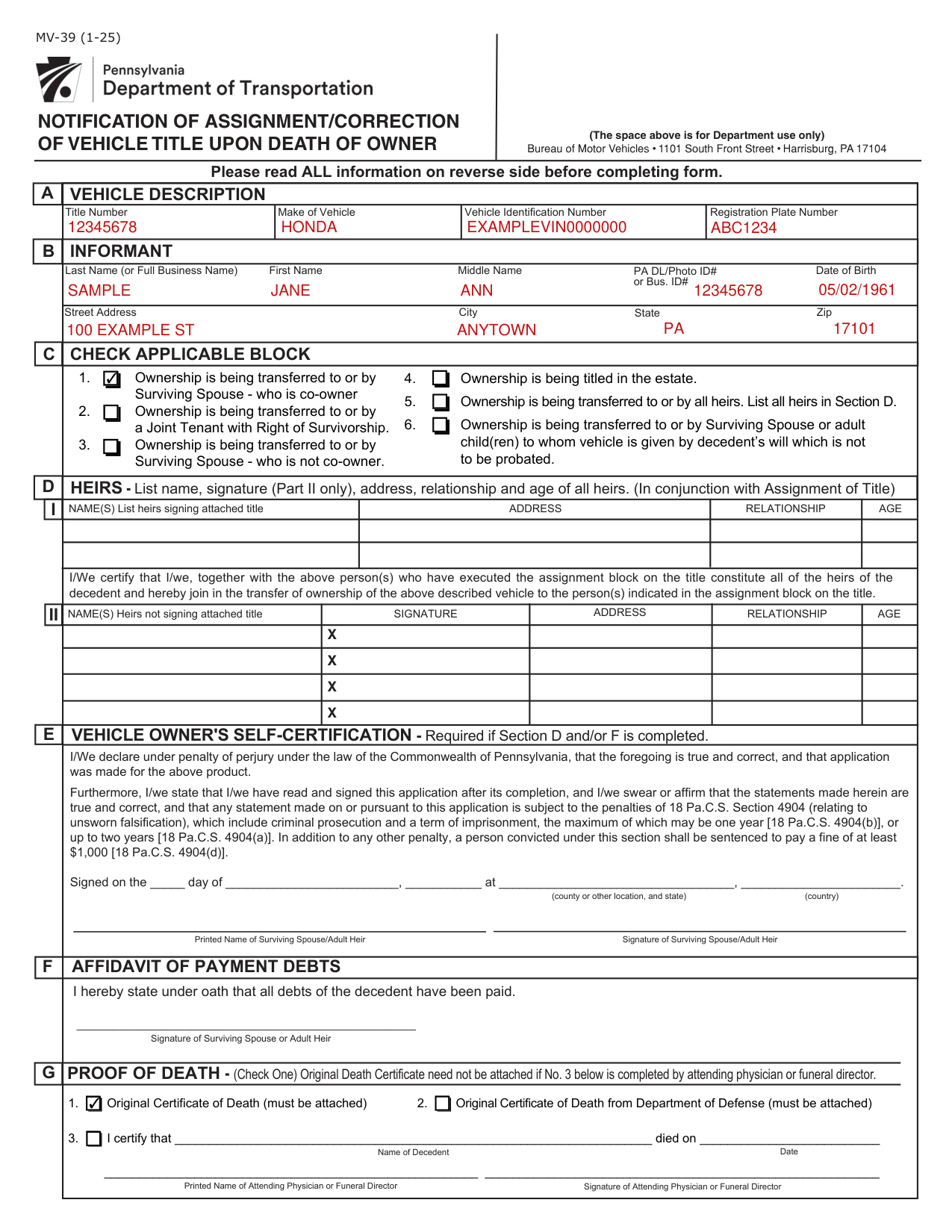
A filled-in Form MV-39 example: a surviving spouse and co-owner, Block 1
How to fill out Form MV-39, box by box
Section A, the vehicle description

Under Vehicle Description, enter the Title Number, Make of Vehicle, Vehicle Identification Number and Registration Plate Number.
Section B, the informant

Under Informant, enter the Last Name (or Full Business Name), First Name, Middle Name, PA DL/Photo ID# or Bus. ID#, Date of Birth, Street Address, City, State and Zip.
Section C, check the applicable block

Check the applicable block.
Block 1: ownership is being transferred to or by Surviving Spouse who is co-owner.
Block 2: ownership is being transferred to or by a Joint Tenant with Right of Survivorship.
Block 3: ownership is being transferred to or by Surviving Spouse who is not co-owner.
Block 4: ownership is being titled in the estate.
Block 5: ownership is being transferred to or by all heirs. List all heirs in Section D.
Block 6: ownership is being transferred to or by Surviving Spouse or adult child(ren) to whom vehicle is given by decedent's will which is not to be probated.
Section D, the heirs
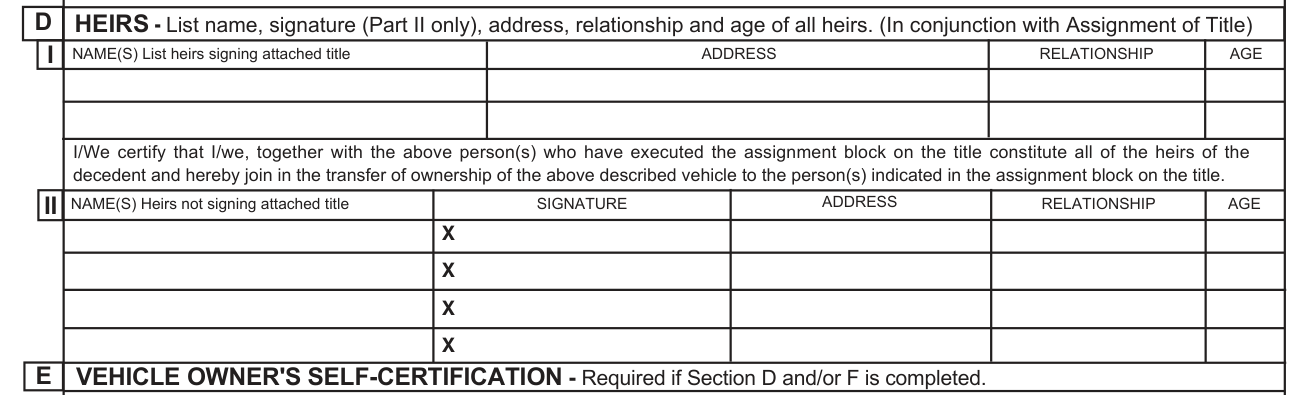
List name, signature (Part II only), address, relationship and age of all heirs (In conjunction with Assignment of Title).
Part I: under Names, list heirs signing attached title, with Address, Relationship and Age.
Part II: under Names, list heirs not signing attached title, with Signature, Relationship, Age and Address.
If all heirs cannot appear before same Notary or attesting officer, attach additional notarized statement(s) listing vehicle information as it appears in Section A, name(s) of person(s) to whom vehicle is being transferred, and signature(s) of heir(s).
Section E, the vehicle owner's self-certification
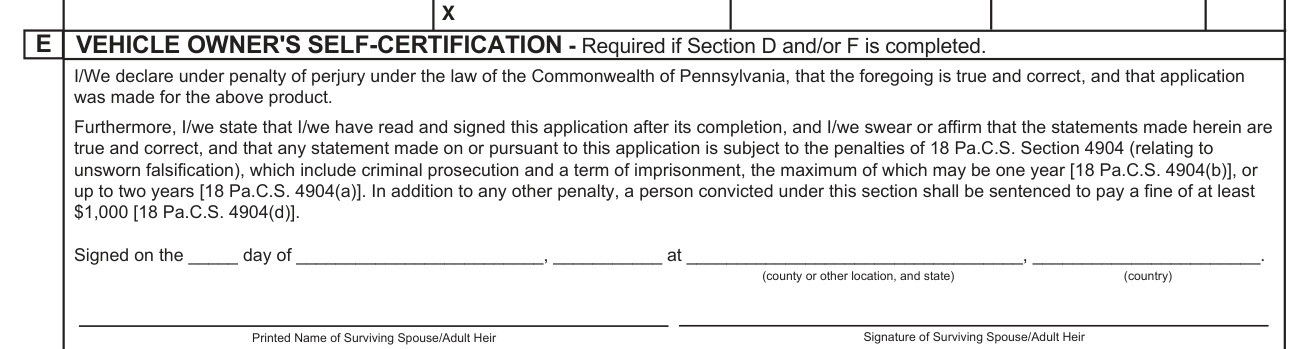
Vehicle owner's self-certification is required if Section D and/or F is completed.
Fill in each part of the line Signed on the day of, at (county or other location, and state) (country), then the Printed Name of Surviving Spouse/Adult Heir, and sign on the Signature of Surviving Spouse/Adult Heir line.
All heirs must sign.
You declare under penalty of perjury under the law of the Commonwealth of Pennsylvania, that this is true and correct, and that application was made for the product.[2]
Section F, the affidavit of payment of debts
The Surviving Spouse or Adult Heir signs the Affidavit of Payment of Debts to state under oath that all debts of the decedent have been paid.
Section G, the proof of death

Check one. Original Death Certificate need not be attached if No. 3 below (box 3) is completed by attending physician or funeral director.
1. Original Certificate of Death (must be attached). 2. Original Certificate of Death from Department of Defense (must be attached).
Attach an original death certificate (copies are not acceptable) or have proper portion of Form MV-39 completed by the attending physician or funeral director.
3. The attending physician or funeral director certifies that the Name of Decedent died on the Date, and enters the Printed Name and Signature of Attending Physician or Funeral Director.[2]
Section H, the vehicle insurance information

If the vehicle is to be registered in the informant's name, list the Insurance Company Name, Policy Number, Policy Effective Date and Policy Expiration Date in the spaces provided.
Block 3 or Block 6: Vehicle insurance information must be listed on Form MV-4ST, Section F. Block 5: the same, if the vehicle will be registered.[2]
Section I, the acknowledgment and certification

Informant must sign as name(s) appears and list driver's license number and telephone number in spaces provided.
Sign on the Informant Signature line and enter the Telephone Number: telephone number will be used only if there is problem with your application.
You state that you have read and signed this form after its completion, and you swear or affirm that the statements made herein are true and correct, and that any statement made on or pursuant to this form is subject to the penalties of 18 Pa.C.S. Section 4903(a)(2) (relating to false swearing), which shall include punishment of a fine not exceeding $5,000 or to a term of imprisonment of not more than two years, or both (checked October 19, 2026).
If vehicle is to be registered in the informant's name, you acknowledge that you may lose your operating privilege or vehicle registration for failure to maintain financial responsibility on the currently registered vehicle for the period of registration.
More rules for Form MV-39
Complete Form MV-1 if vehicle is not currently titled in Pennsylvania.
What to complete and attach for each block
Which sections to complete for each block
Block 1, Block 2 or Block 4: Complete Sections A, B, C, G, H (if the vehicle will be registered) and I.
Block 3: Complete Sections A, B, C, D, E, F, G, and I.
Block 5: Complete Sections A, B, C, D, E, G, and I.
Block 6: Complete Sections A, B, C, G, and I.
Block 1 or Block 2, surviving spouse who is co-owner or Joint Tenant with Right of Survivorship
Title must be assigned only if vehicle is being transferred by surviving spouse (or joint tenant) to another person.
Form MV-4ST is required if title is assigned.
Block 3, no will, surviving spouse who is not co-owner
Surviving spouse and all adult children must assign title (along with surviving co-owner(s), if any).
All heirs must enter their names, address, relationship and age in Section D.
When more than two (2) persons must assign title, use Section D (Part II) for additional signatures.
All signatures in Section D and F must be notarized.
Form MV-4ST is required.
Block 4, vehicle to be titled in name of Estate
Assignment of title not required. Current registration will automatically be placed in the name of the estate.
Block 5, no will, no surviving spouse
All heirs, including guardians of minor heirs, must assign title and enter their name, address, relationship and age in Section D.
When more than two (2) persons must assign the title use Section D (Part II) for additional signature(s).
All Signatures must be notarized.
Form MV-4ST is required.
Block 6, vehicle given by decedent's will which is not to be probated
Copy of the decedent's will must be attached.
Title must be assigned and Form MV-4ST is required.
The registration plate and the decedent's registration card
Block 3 or Block 6: Registration plate is transferable only as provided under Section 1314 of the Vehicle Code.
Block 3 or Block 6: Decedent's registration card should be attached.
Block 5: If transferring registration in accordance with Section 1314 of the Vehicle Code, decedent's registration card should be attached.
Common questions about Form MV-39
What are the instructions for completing the PA MV-39 form?
Read all information on the second page of the form before completing it.
When a spouse dies, what happens to their car?
Block 1 or Block 2, surviving spouse who is co-owner or Joint Tenant with Right of Survivorship: Current registration will automatically be placed in the name of surviving owner. Block 3, no will, surviving spouse who is not co-owner: Registration plate is transferable only as provided under Section 1314 of the Vehicle Code.
Where do I file it?
Mail completed application to: Department of Transportation, Bureau of Motor Vehicles, 1101 S. Front St., Harrisburg, PA 17104.
Are there fees?
Block 1, Block 2, Block 3 or Block 6: Title fee is required except when transfer is to a surviving spouse. Block 4 or Block 5: Title fee is required. Block 1 or Block 2: Registration transfer fee is not required if title is to be issued in surviving co-owner's name. Block 3 or Block 6: Registration transfer fee and all other applicable fees are required. Block 4: Registration transfer fee is not required. Block 5: Applicable registration fees are required.
When is this form not the right one?
If an executor or administrator has been appointed or if a court order is issued under family exemption or small estate procedure, this form is not required unless the vehicle is to be titled in the name of the estate. Otherwise, attach a Short Form Certificate to assigned title. (A Short Form Certificate is issued by the Register of Wills when an executor or administrator is appointed.)
Sources
[1] Form MV-39 (1-25), Notification of Assignment/Correction of Vehicle Title upon Death of Owner, Pennsylvania Department of Transportation (the Official source link on this page).
[2] pa.gov, line_H policy number_doc_insurance_spaces. Accessed October 18, 2026.