
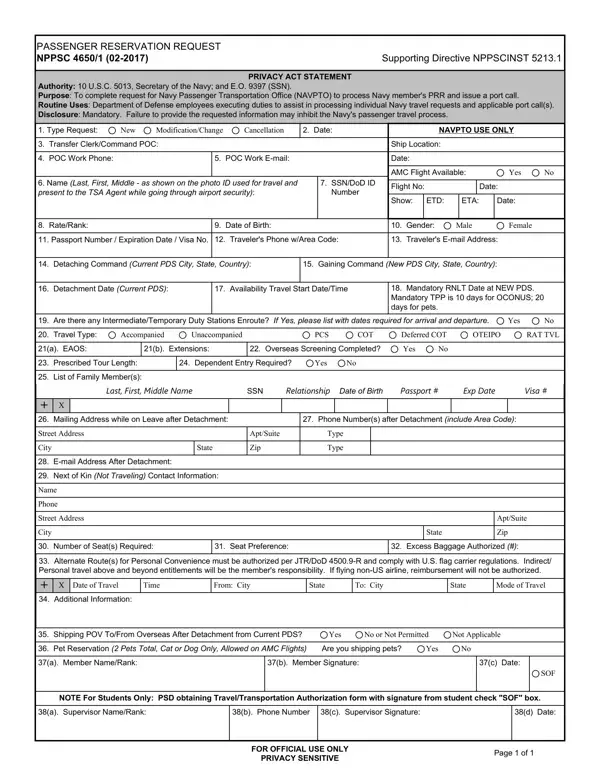

Form NPPSC 4650/1 at a glance
What it is: NPPSC 4650/1 (03-2025) is the Passenger Reservation Request; its purpose is to complete a request for the Navy Passenger Transportation Office (NAVPTO) to process a Navy member's PRR and issue a port call.
Who signs: In the first SIGN box, the Member signs and enters Name/Rank in 37(a) and Date in 37(c). In the second SIGN box, the Supervisor signs and enters Name/Rank in 38(a), Phone Number in 38(b) and Date in 38(d).
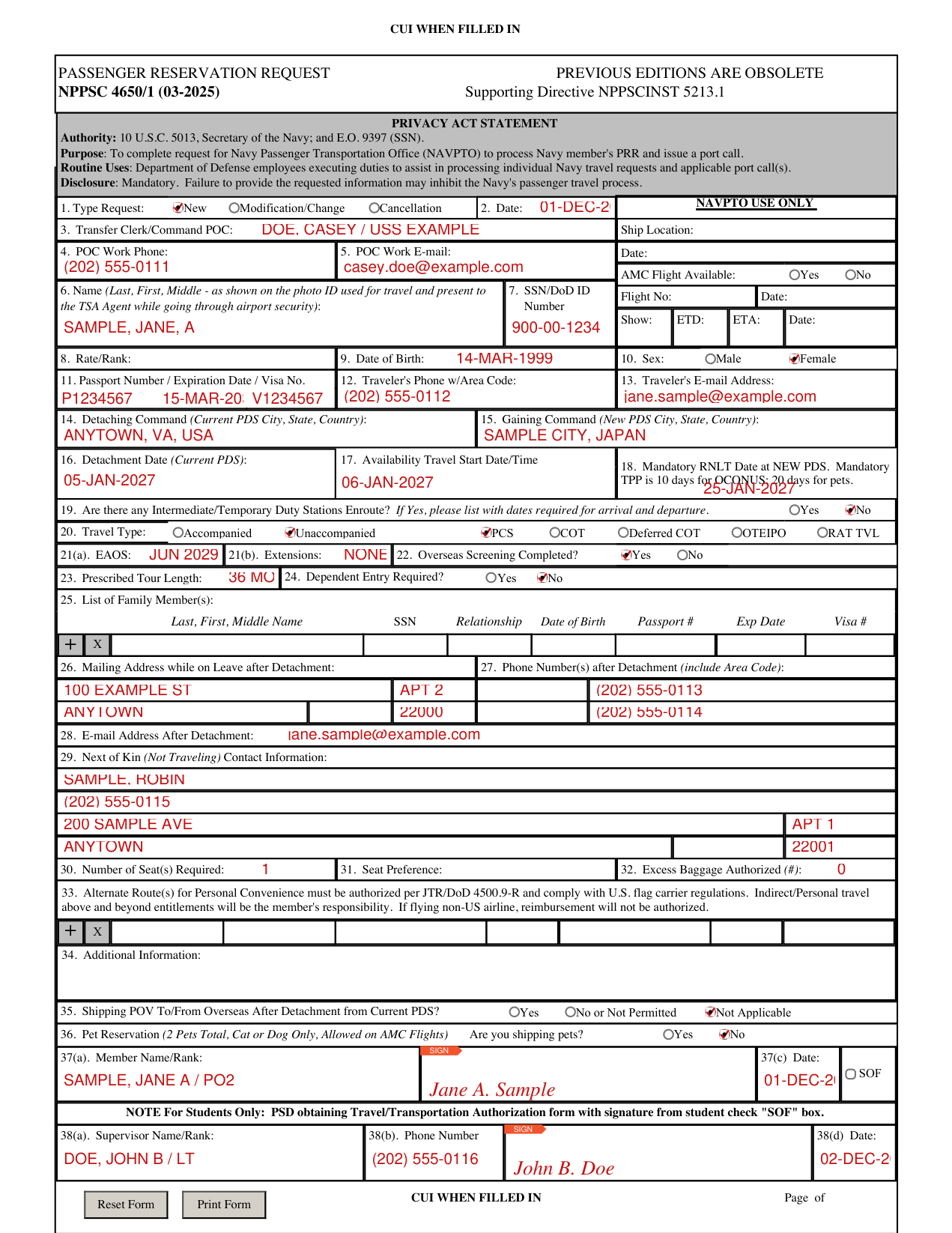
A filled-in Form NPPSC 4650/1 example: a Navy member requests unaccompanied travel
How to fill out Form NPPSC 4650/1, box by box
Type Request, Date and Command POC

In box 1, mark the Type Request: New, Modification/Change or Cancellation. In box 2, enter the Date.
In box 3, enter the Transfer Clerk/Command POC. In box 4, enter the POC Work Phone, and in box 5, the POC Work E-mail.
Name, SSN/DoD ID Number, Rate/Rank, Date of Birth and Sex

In box 6, enter the Name (Last, First, Middle) as shown on the photo ID used for travel and present to the TSA Agent while going through airport security.
In box 7, enter the SSN/DoD ID Number.
In box 8, enter the Rate/Rank. In box 9, enter the Date of Birth. In box 10, mark Sex: Male or Female.
Passport, Visa, Traveler's Phone and E-mail

In box 11, enter the Passport Number, Expiration Date and Visa No. In box 12, enter the Traveler's Phone w/Area Code, and in box 13, the Traveler's E-mail Address.
Detaching and Gaining Command

In box 14, enter the Detaching Command (Current PDS City, State, Country). In box 15, enter the Gaining Command (New PDS City, State, Country).
Detachment, travel start and Mandatory RNLT dates

In box 16, enter the Detachment Date (Current PDS). In box 17, enter the Availability Travel Start Date/Time. In box 18, enter the Mandatory RNLT Date at NEW PDS; Mandatory TPP is 10 days for OCONUS and 20 days for pets.
Intermediate/Temporary Duty Stations Enroute

In box 19, mark Yes or No for any Intermediate/Temporary Duty Stations Enroute. If Yes, please list with dates required for arrival and departure.
Travel Type, Overseas Screening, Tour Length and Dependent Entry

In box 20, mark the Travel Type: Accompanied or Unaccompanied, and PCS, COT, Deferred COT, OTEIPO or RAT TVL.
In box 21(a), enter the EAOS, and in box 21(b), the Extensions. In box 22, mark Yes or No for Overseas Screening Completed.
In box 23, enter the Prescribed Tour Length. In box 24, mark Yes or No for Dependent Entry Required.
List of Family Member(s)

In box 25, list each Family Member(s) with the Last, First, Middle Name, SSN, Relationship, Date of Birth, Passport #, Exp Date and Visa #.
Mailing address, phone and e-mail after detachment

In box 26, enter the Mailing Address while on Leave after Detachment. In box 27, enter the Phone Number(s) after Detachment (include Area Code).
In box 28, enter the E-mail Address After Detachment.
Next of Kin (Not Traveling) Contact Information

In box 29, enter the Next of Kin (Not Traveling) Contact Information.
Seats, Seat Preference and Excess Baggage

In box 30, enter the Number of Seat(s) Required. In box 31, enter the Seat Preference. In box 32, enter the Excess Baggage Authorized (#).
Alternate Route(s) and Additional Information

In box 33, Alternate Route(s) for Personal Convenience must be authorized per JTR/DoD 4500.9-R and comply with U.S. flag carrier regulations.
Indirect/Personal travel beyond entitlements will be the member's responsibility.
If flying non-U.S. airline, reimbursement will not be authorized.
In box 34, enter the Additional Information.
Shipping POV and Pet Reservation

In box 35, mark one of Yes; No or Not Permitted; or Not Applicable for Shipping POV To/From Overseas After Detachment from Current PDS.
In box 36, mark Yes or No for Are you shipping pets? Pet Reservation: 2 Pets Total, Cat or Dog Only, Allowed on AMC Flights.
SIGN: Member

In the first SIGN box, the Member signs and enters Name/Rank in 37(a) and Date in 37(c).
For Students Only: if PSD is obtaining the Travel/Transportation Authorization form with the signature from the student, check the SOF box.
More rules for Form NPPSC 4650/1
Previous editions of NPPSC 4650/1 are obsolete.
Leave the box marked NAVPTO USE ONLY blank.
Disclosure is mandatory; failure to provide the requested information may inhibit the Navy's passenger travel process.
Sources
[1] Form NPPSC 4650/1 (03-2025), Passenger Reservation Request, U.S. Navy (the Official source link on this page).