
Profit Loss Statement Form PDF Details

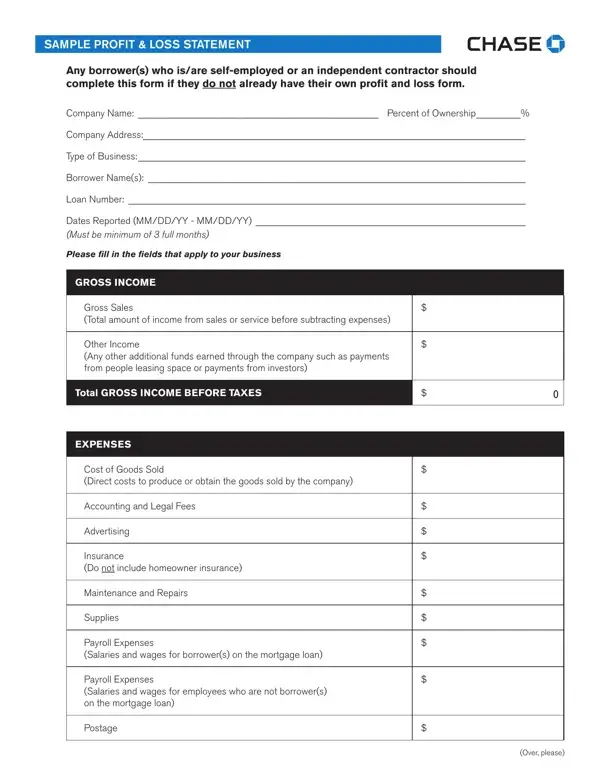
Understanding the Profit Loss Statement form is essential for self-employed individuals and independent contractors aiming to secure loans or simply track their business performance accurately. This crucial financial document requires the disclosure of various details about a business, starting from the company name, ownership percentage, and address, to the specific type of business and borrower information. It also calls for a detailed report of the company's financial activities over a minimum of three full months, including gross income, which encompasses total sales and any other income sources. The form meticulously categorizes expenses, separating costs directly associated with goods sold from operating expenses like accounting and legal fees, advertising costs, insurance (excluding homeowner insurance), and payroll for both the borrower(s) and other employees. Additionally, it includes maintenance, office supplies, rent, taxes (excluding real estate and income taxes but including other business taxes), and utilities, among others, providing a comprehensive view of the business's outgoings. The ultimate goal of the form is to calculate the net income before and after taxes, ensuring transparency and accountability in the process. By signing the form, borrowers affirm the accuracy of the information, acknowledging the serious implications of submitting false information. This document not only aids in loan applications but also serves as a vital tool for financial analysis and planning, making it indispensable in the realm of business finance.

QuestionAnswer
Form NameProfit Loss Statement Form
Form Length2 pages
Fillable?No
Fillable fields0
Avg. time to fill out30 sec
Other namesprofit loss statement, loss and profit statement forms, how to profit and loss statement sample, chase bank statement

How to Edit Profit Loss Statement Form Online for Free

You are able to fill in forms profit loss statements effortlessly with the help of our online editor for PDFs. Our tool is constantly developing to grant the very best user experience attainable, and that is thanks to our dedication to continuous development and listening closely to customer feedback. If you are seeking to start, here's what you will need to do:

Step 1: First of all, access the editor by pressing the "Get Form Button" in the top section of this webpage.

Step 2: The editor will give you the opportunity to work with PDF forms in a variety of ways. Improve it by including personalized text, correct what's originally in the document, and place in a signature - all when it's needed!

Filling out this document calls for attentiveness. Make sure every blank is filled in properly.

1. You will want to fill out the forms profit loss statements correctly, so take care when filling in the parts comprising all of these fields:

Stage # 1 in filling out profit and loss statement forms

2. Soon after filling out this section, go on to the subsequent step and fill in the essential particulars in all these fields - Total GROSS INCOME BEFORE TAXES, EXPENSES, Cost of Goods Sold Direct costs to, Accounting and Legal Fees, Advertising, Insurance Do not include homeowner, Maintenance and Repairs, Supplies, Payroll Expenses Salaries and, and Payroll Expenses Salaries and.

profit and loss statement forms completion process outlined (portion 2)

In terms of Insurance Do not include homeowner and Advertising, ensure you don't make any mistakes here. Those two are considered the most significant fields in this form.

3. The following portion is about Payroll Expenses Salaries and, Postage, and Over please - fill out each one of these empty form fields.

Filling out part 3 of profit and loss statement forms

4. To move forward, your next form section will require filling out a few fields. These include Rent, Licenses, Taxes Do not include Real Estate, Telephone, TravelTransportation, Utilities, Other Total and explanation of any, and Total EXPENSES, which are crucial to going forward with this process.

profit and loss statement forms conclusion process outlined (portion 4)

5. Lastly, this last segment is precisely what you will have to wrap up prior to finalizing the PDF. The blank fields you're looking at include the next: NET INCOME, Net Income Before Taxes, Taxes Paid on Business Income, Total NET INCOME AFTER TAXES, By signing this document Iwe, Borrower Names, Signature Date, Signature Date, and D PL.

Filling out section 5 in profit and loss statement forms

Step 3: Check everything you've entered into the blanks and then click on the "Done" button. Try a 7-day free trial plan with us and obtain direct access to forms profit loss statements - readily available in your personal cabinet. FormsPal offers protected document tools devoid of data recording or distributing. Feel at ease knowing that your data is safe here!