
Ps2067A 15 Form PDF Details

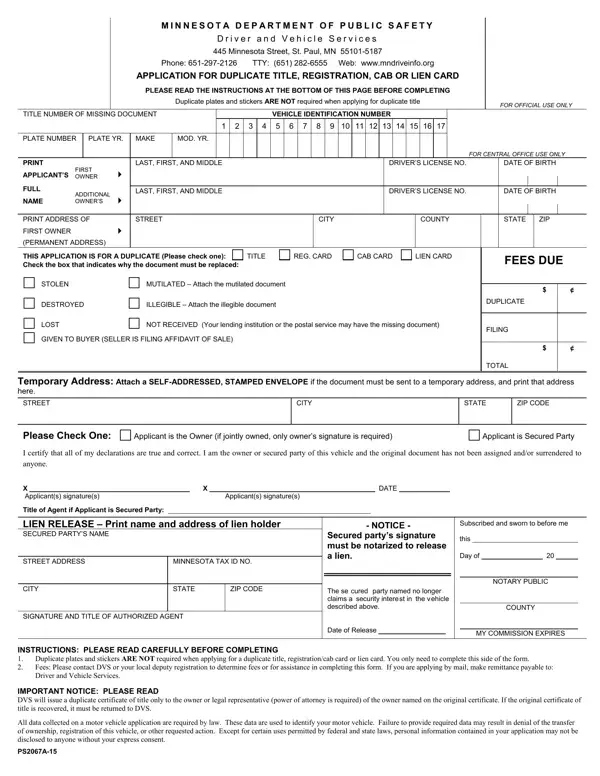
When vehicle owners in Minnesota encounter the need to replace their vehicle's title, registration card, cab card, or lien card, they turn to the PS2067A-15 form, a critical document provided by the Minnesota Department of Public Safety, Driver and Vehicle Services. Located at 445 Minnesota Street in St. Paul, this department facilitates the issuance of duplicates for these essential documents. The process outlined in the form is straightforward, yet requires careful attention to detail, including declaring the reason for the replacement (such as the original being stolen, mutilated, destroyed, illegible, lost, not received, or given to the buyer under specific circumstances). The application must be accompanied by the applicable fees and, under certain conditions, requires the original document - if available in a mutilated or illegible state - to be attached. Additionally, the form highlights the necessity of a notarized lien release for freeing a security interest on the vehicle by the secured party. Moreover, it provides instructions for cases where the document needs to be sent to a temporary address. A key caveat is that the Minnesota Department of Public Safety will only issue a duplicate title to the owner or their legal representative, emphasizing the importance of returning the original title if it is later recovered and clarifying the implications of failing to provide required data, which could obstruct the ownership transfer or registration of the vehicle. This form embodies an intricate blend of process, legal necessity, and attention to procedural details, all aiming to safeguard vehicle ownership records and the interests of all parties involved.

QuestionAnswer
Form NamePs2067A 15 Form
Form Length1 pages
Fillable?No
Fillable fields0
Avg. time to fill out15 sec
Other namesehicle, writeable title car mn, ILLEGIBLE, form ps2067a 15

How to Edit Ps2067A 15 Form Online for Free

With the online editor for PDFs by FormsPal, you can easily complete or modify MINNESOTA here. To keep our editor on the cutting edge of convenience, we work to put into action user-driven features and enhancements on a regular basis. We are routinely thankful for any feedback - join us in revolutionizing how you work with PDF documents. If you are looking to get started, here's what it will take:

Step 1: First, open the tool by clicking the "Get Form Button" above on this site.

Step 2: This editor will let you customize your PDF document in a range of ways. Modify it with your own text, adjust original content, and place in a signature - all at your convenience!

In an effort to complete this document, make sure that you type in the information you need in every blank field:

1. The MINNESOTA involves certain details to be inserted. Make certain the next blanks are filled out:

Step # 1 in submitting PS2067A-15

2. Soon after the prior section is filled out, go to type in the suitable information in these: Please Check One, Applicant is the Owner if jointly, Applicant is Secured Party, I certify that all of my, anyone X Applicants signatures, Applicants signatures, Title of Agent if Applicant is, LIEN RELEASE Print name and, STREET ADDRESS, MINNESOTA TAX ID NO, CITY, STATE, ZIP CODE, SIGNATURE AND TITLE OF AUTHORIZED, and DATE.

PS2067A-15 writing process outlined (stage 2)

Those who work with this PDF generally make errors when filling in STREET ADDRESS in this part. You should definitely revise whatever you type in here.

Step 3: Before finalizing this file, you should make sure that all blanks are filled out correctly. Once you’re satisfied with it, press “Done." Sign up with FormsPal now and easily get MINNESOTA, prepared for downloading. Every change made is conveniently kept , so that you can modify the pdf later if necessary. FormsPal is committed to the confidentiality of all our users; we make sure that all personal data put into our editor is kept confidential.