
Sa 109 Form PDF Details

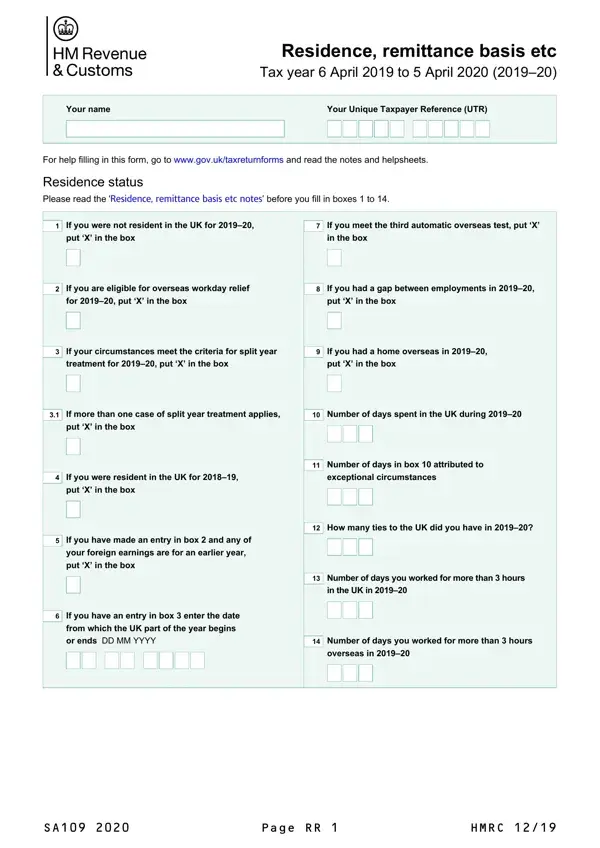
Navigating through the complexities of tax affairs can be a daunting task, especially when it involves understanding specific forms like the SA109, known for its intricate details regarding residence, remittance basis, and other tax considerations for the tax year 6 April 2019 to 5 April 2020. Crafted to guide individuals in accurately reporting their tax status, this form is an essential piece of documentation for those needing to clarify their residence status, claim overseas workday relief, or apply for split-year treatment, among other provisions. With checkboxes designed to simplify the process—ranging from determining one’s eligibility for overseas workday relief to asserting one’s domicile outside the UK—the SA109 form ensures a structured approach to handling diverse and potentially complex tax situations. Additionally, it incorporates sections for claiming relief under Double Taxation Agreements, thereby assisting individuals in navigating the intricacies of international tax obligations. This essential form, complete with a portion designated for any other information that may need clarification or elaboration, underscores the importance of meticulous attention to detail and an understanding of one’s tax responsibilities. To ensure accuracy and compliance, individuals are advised to go through the accompanying notes and helpsheets provided by the government, making the process of completing the SA109 as smooth as possible.

QuestionAnswer
Form NameSa 109 Form
Form Length4 pages
Fillable?No
Fillable fields0
Avg. time to fill out1 min
Other nameshmrc residence form, uk sa109 form, sa109 residence, sa109 form

How to Edit Sa 109 Form Online for Free

You can fill in sa109 instantly using our PDFinity® PDF editor. Our tool is constantly evolving to present the best user experience attainable, and that is due to our resolve for continual enhancement and listening closely to customer feedback. With a few simple steps, you may start your PDF journey:

Step 1: Just press the "Get Form Button" above on this webpage to open our form editing tool. Here you'll find everything that is necessary to fill out your file.

Step 2: When you open the file editor, you will see the form made ready to be filled in. Aside from filling out different fields, you could also perform other things with the form, particularly adding your own text, modifying the original text, adding graphics, placing your signature to the PDF, and a lot more.

This PDF doc requires some specific details; in order to ensure consistency, you should pay attention to the suggestions directly below:

1. First of all, while filling out the sa109, beging with the part that contains the subsequent fields:

Filling out part 1 in sa109

2. Once your current task is complete, take the next step – fill out all of these fields - If more than one case of split, Number of days spent in the UK, put X in the box, If you were resident in the UK, put X in the box, Number of days in box attributed, exceptional circumstances, If you have made an entry in box, If you have an entry in box, How many ties to the UK did you, Number of days you worked for, in the UK in, Number of days you worked for, and overseas in with their corresponding information. Make sure to double check that everything has been entered correctly before continuing!

Writing section 2 of sa109

3. The following step is mostly about nonresident because of the terms, you are a national andor resident, If you are entitled to claim, nonresident on some other basis or, Residence in other countries, Enter the codes for the country, Relief under Double Taxation, other than the UK in which you, If you were also resident in, above for enter the appropriate, the UK and other countries amount, Relief claimed because of other, and relevant Double Taxation - fill in all of these empty form fields.

Relief under Double Taxation, Enter the codes for the country, and above for  enter the appropriate in sa109

Always be really attentive when filling in Relief under Double Taxation and Enter the codes for the country, as this is where many people make a few mistakes.

4. To go ahead, this fourth stage requires typing in a handful of empty form fields. These include Amount of Double Taxation, relevant Double Taxation, for which partial relief is being, Domicile Read the Residence, If you are domiciled outside the, If you have put X in box you must, If you were deemed UK domicile, put X in the box, If is the first year you have, domicile is outside the UK put X, If you have put X in box and, of origin within the UK enter the, If you were born in the UK but, and domiciled here put X in the box, which you'll find fundamental to continuing with this process.

Filling out part 4 of sa109

5. This pdf has to be finalized by going through this section. Below there can be found a detailed set of form fields that require specific details to allow your form submission to be faultless: put X in the box, Enter the number of years youve, UK in the previous years, If you have put X in box and you, outside the UK enter the date that, and Page RR.

Ways to fill in sa109 stage 5

Step 3: Revise all the information you have typed into the blank fields and then click the "Done" button. Right after registering afree trial account here, it will be possible to download sa109 or email it right away. The document will also be available from your personal account menu with your edits. We don't sell or share the information you type in whenever completing documents at FormsPal.