
Sbd4 Form PDF Details

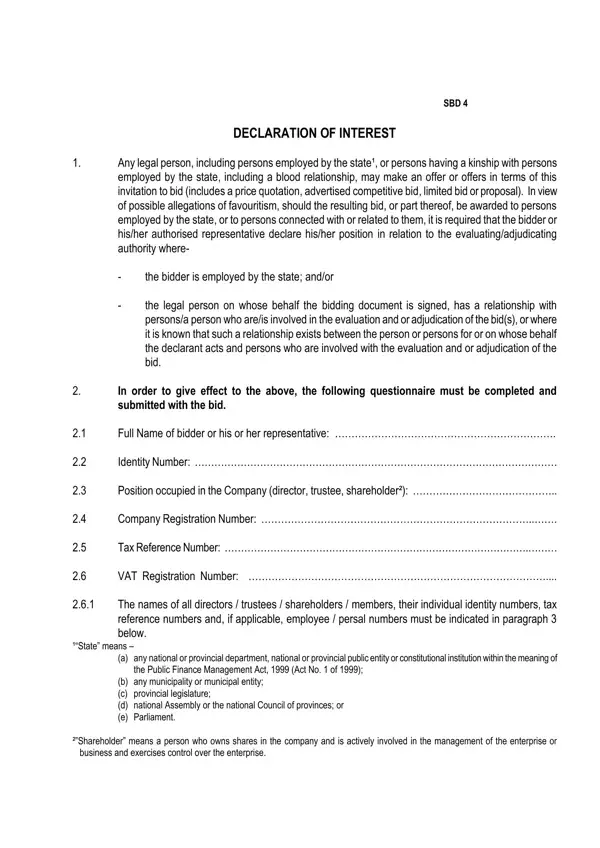
In the intricate landscape of bidding and procurement processes, transparency and honesty stand as pillars ensuring fair competition and the ethical allocation of projects. The SBD 4 form, formally known as the Declaration of Interest, plays a crucial role in maintaining this integrity within the bidding procedures, especially for engagements involving the state or government entities. This form is meticulously designed to uncover any potential conflicts of interest that may influence the evaluation and adjudication of bids. It requires bidders, including entities and individuals employed by the state or those with familial or business ties to state employees, to declare such relationships upfront. The comprehensive questionnaire within the form covers essential aspects like the full name and position of the bidder or their representative, company information including registration and tax details, and explicit inquiry into any state employment or business dealings with the state in the previous year. By compelling bidders to disclose connections with state-employed individuals who might be involved in the bid's assessment or awarding, the form aims to prevent favoritism and ensure that each bid is evaluated on its merit, capacity, and compliance with the required standards. Detailed directives compel the declaration of any interest in related companies and require truthful certification of the provided information, with stern warnings about the consequences of false declarations. Through this rigorous process, the SBD 4 form endeavors to create a fair, transparent, and competitive environment for public sector bidding.

QuestionAnswer
Form NameSbd4 Form
Form Length4 pages
Fillable?No
Fillable fields0
Avg. time to fill out1 min
Other namessbd forms download, sbd4, sbd 4 form, sbd 4 forms

How to Edit Sbd4 Form Online for Free

Working with PDF files online can be quite easy using our PDF tool. You can fill in sbd4 form word here effortlessly. FormsPal team is aimed at providing you with the absolute best experience with our tool by consistently presenting new capabilities and enhancements. With all of these improvements, using our tool becomes better than ever before! By taking a couple of simple steps, you'll be able to begin your PDF editing:

Step 1: Simply click on the "Get Form Button" above on this site to see our pdf form editing tool. Here you'll find everything that is required to work with your document.

Step 2: With our online PDF editor, it's possible to do more than just fill out forms. Try all the features and make your forms look perfect with custom textual content added, or optimize the original input to excellence - all that backed up by an ability to add any pictures and sign the PDF off.

Completing this document generally requires attention to detail. Make sure all mandatory blanks are filled in properly.

1. Before anything else, once completing the sbd4 form word, start out with the form section that has the following fields:

Step number 1 in submitting sbd forms

2. When the previous part is done, you need to include the required particulars in Are you or any person connected, YES NO, If so furnish the following, Name of person director trustee, If you are presently employed by, YES NO, If yes did you attached proof of, YES NO, and document Note Failure to submit in order to move on to the third step.

Part number 2 in filling out sbd forms

As for Name of person director trustee and If yes did you attached proof of, be sure that you get them right here. Those two are the key ones in the page.

3. Completing If no furnish reasons for, Did you or your spouse or any, YES NO, If so furnish particulars Do, and YES NO is essential for the next step, make sure to fill them out in their entirety. Don't miss any details!

Writing segment 3 in sbd forms

4. Completing If so furnish particulars, Are you or any person connected, If so furnish particulars, YESNO, YESNO, Do you or any of the directors, and If so furnish particulars is paramount in the fourth section - don't forget to devote some time and fill out each and every blank!

sbd forms conclusion process shown (step 4)

5. Last of all, this final portion is what you have to finish before submitting the form. The blank fields at issue include the following: Full details of directors, Full Name, Identity Number, Tax Personal Reference Number, and State Employee Number Persal.

sbd forms conclusion process explained (stage 5)

Step 3: Look through all the information you've inserted in the blank fields and click the "Done" button. Join us right now and instantly obtain sbd4 form word, available for downloading. Every modification made is handily preserved , making it possible to customize the file further anytime. At FormsPal, we aim to make sure your information is kept private.