
Sprouts Application Form PDF Details

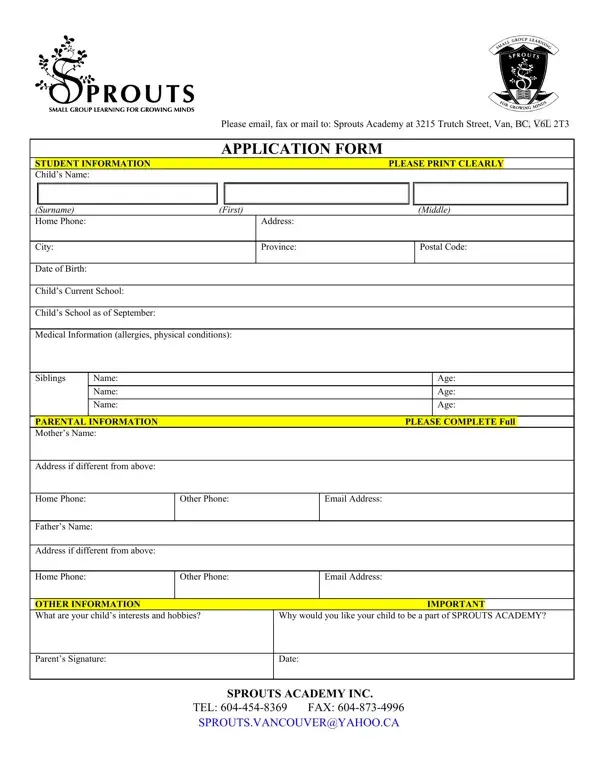
Applying for a spot at Sprouts Academy involves a comprehensive process, as detailed by the Sprouts Application Form, which is an essential document for prospective students and their parents. This form serves as a primary step in enrolling a child into this esteemed institution, located at 3215 Trutch Street, Vancouver, BC. It gathers vital student information, including personal details, medical conditions, and the child's current and intended schools, ensuring a smooth integration into the academy's community. Additionally, parental information is collected to facilitate effective communication and involvement in the child's educational journey. The form also delves into the child's interests and reasons for wanting to join Sprouts Academy, which helps the staff understand and meet the child's needs. Financial commitments are clearly outlined, with specifics on tuition payments, deposit requirements, and policies regarding withdrawal or schedule changes, thereby setting clear expectations for parents. The importance of continual tuition payments, even during holidays or student abscesses, emphasizes the commitment required for enrollment. Furthermore, in case of emergencies, parents authorize the academy to obtain necessary medical care, highlighting the institution's concern for student welfare. Lastly, parents agree to be responsible for any damages caused by their child, underscoring the mutual respect for property and community values expected at Sprouts Academy. Submitting this form indicates acceptance of the academy's terms and conditions, marking the beginning of an enriching educational partnership.

QuestionAnswer
Form NameSprouts Application Form
Form Length2 pages
Fillable?No
Fillable fields0
Avg. time to fill out30 sec
Other namesSproutsApplicat ion2009e sprouts academy vancouver form

How to Edit Sprouts Application Form Online for Free

Working with PDF forms online is always a breeze using our PDF tool. Anyone can fill in Sprouts Application Form here painlessly. Our tool is continually developing to deliver the very best user experience attainable, and that is because of our dedication to continual development and listening closely to comments from users. To get the process started, go through these easy steps:

Step 1: Simply click the "Get Form Button" above on this site to see our pdf form editor. There you will find all that is needed to fill out your file.

Step 2: After you launch the tool, you will get the form made ready to be completed. In addition to filling out different blanks, you may as well do various other things with the Document, including putting on any textual content, editing the initial textual content, adding images, signing the document, and more.

Pay close attention while completing this document. Make sure that every field is filled out properly.

1. The Sprouts Application Form necessitates specific information to be inserted. Be sure that the following fields are filled out:

Writing segment 1 of Sprouts Application Form

2. Once the first part is done, proceed to type in the suitable information in all these - Address if different from above, Home Phone, Other Phone, Email Address, Fathers Name, Address if different from above, Home Phone, Other Phone, Email Address, OTHER INFORMATION IMPORTANT What, Why would you like your child to, Parents Signature, Date, SPROUTS ACADEMY INC, and TEL FAX.

Stage no. 2 in filling out Sprouts Application Form

3. This next step is about Deposit received, TUITION To be paid in Full or by, Tuition Agreement, DEPOSIT A deposit is required, WITHDRAWALCHANGE OF SCHEDULE You, HOLIDAYS Tuition is continuous, STUDENT ILLNESSEMERGENCY You, AUTHORIZATION Your child will be, RESPONSIBILITY You agree that you, and I agree to the above terms and - type in every one of these blanks.

Sprouts Application Form writing process explained (stage 3)

4. The subsequent subsection requires your input in the subsequent parts: I agree to the above terms and, Name of Student Date, Parent Signature Print Name, Parent Signature Print Name, ACCEPTED, Date Mrs Ruth Stafford, and SPROUTS ACADEMY INC. Ensure that you provide all of the requested information to go further.

SPROUTS ACADEMY INC, Parent Signature  Print Name, and ACCEPTED inside Sprouts Application Form

It is easy to make a mistake when completing your SPROUTS ACADEMY INC, hence be sure to reread it before you'll finalize the form.

5. The very last point to conclude this PDF form is critical. Make sure you fill in the required fields, like TEL FAX SPROUTSVANCOUVERYAHOOCA, and SPROUTS ACADEMY INC, prior to submitting. Neglecting to accomplish that could contribute to a flawed and possibly invalid form!

Tips on how to fill in Sprouts Application Form stage 5

Step 3: You should make sure the information is correct and click "Done" to progress further. Right after setting up a7-day free trial account with us, it will be possible to download Sprouts Application Form or send it via email right off. The file will also be readily accessible in your personal account page with your each and every edit. We do not share or sell any details you use whenever filling out documents at FormsPal.