
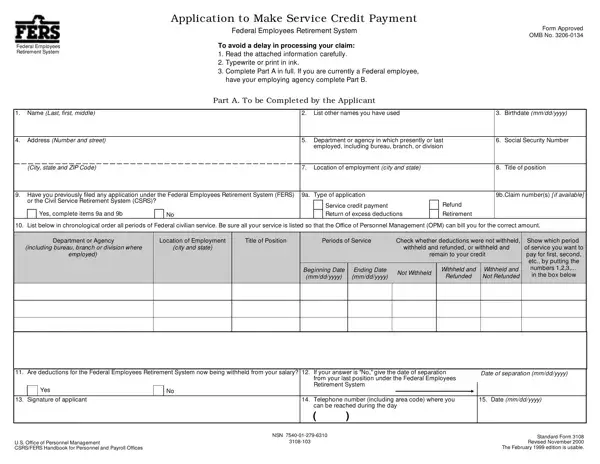
Standard Form 3108 PDF Details

The Standard 3108 form, formally known as the Federal Employees Retirement System Application to Make Service Credit Payment, serves as a critical document for federal employees under the Federal Employees Retirement System (FERS) who wish to receive retirement credit for certain periods of service. This form encompasses various sections that require detailed information from the applicant, including personal information, employment history, and specifics regarding the service periods for which credit payment is sought. It is designed to facilitate the process of making service credit payments, thereby ensuring that employees can enhance their retirement benefits. Applicants are guided through the process with instructions emphasizing the importance of providing accurate and complete information to avoid delays. For those transitioning from the Civil Service Retirement System (CSRS) to FERS, this form also addresses the need to account for service credit under CSRS rules. Additionally, it includes a comprehensive overview regarding the types of service eligible for credit payments, as well as the calculation of payment amounts and the interest that applies to unpaid balances. The ultimate goal of Standard Form 3108 is to streamline the process of securing credit for eligible service periods, which can significantly impact an employee's retirement annuity, making it a document of considerable importance in retirement planning.

QuestionAnswer
Form NameStandard Form 3108
Form Length4 pages
Fillable?No
Fillable fields0
Avg. time to fill out1 min
Other namesform 3108, fillable standard form 3108, sf3108, yyyy

How to Edit Standard Form 3108 Online for Free

OPM can be completed easily. Simply make use of FormsPal PDF editor to complete the job right away. To retain our editor on the cutting edge of efficiency, we strive to adopt user-oriented features and enhancements regularly. We're always grateful for any suggestions - play a pivotal part in reshaping PDF editing. All it requires is a few basic steps:

Step 1: Simply click the "Get Form Button" at the top of this webpage to open our form editor. There you will find all that is needed to fill out your file.

Step 2: As soon as you start the online editor, you will notice the form prepared to be filled out. Besides filling in various fields, you may also perform several other things with the form, that is writing any words, editing the initial textual content, inserting illustrations or photos, affixing your signature to the document, and a lot more.

Pay close attention while filling out this document. Make sure that all necessary blank fields are done correctly.

1. The OPM needs certain details to be entered. Make sure the next fields are filled out:

Writing segment 1 in sf3108 fillable

2. Right after this section is completed, proceed to enter the applicable details in all these - Are deductions for the Federal, Date of separation mmddyyyy, Yes, Signature of applicant, from your last position under the, Telephone number including area, Date mmddyyyy, can be reached during the day, US Office of Personnel Management, NSN, and Standard Form Revised November.

The best way to complete sf3108 fillable stage 2

Always be really mindful when filling out Are deductions for the Federal and Standard Form Revised November, because this is the part in which many people make mistakes.

3. This 3rd part is considered fairly easy, Is the employee covered by the, Provide date FERS deductions, a Did this employee elect to, Yes Effective date of election, Yes, b If yes provide the date CSRS, Date CSRS deductions began mmddyyyy, c Is this employee entitled, Yes, Civilian Service Not Under FERS, Nature of Action Appt pro res, Effective Date mmddyyyy, etc, Basic Salary, and Salary Basis - all of these fields is required to be completed here.

Filling out section 3 in sf3108 fillable

4. This next section requires some additional information. Ensure you complete all the necessary fields - Comments, If parttime provide the number of, Certification The information, Agency address, Signature, Official title, Date mmddyyyy, and Email address - to proceed further in your process!

Part no. 4 in submitting sf3108 fillable

5. To finish your form, this final part incorporates a couple of additional blank fields. Entering Official title, Email address, Telephone number including area, Fax number including area code, and Standard Form Revised November should finalize the process and you're going to be done in a blink!

Step no. 5 for filling in sf3108 fillable

Step 3: Prior to addressing the next stage, make sure that form fields were filled out correctly. Once you believe it's all fine, click on “Done." After setting up afree trial account here, you will be able to download OPM or send it through email right off. The PDF file will also be easily accessible via your personal account with your every single edit. Here at FormsPal, we endeavor to make sure all of your information is stored private.