
State Form 46021 PDF Details

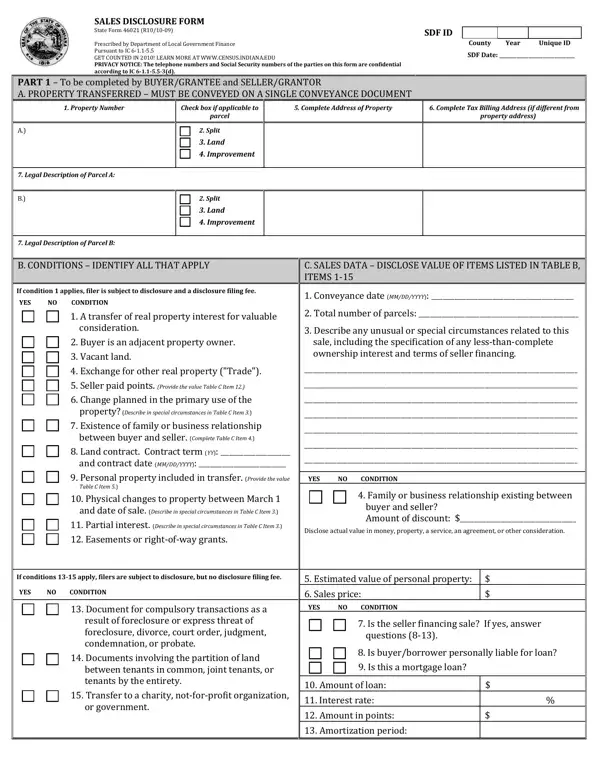
The State 46021 form, officially known as the Sales Disclosure Form, stands as a significant document within the Indiana property transaction landscape, meticulously designed and mandated by the Department of Local Government Finance. This documentation plays a pivotal role in the conveyance process, ensuring transparency and compliance with IC 6-1.1-5.5, the Real Property Sales Disclosure Act. Its comprehensive structure demands detailed input from both buyers/grantees and sellers/grantors, capturing essential data including property transfer details, conditions affecting the sale, and intricate sales data. With strict guidelines protecting personal information, the form strikes a balance between required disclosure and privacy concerns, explicitly marking telephone numbers and Social Security numbers as confidential. Conditions listed within the form not only address common circumstances around property transactions - such as adjacent property ownership or changes in property use - but also delve into specifics like seller financing terms and the inclusion of personal property in the transfer. Moreover, the form is instrumental for buyers aiming to apply for property tax deductions, encompassing options from homestead to renewable energy systems. Assessor and auditor sections further validate and process the disclosure, ensuring a holistic approach to property sale transparency. Serving beyond a mere transactional requirement, the State 46021 form emerges as a critical tool for clarity, legal compliance, and facilitation of property sales within Indiana.

QuestionAnswer
Form NameState Form 46021
Form Length13 pages
Fillable?No
Fillable fields0
Avg. time to fill out3 min 15 sec
Other namesform 46021, state form 46021, indiana form 46021, disclosure

How to Edit State Form 46021 Online for Free

When using the online PDF editor by FormsPal, you are able to fill in or change notforprofit right here. The editor is consistently upgraded by us, receiving useful features and turning out to be a lot more versatile. Here's what you'd have to do to get going:

Step 1: Simply hit the "Get Form Button" at the top of this webpage to get into our form editor. This way, you will find everything that is necessary to work with your document.

Step 2: As you launch the editor, you will get the document all set to be completed. In addition to filling in different blanks, you can also perform many other things with the Document, specifically writing your own text, editing the initial textual content, adding images, affixing your signature to the document, and more.

This PDF doc requires specific information; in order to guarantee consistency, take the time to take into account the subsequent guidelines:

1. To begin with, when filling in the notforprofit, beging with the form section that includes the following blanks:

Stage no. 1 of filling out indiana

2. Once your current task is complete, take the next step – fill out all of these fields - PART To be completed by, C SALES DATA DSCLOSE VALUE OF TEMS, cid s the seller financing sale f, If conditions apply filers are, YES, CONDITION, YES, CONDITION, YES, and CONDITION with their corresponding information. Make sure to double check that everything has been entered correctly before continuing!

Filling out section 2 of indiana

3. Completing PART To be completed by, C SALES DATA DSCLOSE VALUE OF TEMS, and cid s the seller financing sale f is essential for the next step, make sure to fill them out in their entirety. Don't miss any details!

The way to prepare indiana step 3

4. To move ahead, your next step will require filling out a handful of form blanks. These comprise of Preparer of the Sales Disclosure, Page, Telephone Number, Telephone Number, Printed Name of Seller, Printed Name of Seller, Address Number and Street, City State and ZIP Code, Telephone Number, Email, INDIANA SALES DISCLOSURE FORM, SDF ID, Under penalties of perjury I, Title Company Seller Name as, and D PREPARER E, which are vital to continuing with this particular PDF.

Best ways to fill out indiana part 4

It's simple to make an error while filling in the Page, hence be sure to reread it before you submit it.

5. This final point to finish this document is essential. Be sure you fill in the necessary fields, consisting of Title Company Seller Name as, D PREPARER E, Under penalties of perjury I, below Please see instructions for, THE SALES DISCLOSURE FORM MAY BE, City State and ZIP Code, Telephone Number, City State and ZIP Code, Telephone Number, Address Number and Street, City State ZIP Code, Address Number and Street, City State ZIP Code, YES, and CONDITION, before submitting. Otherwise, it may give you an unfinished and possibly incorrect paper!

City State ZIP Code, Telephone Number, and D PREPARER    E of indiana

Step 3: Immediately after double-checking the filled in blanks, click "Done" and you're done and dusted! After creating a7-day free trial account here, you'll be able to download notforprofit or email it directly. The PDF document will also be available through your personal account menu with all of your changes. When you work with FormsPal, you're able to fill out documents without needing to worry about data incidents or data entries getting distributed. Our secure software ensures that your private data is stored safely.