Please rate Topographic Map Reading Worksheet

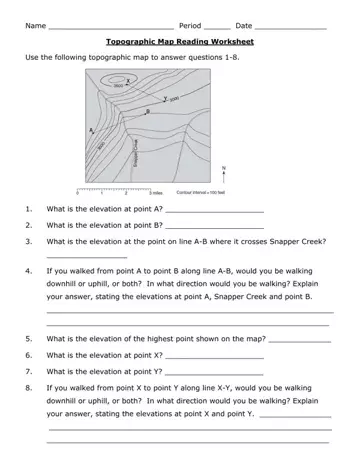
Navigating through the intricacies of topographic maps is an essential skill for both enthusiasts and professionals in fields such as geology, geography, and environmental science. The Topographic Map Reading Worksheet form serves as a practical tool designed to enhance this skill through a hands-on learning approach. It guides users through a series of questions that challenge their ability to interpret and understand the contours, elevations, and geographic features represented on a topographic map. Starting with basic queries about elevation points and proceeding to more complex scenarios that require understanding the elevation change over a distance, the worksheet spans a variety of skills. It uses the topographic map of Palo Duro Canyon State Park in west Texas as its basis, offering a real-world context to apply these skills. Through tasks such as identifying the highest and lowest elevation points, determining the direction of travel and elevation change between two points, and even engaging in predictive thinking about geological changes over time, learners are equipped with the knowledge to adeptly navigate and read topographic maps beyond the classroom setting.
| Question | Answer |
|---|---|
| Form Name | Topographic Map Reading Worksheet |
| Form Length | 3 pages |
| Fillable? | No |
| Fillable fields | 0 |
| Avg. time to fill out | 45 sec |
| Other names | topographic map reading worksheet answer key, topographic map worksheet pdf answer key, topographic map reading worksheet answers, topographic map practice answer key |
Topographic Map Reading Worksheet isn’t the one you’re looking for?
Please rate Topographic Map Reading Worksheet
