
Uia Form 1028 PDF Details

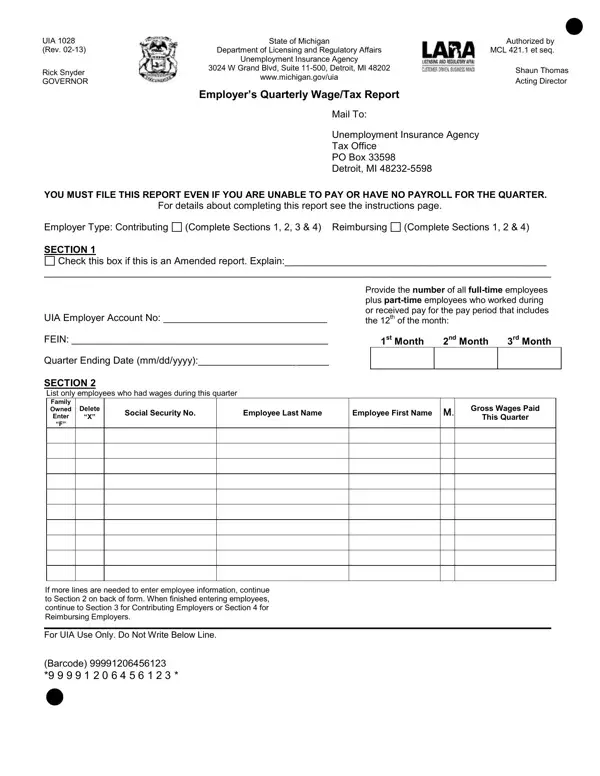
Navigating the complexities of unemployment insurance contributions and reporting can be daunting for employers, particularly when it comes to fulfilling state-specific requirements. In Michigan, the Unemployment Insurance Agency (UIA) requires employers to submit the UIA 1028 form, a document critical for the Employer’s Quarterly Wage/Tax Report. Authored under the authority of the Department of Licensing and Regulatory Affairs and adhering to the Michigan Employment Security (MES) Act, this form serves as a cornerstone for reporting employee wages and calculating unemployment insurance contributions. Employers must meticulously complete sections tailored to whether they are contributing or reimbursing employers, with detailed inputs on wages paid during the quarter, taxable wages, and due taxes. Specific mandates for amendments, multi-state employers, and successor employers underscore the form’s intricate role in ensuring accurate tax liability disclosure. Moreover, the form includes provisions for periodic adjustments and emphasizes stringent deadlines and penalties for late submissions, reinforcing the importance of timely and precise compliance. The encouragement for online filing through the Michigan Web Account Manager (MiWAM) platform hints at an ongoing shift towards digital administration, aiming to streamline the filing process. With an inherent dual function, the UIA 1028 not only assists in the administrative aspect of unemployment insurance but also safeguards the accuracy of financial contributions crucial for unemployment benefits distribution.

QuestionAnswer
Form NameUia Form 1028
Form Length4 pages
Fillable?No
Fillable fields0
Avg. time to fill out1 min
Other namesmuia form 1027, form uia 1028 pdf, uia form 1027 instructions, uia form 1027

How to Edit Uia Form 1028 Online for Free

You may work with state of michigan form 1027 effectively using our online PDF editor. To make our editor better and easier to use, we continuously work on new features, with our users' feedback in mind. With some simple steps, you can begin your PDF editing:

Step 1: First of all, open the pdf tool by pressing the "Get Form Button" at the top of this page.

Step 2: As you open the PDF editor, there'll be the form prepared to be filled in. In addition to filling in different blank fields, you might also perform various other things with the file, particularly putting on your own words, changing the initial text, adding illustrations or photos, signing the form, and much more.

Filling out this document demands focus on details. Ensure that all required fields are filled out accurately.

1. It is recommended to fill out the state of michigan form 1027 correctly, hence be careful when filling out the parts that contain all of these fields:

Step number 1 in submitting uia form 1027 instructions

2. Right after finishing the previous part, head on to the subsequent step and fill out the necessary details in these fields - pay Include employees who earned, Social Security Number SSN, Report These Wages, Do NOT Report These, REPORTING REQUIREMENTS All liable, Wages paid in cash, Wages in any medium other than, Wages, and Wages that were earned but not.

Ways to fill in uia form 1027 instructions stage 2

People generally make errors when completing Wages in this area. Be sure to re-examine what you type in right here.

3. Completing st Qtr TOTAL NOTE FOR, Prior Balance Indicates any prior, Unemployment Insurance Agency Tax, and CONTACT US UIA forms are available is essential for the next step, make sure to fill them out in their entirety. Don't miss any details!

uia form 1027 instructions writing process shown (part 3)

Step 3: Prior to moving forward, double-check that blank fields are filled out as intended. The moment you believe it's all fine, press “Done." Try a 7-day free trial option at FormsPal and obtain instant access to state of michigan form 1027 - download, email, or change in your FormsPal cabinet. FormsPal guarantees secure document editor with no personal information recording or any type of sharing. Rest assured that your details are in good hands here!