
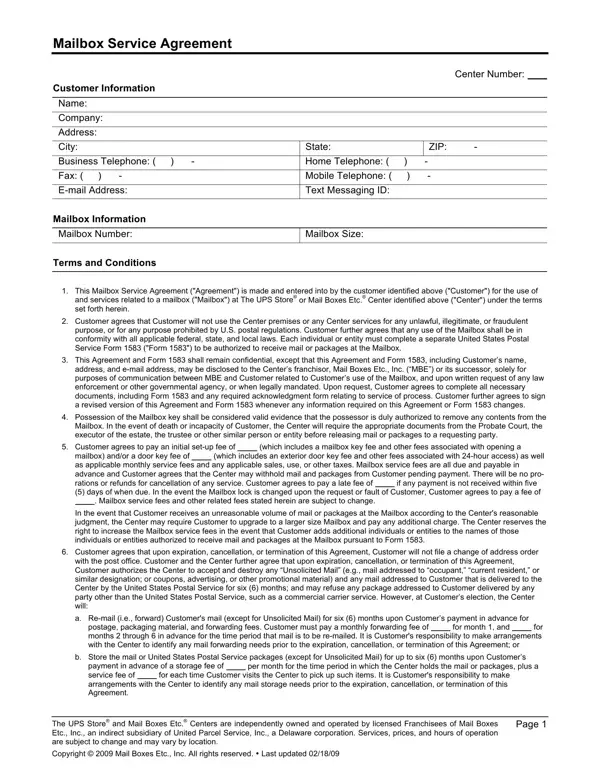
Using PDF documents online can be easy with our PDF editor. Anyone can fill out ups store mailbox agreement here without trouble. To have our editor on the leading edge of practicality, we aim to put into operation user-driven capabilities and enhancements regularly. We're routinely grateful for any feedback - join us in revampimg the way you work with PDF documents. Starting is effortless! All you have to do is follow the following basic steps directly below:
Step 1: Just click on the "Get Form Button" above on this webpage to open our pdf editor. Here you'll find everything that is necessary to work with your file.
Step 2: With this state-of-the-art PDF editor, it's possible to accomplish more than merely fill in blanks. Try each of the features and make your docs look great with customized textual content added, or modify the original input to excellence - all comes with an ability to add your personal images and sign the file off.
It's easy to finish the document using this practical guide! Here is what you must do:
1. While submitting the ups store mailbox agreement, be sure to complete all of the necessary fields within the corresponding part. This will help expedite the process, allowing for your details to be processed efficiently and properly.
2. The third stage is to fill out these blank fields: Mailbox In the event of death or, Customer agrees to pay an initial, which includes a mailbox key fee, mailbox andor a door key fee of as, which includes an exterior door, Mailbox service fees and other, In the event that Customer, Customer agrees that upon, with the post office Customer and, a Remail ie forward Customers mail, for postage packaging material and, for month and, b Store the mail or United States, payment in advance of a storage, and per month for the time period in.
You can certainly get it wrong while filling in your Customer agrees that upon, so make sure to look again before you decide to send it in.
3. Completing if authorized on Form restricted, per day per package which must be, days of notification will, Customer agrees to protect, Customer acknowledges and agrees, responsible for any acts or, and CUSTOMER HEREIN AGREES THAT THE is essential for the next step, make sure to fill them out in their entirety. Don't miss any details!
4. The next section needs your attention in the following parts: Mailbox Service Agreement, Customer Signature, Date, Authorized Center Representative, Date, For Center Use Only, How did the customer hear about us, and Comments. Be sure to type in all of the needed info to move onward.
5. To finish your document, the particular segment requires a couple of additional blanks. Filling out United States Postal Service, Date, In consideration of delivery of my, NOTE The applicant must execute, This application may be subject to, Name in Which Applicants Mail, aAddress to be Used for Delivery, b City, c State, d ZIP, Applicant authorizes delivery to, and This authorization is extended to will certainly wrap up everything and you can be done in a tick!
Step 3: Prior to finalizing this file, ensure that blank fields have been filled out the proper way. The moment you’re satisfied with it, click on “Done." Go for a free trial option with us and obtain direct access to ups store mailbox agreement - download or edit from your personal account. We don't sell or share any information that you provide while filling out forms at our website.
