
Utah Form Tc 40V PDF Details

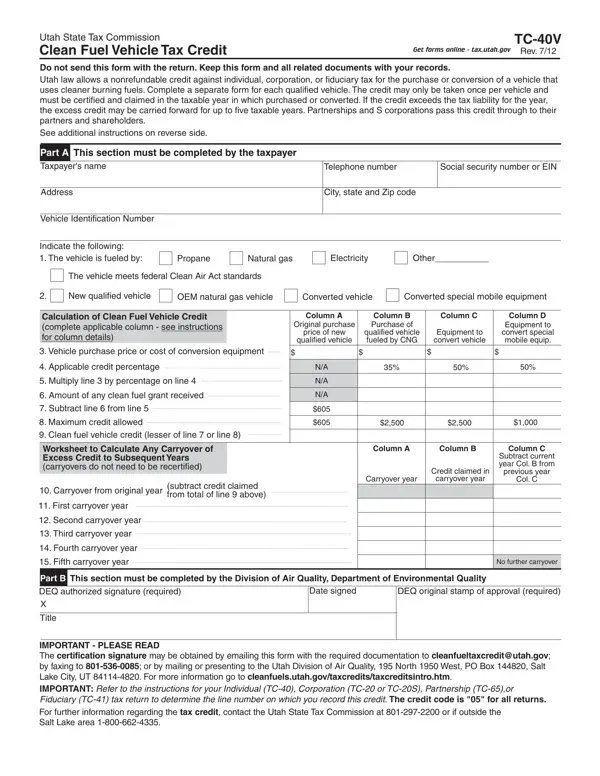
In the heart of Utah's efforts to promote environmental stewardship and clean air, the TC-40V form plays a pivotal role by offering tax incentives for the adoption of clean fuel vehicles. This form, designed by the Utah State Tax Commission, is a gateway for individuals and businesses alike to receive a nonrefundable tax credit against individual, corporation, or fiduciary taxes for the purchase or conversion of vehicles to cleaner burning fuels. Eligible vehicles, including those fueled by propane, natural gas, electricity, and other approved cleaner burning fuels, not only contribute to reducing the ecological footprint but also offer financial benefits to their owners. The credit, which can only be claimed once per vehicle, varies in amount depending on the vehicle's fuel type, purchase price, or conversion cost, and is subject to certification and claim within the taxable year of purchase or conversion. The form highlights a forward-thinking approach by allowing for excess credit to be carried forward for up to five taxable years, ensuring that even if the credit exceeds the tax liability for the year it is claimed, the benefits are not lost. Additionally, partnerships and S corporations can pass these credits through to partners and shareholders, broadening the incentive's impact. With specific columns designed to cater to various categories of clean fuel vehicles and conversions, the TC-40V form embodies Utah's commitment to a cleaner environment and its strategy to use tax policy to encourage sustainable transportation solutions.

QuestionAnswer
Form NameUtah Form Tc 40V
Form Length2 pages
Fillable?No
Fillable fields0
Avg. time to fill out30 sec
Other namesTC-20, htm, carryover, TC-20S

How to Edit Utah Form Tc 40V Online for Free

Working with PDF files online is always surprisingly easy with our PDF tool. You can fill in 1811 here with no trouble. The editor is consistently updated by our staff, receiving powerful functions and growing to be greater. It merely requires a couple of simple steps:

Step 1: Click the orange "Get Form" button above. It's going to open our pdf tool so you can start filling out your form.

Step 2: Using our handy PDF tool, you're able to do more than just complete forms. Try all of the features and make your forms seem great with customized text added, or fine-tune the file's original content to perfection - all comes along with an ability to insert just about any pictures and sign it off.

This PDF form will need you to enter some specific information; in order to ensure accuracy and reliability, don't hesitate to heed the subsequent recommendations:

1. For starters, while filling in the 1811, start in the area that includes the following blanks:

Part # 1 of submitting EIN

2. Once the last part is finished, you're ready to insert the required details in Worksheet to Calculate Any, Carryover from original year, subtract credit claimed from total, First carryover year, Second carryover year, Third carryover year, Fourth carryover year, Fifth carryover year, Carryover year, Credit claimed in, carryover year, previous year, Col C, No further carryover, and Part B This section must be so you're able to move on to the next step.

The way to fill in EIN step 2

Always be extremely careful while filling out Part B This section must be and First carryover year, since this is where many people make mistakes.

Step 3: Immediately after going through your fields, press "Done" and you're all set! Grab your 1811 as soon as you join for a free trial. Conveniently view the pdf form from your FormsPal cabinet, with any modifications and changes being all preserved! FormsPal is committed to the confidentiality of our users; we always make sure that all personal information processed by our system remains protected.