
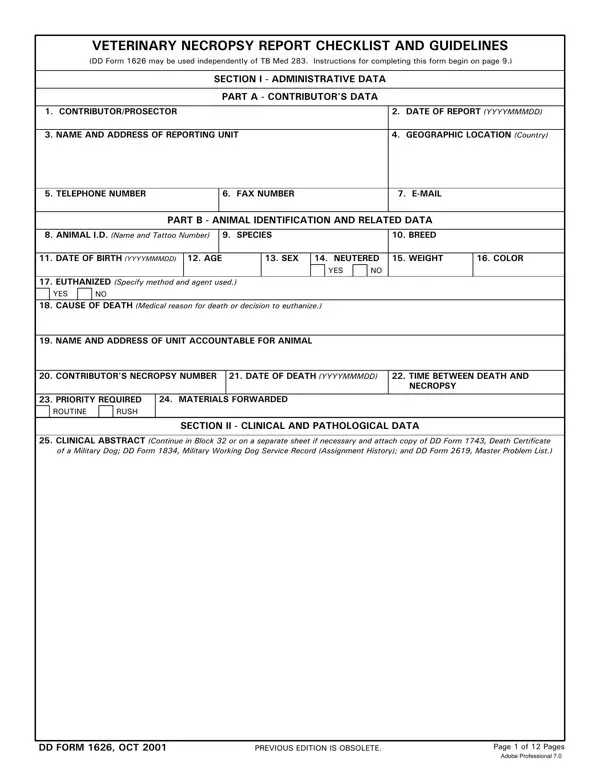
Veterinary Necropsy Form PDF Details

At the heart of veterinary pathology and diagnostics is the meticulously structured Veterinary Necropsy Report, an essential document that aids in the understanding of an animal's cause of death. This form, often referenced as DD Form 1626, operates within a framework designed to capture a comprehensive array of data ranging from the contributing party’s information to intricate clinical and pathological details pertinent to the deceased animal. The initial sections of the form are dedicated to gathering administrative data and animal identification, which include the contributor's contact details, the animal's unique identification, species, breed, and the circumstances surrounding its death. Additionally, it embarks on collecting clinical abstracts and diagnostic findings that may encompass a variety of tests and observations, such as microbiological culture results, clinical pathology test results, and radiographs, thereby painting a detailed picture of the animal's health preceding death. The form's structure facilitates a thorough examination, enabling contributory factors to the animal’s death to be meticulously documented and analyzed. This extensive compilation of information not only serves as a crucial tool for veterinary professionals in determining the cause of death but also contributes significantly to the broader scientific community by providing valuable data that can aid in the prevention of future illnesses and the improvement of animal health care practices.

QuestionAnswer
Form NameVeterinary Necropsy Form
Form Length12 pages
Fillable?No
Fillable fields0
Avg. time to fill out3 min
Other namesnecropsy report online, form 1626 form, necropsy report, form 1626

How to Edit Veterinary Necropsy Form Online for Free

Working with PDF documents online is actually very easy using our PDF tool. Anyone can fill out veterinary necropsy form here and use several other functions available. To have our tool on the leading edge of convenience, we strive to integrate user-oriented capabilities and improvements on a regular basis. We are always thankful for any suggestions - assist us with remolding how we work with PDF docs. Here is what you would want to do to get going:

Step 1: Press the "Get Form" button in the top part of this webpage to open our PDF tool.

Step 2: When you access the editor, you will see the document ready to be filled in. Apart from filling out various fields, you could also do various other things with the PDF, particularly putting on your own words, changing the initial textual content, adding images, signing the PDF, and much more.

To be able to complete this PDF document, make sure that you enter the required details in each and every area:

1. The veterinary necropsy form requires certain information to be typed in. Be sure the next fields are complete:

Filling in part 1 of sample of necropsy report

2. The subsequent step is to complete all of the following blank fields: CLINICAL ABSTRACT Continue in.

Find out how to complete sample of necropsy report step 2

3. Completing CLINICAL DIAGNOSES Relevant to, GROSS NECROPSY DIAGNOSES, GROSS PHOTOGRAPHS Tissues and, MICROBIOLOGICAL CULTURE RESULTS, and CLINICAL PATHOLOGY TEST RESULTS is essential for the next step, make sure to fill them out in their entirety. Don't miss any details!

Filling in segment 3 in sample of necropsy report

4. This next section requires some additional information. Ensure you complete all the necessary fields - RADIOGRAPHS AND INTERPRETATIONS, REMARKS List any additional, and SIGNATURE OF CONTRIBUTORPROSECTOR - to proceed further in your process!

sample of necropsy report completion process shown (stage 4)

Always be extremely careful when filling out SIGNATURE OF CONTRIBUTORPROSECTOR and REMARKS List any additional, as this is the part where many people make mistakes.

5. Since you approach the finalization of the file, there are a few extra points to complete. Specifically, If more space is needed identify, GENERAL Condition of cadaver, EYES AND EARS, Ventral, and Dorsal must be filled in.

How to prepare sample of necropsy report portion 5

Step 3: Spell-check what you've typed into the blank fields and press the "Done" button. After creating afree trial account at FormsPal, it will be possible to download veterinary necropsy form or email it right away. The PDF will also be at your disposal from your personal cabinet with your edits. FormsPal is devoted to the confidentiality of our users; we make certain that all information used in our system is kept protected.