Please rate Vtr 275 Form

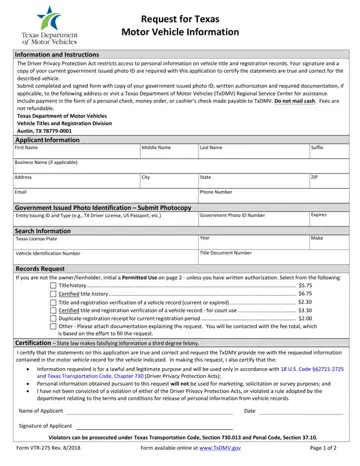
In the realm of motor vehicle administration in Texas, the VTR-275 form serves a critical function, mediating between the need for individuals and entities to access vehicle information and the imperative to protect personal data as mandated by law. Ostensibly, it's a request form for Texas motor vehicle information, which, at its core, is guided by the Driver Privacy Protection Act—a regulation that restricts access to personal information contained within vehicle title and registration records. Applicants are required to furnish a current government-issued photo ID alongside their signed request to ensure the truthfulness of their statements regarding the vehicle in question. Moreover, the form delineates a variety of specifics including fees associated with different types of records requests, such as title history, certification of title history, and verification of vehicle records, among others, all while underscoring the non-refundable nature of these charges. In leaving no room for ambiguity, the form also makes it clear that the misuse of the obtained information for purposes not in alignment with the stipulated Driver Privacy Protection Acts and Texas Transportation Code, Chapter 730, could result in legal repercussions. Through its intricate stipulation of permitted uses and the necessity for a signed attestation to the legitimacy of the request's purpose, the VTR-275 form embodies the delicate balance between accessibility of public records and the protection of individual privacy in the digital age.
| Question | Answer |
|---|---|
| Form Name | Vtr 275 Form |
| Form Length | 2 pages |
| Fillable? | Yes |
| Fillable fields | 42 |
| Avg. time to fill out | 8 min 58 sec |
| Other names | vtr 275 texas, texas form vtr 275, texas vtr 275, vtr 275 online |
Vtr 275 Form isn’t the one you’re looking for?
Please rate Vtr 275 Form
